> ## Documentation Index
> Fetch the complete documentation index at: https://docs.begin.eu/llms.txt
> Use this file to discover all available pages before exploring further.
# Reviewing your offer
> Read your job offer, keep a copy and accept or decline it.
export const BetaCallout = ({children}) => ;

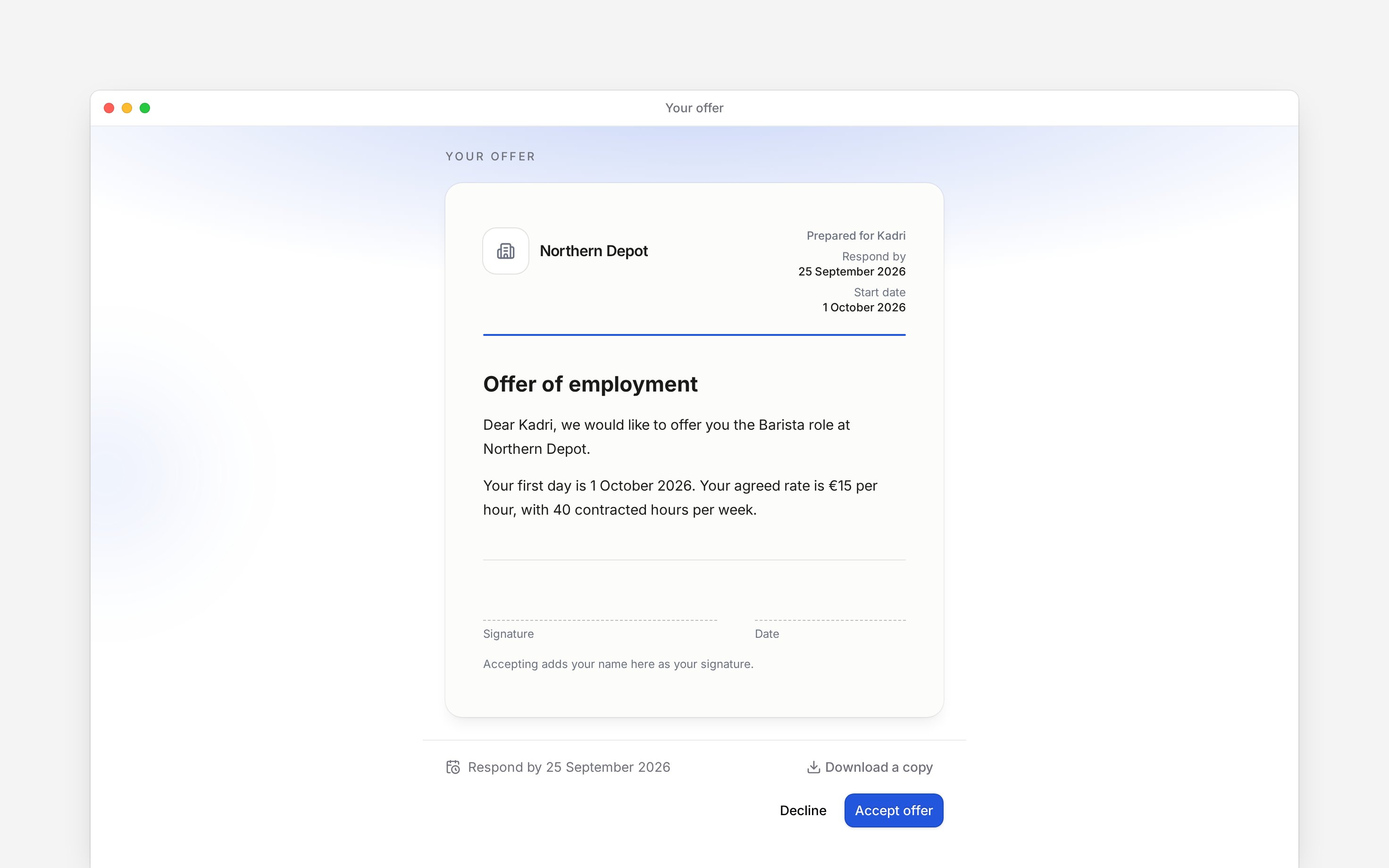
 Open the link your employer sent to read **Your offer**. Check the role, terms and any **Respond by** date before answering. You can do this in your phone’s browser without first joining the Begin workspace.
Guided onboarding is rolling out gradually. This guide applies when your employer sends an offer
through Begin; ask them if you are expecting a link.
## Read and keep the offer
Read the whole letter and choose **Download a copy** if you want to keep it. If a name, date or term is wrong, contact the person who sent it before accepting.
Open the link your employer sent to read **Your offer**. Check the role, terms and any **Respond by** date before answering. You can do this in your phone’s browser without first joining the Begin workspace.
Guided onboarding is rolling out gradually. This guide applies when your employer sends an offer
through Begin; ask them if you are expecting a link.
## Read and keep the offer
Read the whole letter and choose **Download a copy** if you want to keep it. If a name, date or term is wrong, contact the person who sent it before accepting.
 ## Send your answer
Choose **Accept offer** to take it up, or **Decline** if you are not accepting.
To accept, enter **Your full name** and choose **Accept offer** again. To decline, add a note if
you want to explain, then choose **Decline offer**.
Acceptance opens the starter-details sections. Declining shows **You have declined this offer**
and leaves those sections closed.
Typing your name records your acceptance of the offer. A separate contract, when your employer
sends one, still has its own signing step.
## If the offer cannot be answered
**This offer has expired** means the response deadline has passed. **This offer has been withdrawn** means the sender withdrew it. Contact the sender about either result.
If the letter cannot be shown, Begin does not let you accept unread terms. Ask the sender to send it again. If the page cannot load the offer, refresh once and contact the sender if it still fails.
The offer must be answered before section submissions are accepted. A decline note is optional and limited to 500 characters. An unreadable document removes acceptance and download controls but retains Decline. The preboarding token does not authenticate an app account.
## Next
Complete the sections unlocked by your acceptance.
Follow a separate contract-signing request.
## Still need help?
Email the Begin team and we'll get back to you.
Open the AI assistant and get instant answers based on these docs.
## Send your answer
Choose **Accept offer** to take it up, or **Decline** if you are not accepting.
To accept, enter **Your full name** and choose **Accept offer** again. To decline, add a note if
you want to explain, then choose **Decline offer**.
Acceptance opens the starter-details sections. Declining shows **You have declined this offer**
and leaves those sections closed.
Typing your name records your acceptance of the offer. A separate contract, when your employer
sends one, still has its own signing step.
## If the offer cannot be answered
**This offer has expired** means the response deadline has passed. **This offer has been withdrawn** means the sender withdrew it. Contact the sender about either result.
If the letter cannot be shown, Begin does not let you accept unread terms. Ask the sender to send it again. If the page cannot load the offer, refresh once and contact the sender if it still fails.
The offer must be answered before section submissions are accepted. A decline note is optional and limited to 500 characters. An unreadable document removes acceptance and download controls but retains Decline. The preboarding token does not authenticate an app account.
## Next
Complete the sections unlocked by your acceptance.
Follow a separate contract-signing request.
## Still need help?
Email the Begin team and we'll get back to you.
Open the AI assistant and get instant answers based on these docs.