> ## Documentation Index
> Fetch the complete documentation index at: https://docs.begin.eu/llms.txt
> Use this file to discover all available pages before exploring further.
# Sharing files
> Share files and recordings, then find them again in the conversation.

 Share a file in the conversation where the team needs it. Use that conversation’s **Files** tab to find it again without reading back through the messages.
## Attach and send
In the message box, open **Add attachment → Attach file**. If recording is unavailable, the
attachment button opens the file picker directly.
Wait for the upload to finish. Remove an unwanted attachment before sending and add a message if
the file needs context.
Tap the send arrow. The attachment appears in the conversation for people who can read it.
Each file can be up to **25 MB**. Begin rejects blocked file types; renaming one is not a way to make it safe to send. A file still uploading is not ready to send.
## Share it with another conversation
Open the attachment’s preview and choose **Share** from its actions. In **Share file**, choose a channel, conversation or person, add a message if needed, and send. The destination must be somewhere you can post. Check its audience: sharing a file creates a message there rather than inviting people into the original conversation.
## Record instead of typing
Choose **Record an audio clip**, allow microphone access and record your message. Stop the recording to attach it, then send. Cancelling the recording discards it. Recordings stop automatically a few seconds short of five minutes. Recipients can play the clip and change its playback speed.
In the installed mobile app, **Take photo** and **Record video** use your device’s camera. Allow camera access when asked. These capture actions are not shown in the desktop browser.
If recording cannot access your microphone or camera, check the device’s permissions for Begin.
You can still attach an existing supported file.
## Find what was shared
Open **Files** at the top of the channel or conversation. Choose **Images**, **Videos**, **Documents** or **Links** to narrow the list, and use **Search files** to find a name. Switch between the grid and list if one makes the material easier to scan.
Share a file in the conversation where the team needs it. Use that conversation’s **Files** tab to find it again without reading back through the messages.
## Attach and send
In the message box, open **Add attachment → Attach file**. If recording is unavailable, the
attachment button opens the file picker directly.
Wait for the upload to finish. Remove an unwanted attachment before sending and add a message if
the file needs context.
Tap the send arrow. The attachment appears in the conversation for people who can read it.
Each file can be up to **25 MB**. Begin rejects blocked file types; renaming one is not a way to make it safe to send. A file still uploading is not ready to send.
## Share it with another conversation
Open the attachment’s preview and choose **Share** from its actions. In **Share file**, choose a channel, conversation or person, add a message if needed, and send. The destination must be somewhere you can post. Check its audience: sharing a file creates a message there rather than inviting people into the original conversation.
## Record instead of typing
Choose **Record an audio clip**, allow microphone access and record your message. Stop the recording to attach it, then send. Cancelling the recording discards it. Recordings stop automatically a few seconds short of five minutes. Recipients can play the clip and change its playback speed.
In the installed mobile app, **Take photo** and **Record video** use your device’s camera. Allow camera access when asked. These capture actions are not shown in the desktop browser.
If recording cannot access your microphone or camera, check the device’s permissions for Begin.
You can still attach an existing supported file.
## Find what was shared
Open **Files** at the top of the channel or conversation. Choose **Images**, **Videos**, **Documents** or **Links** to narrow the list, and use **Search files** to find a name. Switch between the grid and list if one makes the material easier to scan.
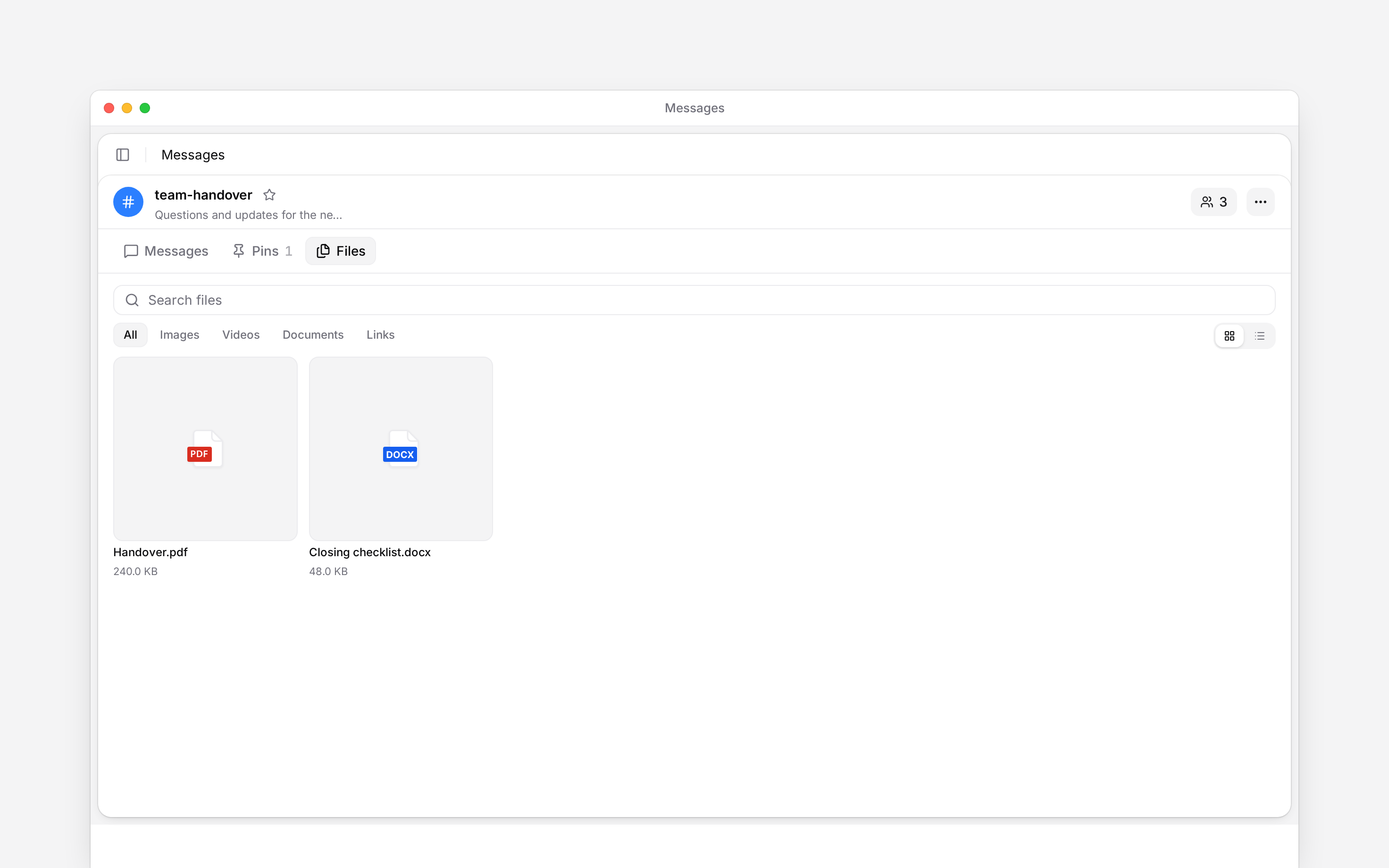
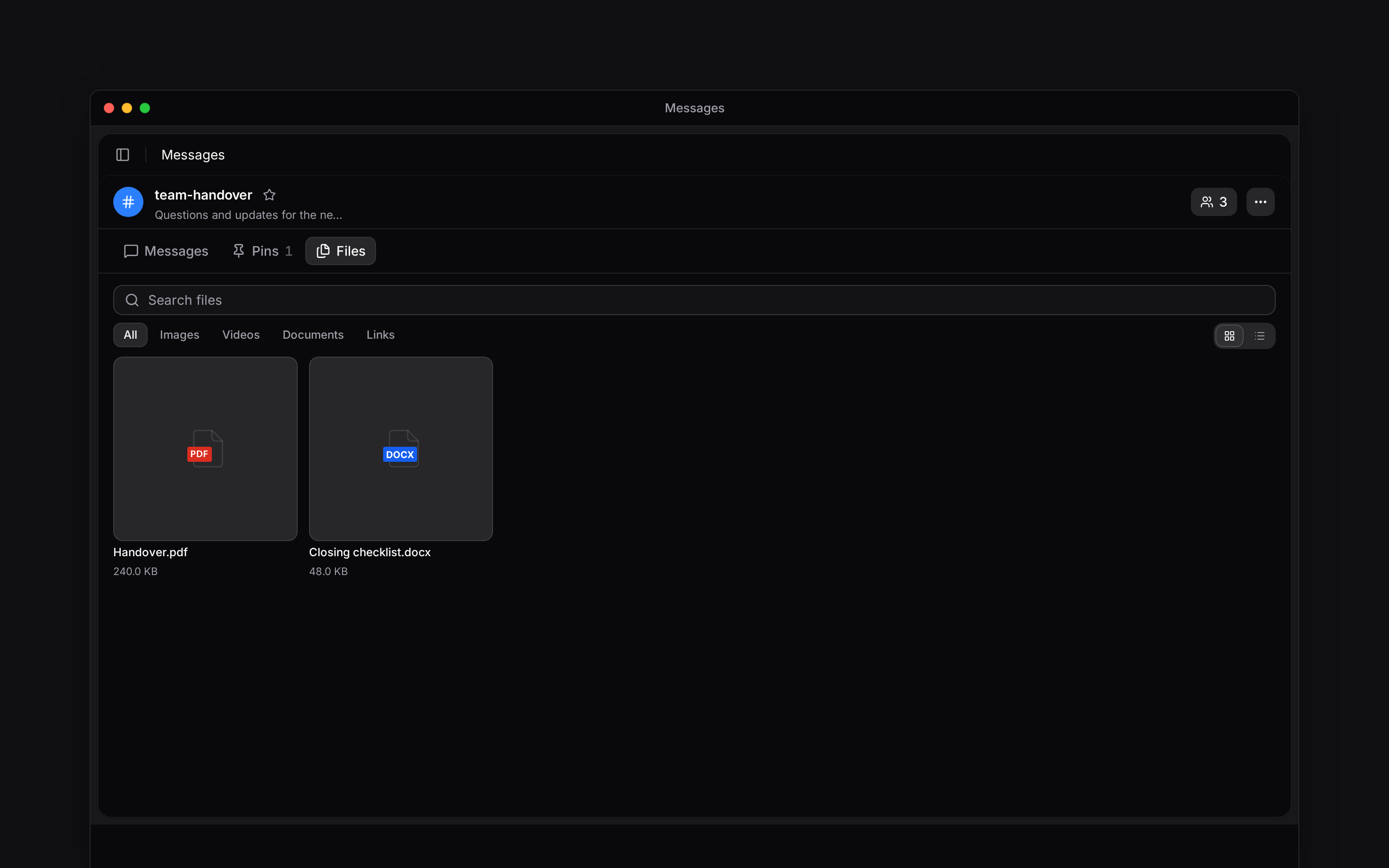 Click an attachment to open the available preview or download action. Documents and links stay associated with the conversation where they were shared; finding a Begin document link does not grant permission to the document itself.
The Files tab belongs to the open conversation. Use [search](/for-employees/messages/finding-messages) to find a file by name across conversations you can access. A file’s name is searchable; this is not a search through the text inside every attachment.
**Context for an assistant answering questions about sharing files.**
* **Access:** reading a shared attachment requires access to its message’s conversation. A Begin document link retains the document’s own access checks.
* **Limits:** the 25 MB limit is per file, including recordings. Blocked extensions are rejected. No attachment-content search is provided.
* **Drafts:** successfully uploaded attachments can be retained with the unsent draft. Attaching alone does not post the message.
## Next
Find an earlier message, keep important information in Pins, and return to unread work.
Send a message, keep a reply with its question, and correct what you wrote.
## Still need help?
Email the Begin team and we'll get back to you.
Open the AI assistant and get instant answers based on these docs.
Click an attachment to open the available preview or download action. Documents and links stay associated with the conversation where they were shared; finding a Begin document link does not grant permission to the document itself.
The Files tab belongs to the open conversation. Use [search](/for-employees/messages/finding-messages) to find a file by name across conversations you can access. A file’s name is searchable; this is not a search through the text inside every attachment.
**Context for an assistant answering questions about sharing files.**
* **Access:** reading a shared attachment requires access to its message’s conversation. A Begin document link retains the document’s own access checks.
* **Limits:** the 25 MB limit is per file, including recordings. Blocked extensions are rejected. No attachment-content search is provided.
* **Drafts:** successfully uploaded attachments can be retained with the unsent draft. Attaching alone does not post the message.
## Next
Find an earlier message, keep important information in Pins, and return to unread work.
Send a message, keep a reply with its question, and correct what you wrote.
## Still need help?
Email the Begin team and we'll get back to you.
Open the AI assistant and get instant answers based on these docs.