> ## Documentation Index
> Fetch the complete documentation index at: https://docs.begin.eu/llms.txt
> Use this file to discover all available pages before exploring further.

# My profile

> Find your employment details, job and pay, documents and requests in one place.

export const IntentList = ({title = "I want to…", children}) => <nav className="kb-intent not-prose" aria-label={title}>
    <div className="kb-intent-header">{title}</div>
    <ul className="kb-intent-rows">{children}</ul>
  </nav>;

export const Intent = ({icon, href, to, beta, children}) => {
  const stroke = {
    fill: "none",
    stroke: "currentColor",
    strokeWidth: 1.6,
    strokeLinecap: "round",
    strokeLinejoin: "round"
  };
  const paths = {
    calendar: "M8 2v4M16 2v4M3 10h18M5 4h14a2 2 0 0 1 2 2v14a2 2 0 0 1-2 2H5a2 2 0 0 1-2-2V6a2 2 0 0 1 2-2z",
    filter: "M22 3H2l8 9.46V19l4 2v-8.54L22 3z",
    plus: "M8 2v4M16 2v4M3 10h18M21 13V6a2 2 0 0 0-2-2H5a2 2 0 0 0-2 2v14a2 2 0 0 0 2 2h8M16 19h6M19 16v6",
    repeat: "m17 2 4 4-4 4M3 11v-1a4 4 0 0 1 4-4h14M7 22l-4-4 4-4M21 13v1a4 4 0 0 1-4 4H3",
    open: "M12 8v4l2 2M5 4h14a2 2 0 0 1 2 2v14a2 2 0 0 1-2 2H5a2 2 0 0 1-2-2V6a2 2 0 0 1 2-2z",
    warning: "M10.29 3.86 1.82 18a2 2 0 0 0 1.71 3h16.94a2 2 0 0 0 1.71-3L13.71 3.86a2 2 0 0 0-3.42 0zM12 9v4M12 17h.01",
    eye: "M2 12s3.64-7 10-7 10 7 10 7-3.64 7-10 7-10-7-10-7zM12 15a3 3 0 1 0 0-6 3 3 0 0 0 0 6z",
    layers: "m12.83 2.18 8.34 4.17a1 1 0 0 1 0 1.79l-8.34 4.17a2 2 0 0 1-1.66 0L2.83 8.14a1 1 0 0 1 0-1.79l8.34-4.17a2 2 0 0 1 1.66 0zM2 17l9.17 4.59a2 2 0 0 0 1.66 0L22 17M2 12l9.17 4.59a2 2 0 0 0 1.66 0L22 12",
    away: "M8 2v4M16 2v4M3 10h18M5 4h14a2 2 0 0 1 2 2v14a2 2 0 0 1-2 2H5a2 2 0 0 1-2-2V6a2 2 0 0 1 2-2zM9 16l6-6M15 16l-6-6",
    swap: "M8 3 4 7l4 4M4 7h16M16 21l4-4-4-4M20 17H4",
    building: "M6 22V4a2 2 0 0 1 2-2h8a2 2 0 0 1 2 2v18M6 12H4a2 2 0 0 0-2 2v6a2 2 0 0 0 2 2h2M18 9h2a2 2 0 0 1 2 2v9a2 2 0 0 1-2 2h-2M10 6h4M10 10h4M10 14h4M10 18h4",
    users: "M16 21v-2a4 4 0 0 0-4-4H6a4 4 0 0 0-4 4v2M9 3a4 4 0 1 0 0 8 4 4 0 0 0 0-8zM22 21v-2a4 4 0 0 0-3-3.87M16 3.13a4 4 0 0 1 0 7.75",
    help: "M12 2a10 10 0 1 0 0 20 10 10 0 0 0 0-20zM9.09 9a3 3 0 0 1 5.83 1c0 2-3 3-3 3M12 17h.01",
    chart: "M3 3v16a2 2 0 0 0 2 2h16M18 17V9M13 17V5M8 17v-3",
    clock: "M12 2a10 10 0 1 0 0 20 10 10 0 0 0 0-20zM12 6v6l4 2",
    check: "M12 2a10 10 0 1 0 0 20 10 10 0 0 0 0-20zM9 12l2 2 4-4",
    message: "M21 11.5a8.38 8.38 0 0 1-.9 3.8 8.5 8.5 0 0 1-7.6 4.7 8.38 8.38 0 0 1-3.8-.9L3 21l1.9-5.7a8.38 8.38 0 0 1-.9-3.8 8.5 8.5 0 0 1 4.7-7.6 8.38 8.38 0 0 1 3.8-.9h.5a8.48 8.48 0 0 1 8 8v.5z",
    reply: "m9 10-5 5 5 5M4 15h11a6 6 0 0 0 0-12h-1",
    attachment: "m21.44 11.05-9.19 9.19a6 6 0 0 1-8.49-8.49l10-10a4 4 0 0 1 5.66 5.66l-10 10a2 2 0 0 1-2.83-2.83l9.19-9.19",
    search: "m21 21-4.34-4.34M11 3a8 8 0 1 0 0 16 8 8 0 0 0 0-16z",
    bell: "M18 8a6 6 0 0 0-12 0c0 7-3 7-3 9h18c0-2-3-2-3-9M10 21h4",
    settings: "M21 4h-7M10 4H3M21 12h-9M8 12H3M21 20h-5M12 20H3M14 2v4M8 10v4M16 18v4",
    zap: "M13 2 4.09 12.91a1 1 0 0 0 .77 1.64h6.14l-1 7.45 8.9-10.91a1 1 0 0 0-.77-1.64h-6.14z"
  };
  return <li className="kb-intent-item">
      <a className="kb-intent-row" href={href}>
        <span className="kb-intent-tile">
          <svg className="kb-intent-glyph" viewBox="0 0 24 24" aria-hidden="true" {...stroke}>
            <path d={paths[icon] ?? paths.calendar} />
          </svg>
        </span>
        <span className="kb-intent-text">
          <span className="kb-intent-goal">
            {children}
            {beta ? <span className="kb-beta">Beta</span> : null}
          </span>
          <span className="kb-intent-to">{to}</span>
        </span>
        <svg className="kb-intent-chevron" viewBox="0 0 24 24" aria-hidden="true" {...stroke}>
          <path d="m9 18 6-6-6-6" />
        </svg>
      </a>
    </li>;
};

<img src="https://mintcdn.com/beginltd/XT-KKA4cusl35-uC/images/cover/getting-started-employee-profile-setup-light.png?fit=max&auto=format&n=XT-KKA4cusl35-uC&q=85&s=cf14b17e55d200b6d11b12f45afb3ea2" alt="An employee contact card with an emergency contact and Edit action" className="block dark:hidden" noZoom width="1152" height="616" data-path="images/cover/getting-started-employee-profile-setup-light.png" />

<img src="https://mintcdn.com/beginltd/MeMYha01eZlW8eNA/images/cover/getting-started-employee-profile-setup-dark.png?fit=max&auto=format&n=MeMYha01eZlW8eNA&q=85&s=170161c940f72d6cdeb82044d15bb679" alt="An employee contact card with an emergency contact and Edit action" className="hidden dark:block" noZoom width="1152" height="616" data-path="images/cover/getting-started-employee-profile-setup-dark.png" />

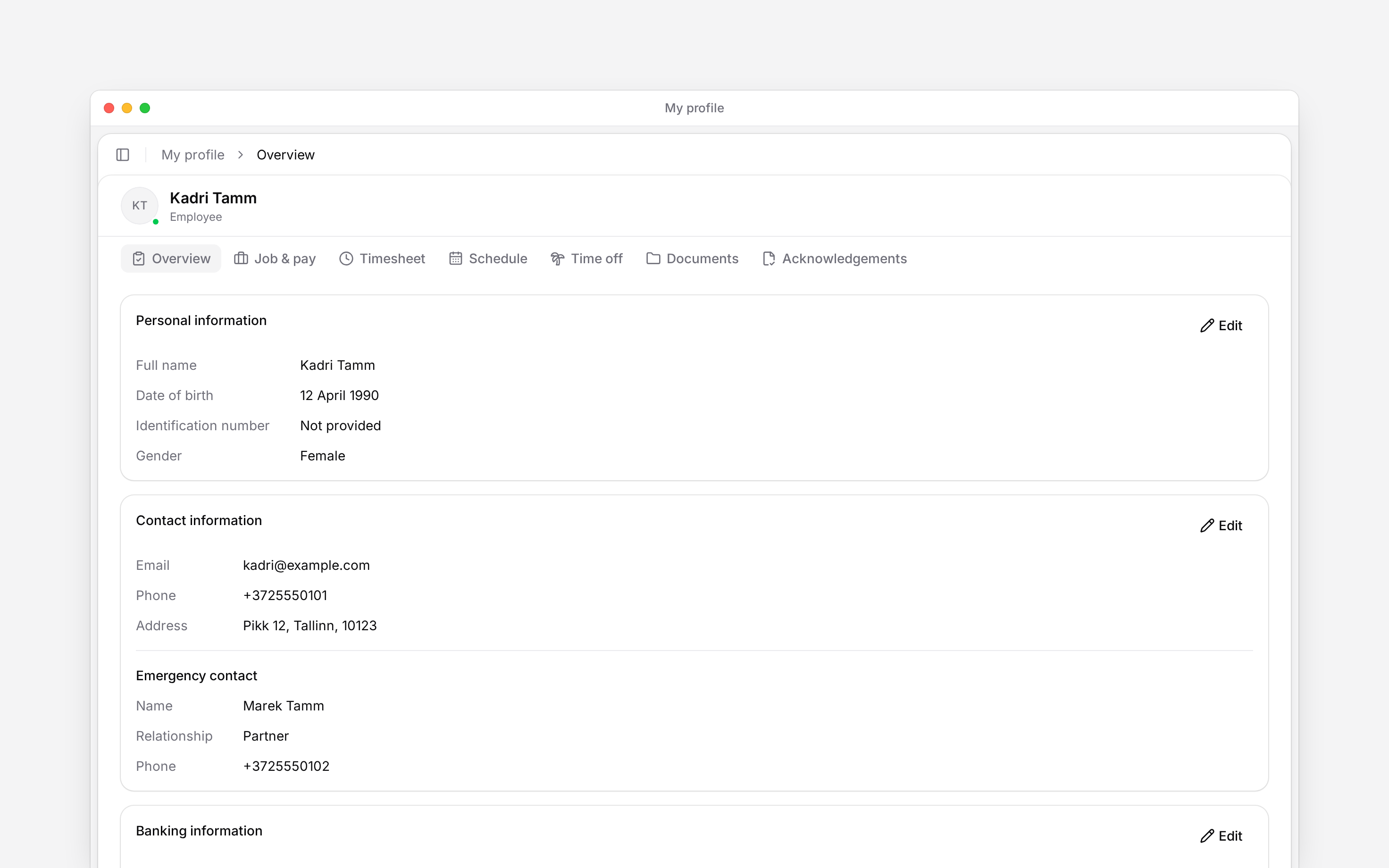
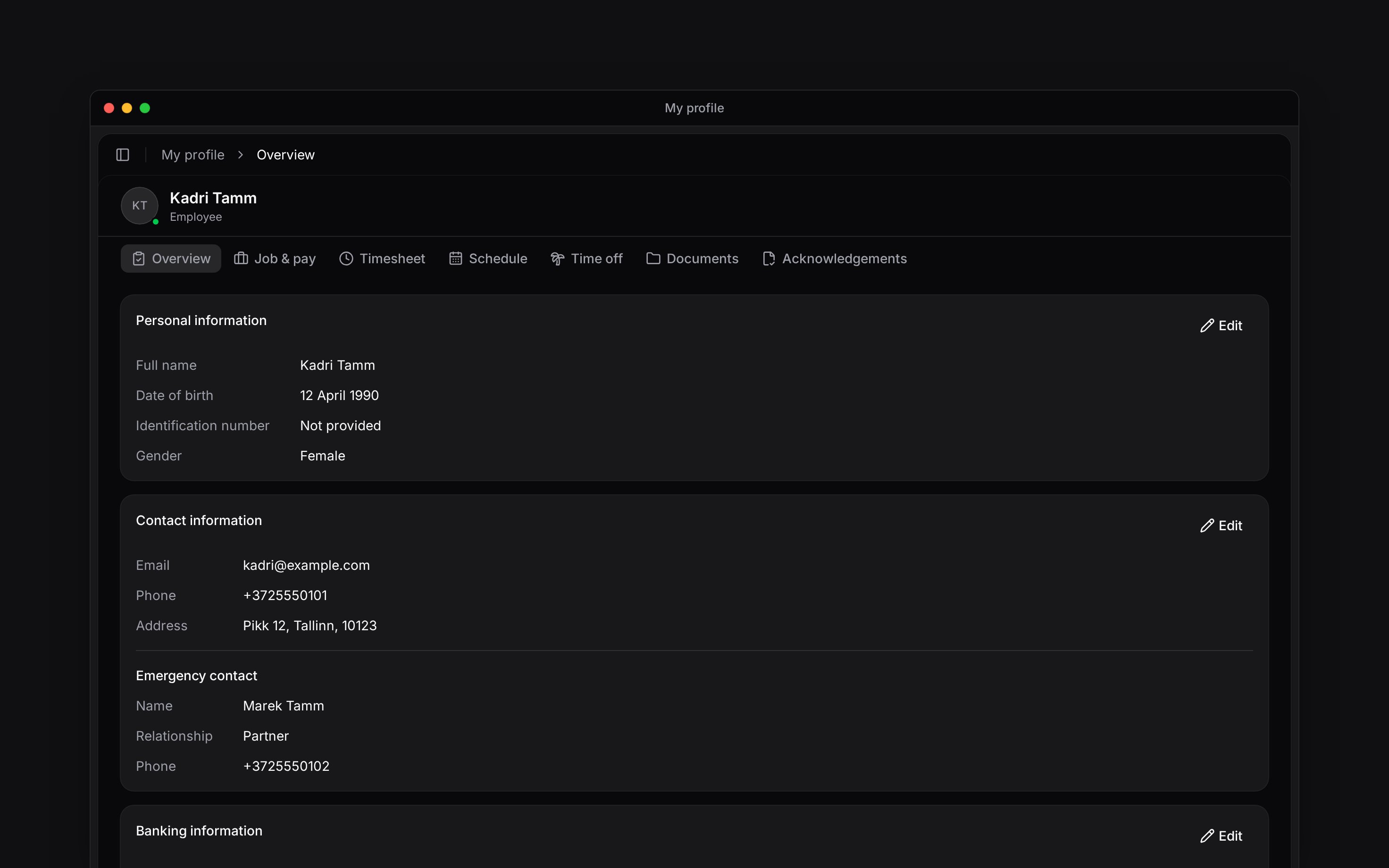
**My profile** brings together your own records in the current workspace. Open it from the sidebar, or from **More** on your phone. For your account photo and sign-in details, use **More → Profile & settings → Personal profile** on your phone, or **Settings → Personal profile** on a computer.

<IntentList title="I want to…">
  <Intent icon="users" to="Update your employee details" href="/for-employees/getting-started/profile-setup">
    Correct my contact, bank or emergency-contact details
  </Intent>

  <Intent icon="eye" to="Viewing job and pay" href="/for-employees/my-profile/viewing-job-and-pay">
    Check my employment terms
  </Intent>

  <Intent icon="attachment" to="Finding documents and records" href="/for-employees/my-profile/finding-documents-and-records">
    Find files and records shared with me
  </Intent>

  <Intent icon="check" to="Signing a document" href="/for-employees/my-profile/signing-a-document" beta>
    Respond to a signing request
  </Intent>

  <Intent icon="check" to="Completing acknowledgements" href="/for-employees/my-profile/completing-acknowledgements" beta>
    Read and confirm a document
  </Intent>
</IntentList>

## Find your work alongside your details

The **Schedule** tab shows your own week. **Timesheet** shows your entries, and **Time off** holds your leave balances and requests. Follow [Viewing your shifts](/for-employees/schedule/viewing-shifts), [Viewing your hours](/for-employees/timesheets/viewing-hours) or [Requesting time off](/for-employees/schedule/requesting-time-off) for those tasks.

<img src="https://mintcdn.com/beginltd/eTnxmebqR92iwCjw/images/articles/employees/employee-profile-details-screen-light.png?fit=max&auto=format&n=eTnxmebqR92iwCjw&q=85&s=b2567bdda14cba2a23b09e509e910a9c" alt="My profile with its tabs and personal-information cards" className="block dark:hidden" width="2944" height="1840" data-path="images/articles/employees/employee-profile-details-screen-light.png" />

<img src="https://mintcdn.com/beginltd/eTnxmebqR92iwCjw/images/articles/employees/employee-profile-details-screen-dark.png?fit=max&auto=format&n=eTnxmebqR92iwCjw&q=85&s=134a3d5c2fc9cdbad8cc551e5144973a" alt="My profile with its tabs and personal-information cards" className="hidden dark:block" width="2944" height="1840" data-path="images/articles/employees/employee-profile-details-screen-dark.png" />

## Check the workspace first

Your employer-held records belong to this workspace. Switching workspaces changes the job, hours and documents you are looking at. A missing record is a reason to check the workspace and ask your manager, not to create another account.

The tabs and editing controls you see depend on your access and the features your employer uses.

Self-profile queries derive the subject from the signed-in member. The employee Job & pay surface has no edit actions. The Acknowledgements tab additionally requires the workspace feature. Ordinary employees use the personal tab rather than the manager acknowledgement dashboard.

## Next

<Columns cols={2}>
  <Card title="Employee details" icon="user" href="/for-employees/getting-started/profile-setup">
    Keep the information your employer uses current.
  </Card>

  <Card title="Finding documents" icon="folder" href="/for-employees/my-profile/finding-documents-and-records">
    Open your files and personal records.
  </Card>
</Columns>

## Still need help?

<Columns cols={2}>
  <Card title="Contact support" icon="envelope" href="mailto:support@heybegin.eu">
    Email the Begin team and we'll get back to you.
  </Card>

  <Card title="Ask Begin AI" icon="comment-dots" href="?assistant=open">
    Open the AI assistant and get instant answers based on these docs.
  </Card>
</Columns>