> ## Documentation Index
> Fetch the complete documentation index at: https://docs.begin.eu/llms.txt
> Use this file to discover all available pages before exploring further.
# Signing a document
> Read a document, sign with an available identity method and keep the completed copy.
export const BetaCallout = ({children}) => ;

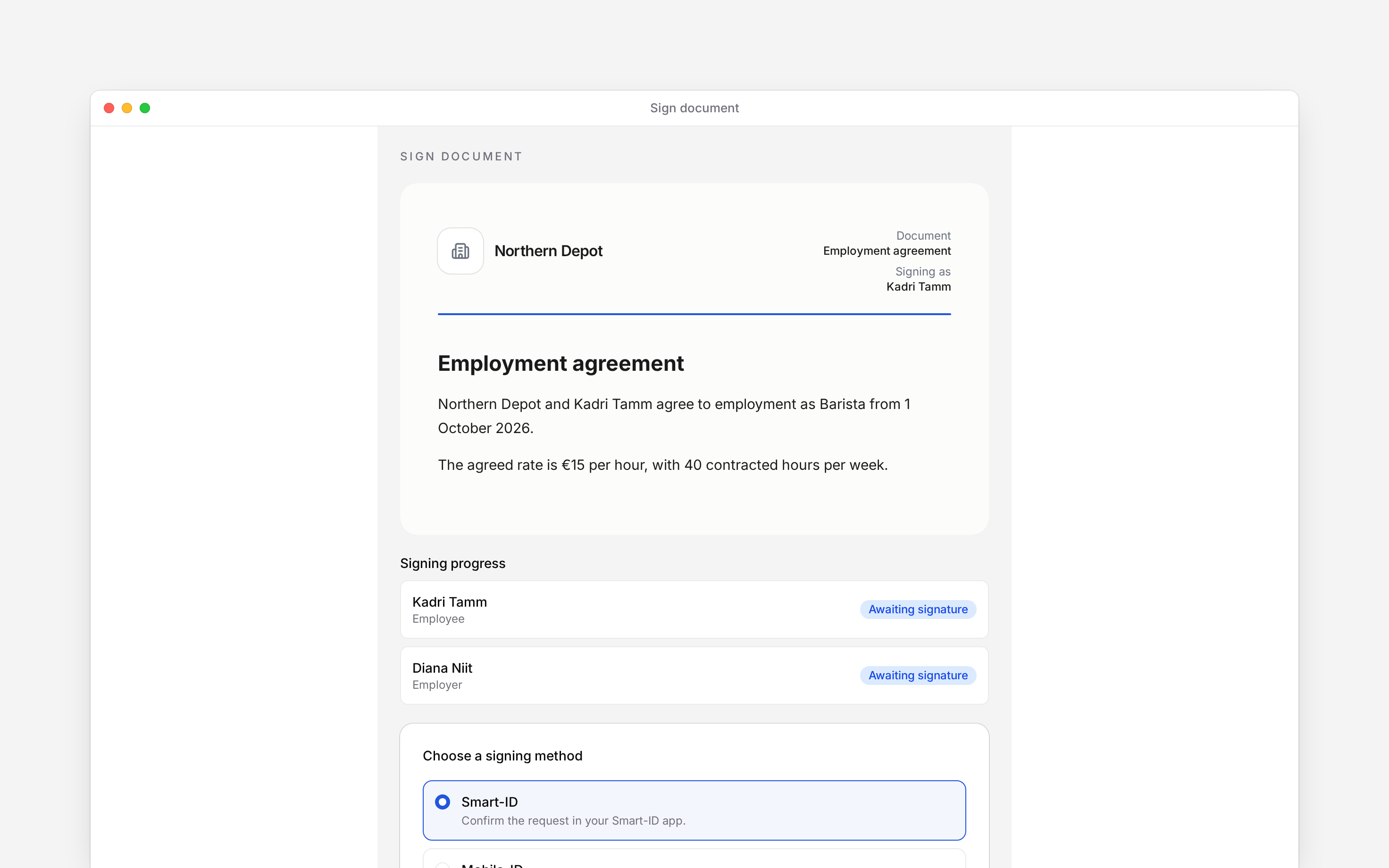
 Open the signing link your employer sends to read and sign a document. You do not need to sign in to Begin first. Check the document name, sender and **Signing as** name before continuing.
Document signing is rolling out gradually. This guide applies when your employer sends you a
signing request; ask the sender if you are expecting a link.
## Read before signing
Read to the end of the document, scrolling inside its preview when needed. If you cannot read it, or the name or terms are wrong, contact the sender before signing. A **Download PDF** action appears when a PDF is available.
Open the signing link your employer sends to read and sign a document. You do not need to sign in to Begin first. Check the document name, sender and **Signing as** name before continuing.
Document signing is rolling out gradually. This guide applies when your employer sends you a
signing request; ask the sender if you are expecting a link.
## Read before signing
Read to the end of the document, scrolling inside its preview when needed. If you cannot read it, or the name or terms are wrong, contact the sender before signing. A **Download PDF** action appears when a PDF is available.
 ## Add your signature
Choose an available signing method, then **Continue**. The choices can include Smart-ID,
Mobile-ID, ID-card or eParaksts, depending on the workspace’s country.
For Smart-ID, check the country and personal identification number. Mobile-ID also asks for your
phone number. Follow the on-screen instructions for your method.
Start signing and follow your identity provider’s prompt. If a verification code appears, check
it matches before confirming.
Wait for **Thank you for signing**. **Signing progress** shows whether the other people have
signed too.
Your signature can be recorded while somebody else still needs to sign. **Download signed document** appears when the completed file is available. Keep that file if you need a copy.
## Decline or resolve a failed link
If you do not agree, choose **Decline to sign**, optionally enter a reason, then choose **Decline**. The signing round closes as declined; contact the sender if the document needs changing.
**This signing link is no longer valid** can mean the link expired or signing was closed. Ask the sender for a current request. A connection error offers **Try again**; it does not mean you have declined or signed.
The public token route requires no Begin login and obtains a separate signing state. A completed personal signature is distinct from a completed envelope and available signed container. Country limits apply: Estonia/Lithuania offer Smart-ID, Mobile-ID and ID-card; Latvia offers eParaksts, Smart-ID and ID-card. The read-to-end gate applies before starting signing, not before declining. There is no employee action to edit the document or restart a closed round.
## Next
Find your agreement again inside Begin.
Respond when your employer asks you to read and confirm.
## Still need help?
Email the Begin team and we'll get back to you.
Open the AI assistant and get instant answers based on these docs.
## Add your signature
Choose an available signing method, then **Continue**. The choices can include Smart-ID,
Mobile-ID, ID-card or eParaksts, depending on the workspace’s country.
For Smart-ID, check the country and personal identification number. Mobile-ID also asks for your
phone number. Follow the on-screen instructions for your method.
Start signing and follow your identity provider’s prompt. If a verification code appears, check
it matches before confirming.
Wait for **Thank you for signing**. **Signing progress** shows whether the other people have
signed too.
Your signature can be recorded while somebody else still needs to sign. **Download signed document** appears when the completed file is available. Keep that file if you need a copy.
## Decline or resolve a failed link
If you do not agree, choose **Decline to sign**, optionally enter a reason, then choose **Decline**. The signing round closes as declined; contact the sender if the document needs changing.
**This signing link is no longer valid** can mean the link expired or signing was closed. Ask the sender for a current request. A connection error offers **Try again**; it does not mean you have declined or signed.
The public token route requires no Begin login and obtains a separate signing state. A completed personal signature is distinct from a completed envelope and available signed container. Country limits apply: Estonia/Lithuania offer Smart-ID, Mobile-ID and ID-card; Latvia offers eParaksts, Smart-ID and ID-card. The read-to-end gate applies before starting signing, not before declining. There is no employee action to edit the document or restart a closed round.
## Next
Find your agreement again inside Begin.
Respond when your employer asks you to read and confirm.
## Still need help?
Email the Begin team and we'll get back to you.
Open the AI assistant and get instant answers based on these docs.