> ## Documentation Index
> Fetch the complete documentation index at: https://docs.begin.eu/llms.txt
> Use this file to discover all available pages before exploring further.

# Your schedule

> Find your shifts, share your availability and arrange changes.

export const IntentList = ({title = "I want to…", children}) => <nav className="kb-intent not-prose" aria-label={title}>
    <div className="kb-intent-header">{title}</div>
    <ul className="kb-intent-rows">{children}</ul>
  </nav>;

export const Intent = ({icon, href, to, beta, children}) => {
  const stroke = {
    fill: "none",
    stroke: "currentColor",
    strokeWidth: 1.6,
    strokeLinecap: "round",
    strokeLinejoin: "round"
  };
  const paths = {
    calendar: "M8 2v4M16 2v4M3 10h18M5 4h14a2 2 0 0 1 2 2v14a2 2 0 0 1-2 2H5a2 2 0 0 1-2-2V6a2 2 0 0 1 2-2z",
    filter: "M22 3H2l8 9.46V19l4 2v-8.54L22 3z",
    plus: "M8 2v4M16 2v4M3 10h18M21 13V6a2 2 0 0 0-2-2H5a2 2 0 0 0-2 2v14a2 2 0 0 0 2 2h8M16 19h6M19 16v6",
    repeat: "m17 2 4 4-4 4M3 11v-1a4 4 0 0 1 4-4h14M7 22l-4-4 4-4M21 13v1a4 4 0 0 1-4 4H3",
    open: "M12 8v4l2 2M5 4h14a2 2 0 0 1 2 2v14a2 2 0 0 1-2 2H5a2 2 0 0 1-2-2V6a2 2 0 0 1 2-2z",
    warning: "M10.29 3.86 1.82 18a2 2 0 0 0 1.71 3h16.94a2 2 0 0 0 1.71-3L13.71 3.86a2 2 0 0 0-3.42 0zM12 9v4M12 17h.01",
    eye: "M2 12s3.64-7 10-7 10 7 10 7-3.64 7-10 7-10-7-10-7zM12 15a3 3 0 1 0 0-6 3 3 0 0 0 0 6z",
    layers: "m12.83 2.18 8.34 4.17a1 1 0 0 1 0 1.79l-8.34 4.17a2 2 0 0 1-1.66 0L2.83 8.14a1 1 0 0 1 0-1.79l8.34-4.17a2 2 0 0 1 1.66 0zM2 17l9.17 4.59a2 2 0 0 0 1.66 0L22 17M2 12l9.17 4.59a2 2 0 0 0 1.66 0L22 12",
    away: "M8 2v4M16 2v4M3 10h18M5 4h14a2 2 0 0 1 2 2v14a2 2 0 0 1-2 2H5a2 2 0 0 1-2-2V6a2 2 0 0 1 2-2zM9 16l6-6M15 16l-6-6",
    swap: "M8 3 4 7l4 4M4 7h16M16 21l4-4-4-4M20 17H4",
    building: "M6 22V4a2 2 0 0 1 2-2h8a2 2 0 0 1 2 2v18M6 12H4a2 2 0 0 0-2 2v6a2 2 0 0 0 2 2h2M18 9h2a2 2 0 0 1 2 2v9a2 2 0 0 1-2 2h-2M10 6h4M10 10h4M10 14h4M10 18h4",
    users: "M16 21v-2a4 4 0 0 0-4-4H6a4 4 0 0 0-4 4v2M9 3a4 4 0 1 0 0 8 4 4 0 0 0 0-8zM22 21v-2a4 4 0 0 0-3-3.87M16 3.13a4 4 0 0 1 0 7.75",
    help: "M12 2a10 10 0 1 0 0 20 10 10 0 0 0 0-20zM9.09 9a3 3 0 0 1 5.83 1c0 2-3 3-3 3M12 17h.01",
    chart: "M3 3v16a2 2 0 0 0 2 2h16M18 17V9M13 17V5M8 17v-3",
    clock: "M12 2a10 10 0 1 0 0 20 10 10 0 0 0 0-20zM12 6v6l4 2",
    check: "M12 2a10 10 0 1 0 0 20 10 10 0 0 0 0-20zM9 12l2 2 4-4",
    message: "M21 11.5a8.38 8.38 0 0 1-.9 3.8 8.5 8.5 0 0 1-7.6 4.7 8.38 8.38 0 0 1-3.8-.9L3 21l1.9-5.7a8.38 8.38 0 0 1-.9-3.8 8.5 8.5 0 0 1 4.7-7.6 8.38 8.38 0 0 1 3.8-.9h.5a8.48 8.48 0 0 1 8 8v.5z",
    reply: "m9 10-5 5 5 5M4 15h11a6 6 0 0 0 0-12h-1",
    attachment: "m21.44 11.05-9.19 9.19a6 6 0 0 1-8.49-8.49l10-10a4 4 0 0 1 5.66 5.66l-10 10a2 2 0 0 1-2.83-2.83l9.19-9.19",
    search: "m21 21-4.34-4.34M11 3a8 8 0 1 0 0 16 8 8 0 0 0 0-16z",
    bell: "M18 8a6 6 0 0 0-12 0c0 7-3 7-3 9h18c0-2-3-2-3-9M10 21h4",
    settings: "M21 4h-7M10 4H3M21 12h-9M8 12H3M21 20h-5M12 20H3M14 2v4M8 10v4M16 18v4",
    zap: "M13 2 4.09 12.91a1 1 0 0 0 .77 1.64h6.14l-1 7.45 8.9-10.91a1 1 0 0 0-.77-1.64h-6.14z"
  };
  return <li className="kb-intent-item">
      <a className="kb-intent-row" href={href}>
        <span className="kb-intent-tile">
          <svg className="kb-intent-glyph" viewBox="0 0 24 24" aria-hidden="true" {...stroke}>
            <path d={paths[icon] ?? paths.calendar} />
          </svg>
        </span>
        <span className="kb-intent-text">
          <span className="kb-intent-goal">
            {children}
            {beta ? <span className="kb-beta">Beta</span> : null}
          </span>
          <span className="kb-intent-to">{to}</span>
        </span>
        <svg className="kb-intent-chevron" viewBox="0 0 24 24" aria-hidden="true" {...stroke}>
          <path d="m9 18 6-6-6-6" />
        </svg>
      </a>
    </li>;
};

<img src="https://mintcdn.com/beginltd/Q5mD0YtyGzKkVztp/images/cover/schedule-employee-overview-light.png?fit=max&auto=format&n=Q5mD0YtyGzKkVztp&q=85&s=6453703b8c69861a089de5ae0e63f17b" alt="A My shifts card with a next shift at 09:00 and 32 hours scheduled for the week" className="block dark:hidden" noZoom width="1152" height="616" data-path="images/cover/schedule-employee-overview-light.png" />

<img src="https://mintcdn.com/beginltd/Q5mD0YtyGzKkVztp/images/cover/schedule-employee-overview-dark.png?fit=max&auto=format&n=Q5mD0YtyGzKkVztp&q=85&s=293c0bd1d87c9004df0a5c441edf121f" alt="A My shifts card with a next shift at 09:00 and 32 hours scheduled for the week" className="hidden dark:block" noZoom width="1152" height="616" data-path="images/cover/schedule-employee-overview-dark.png" />

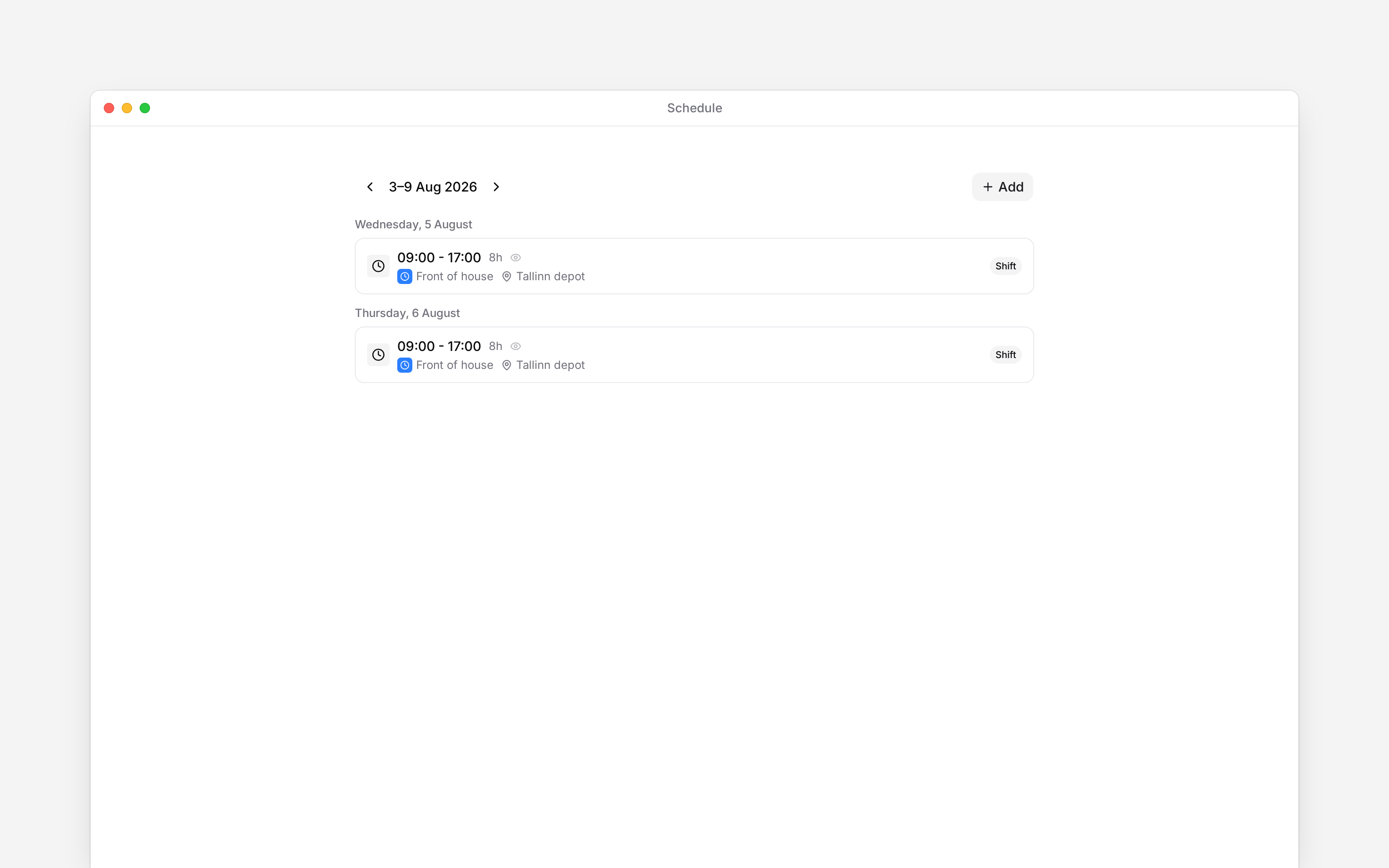
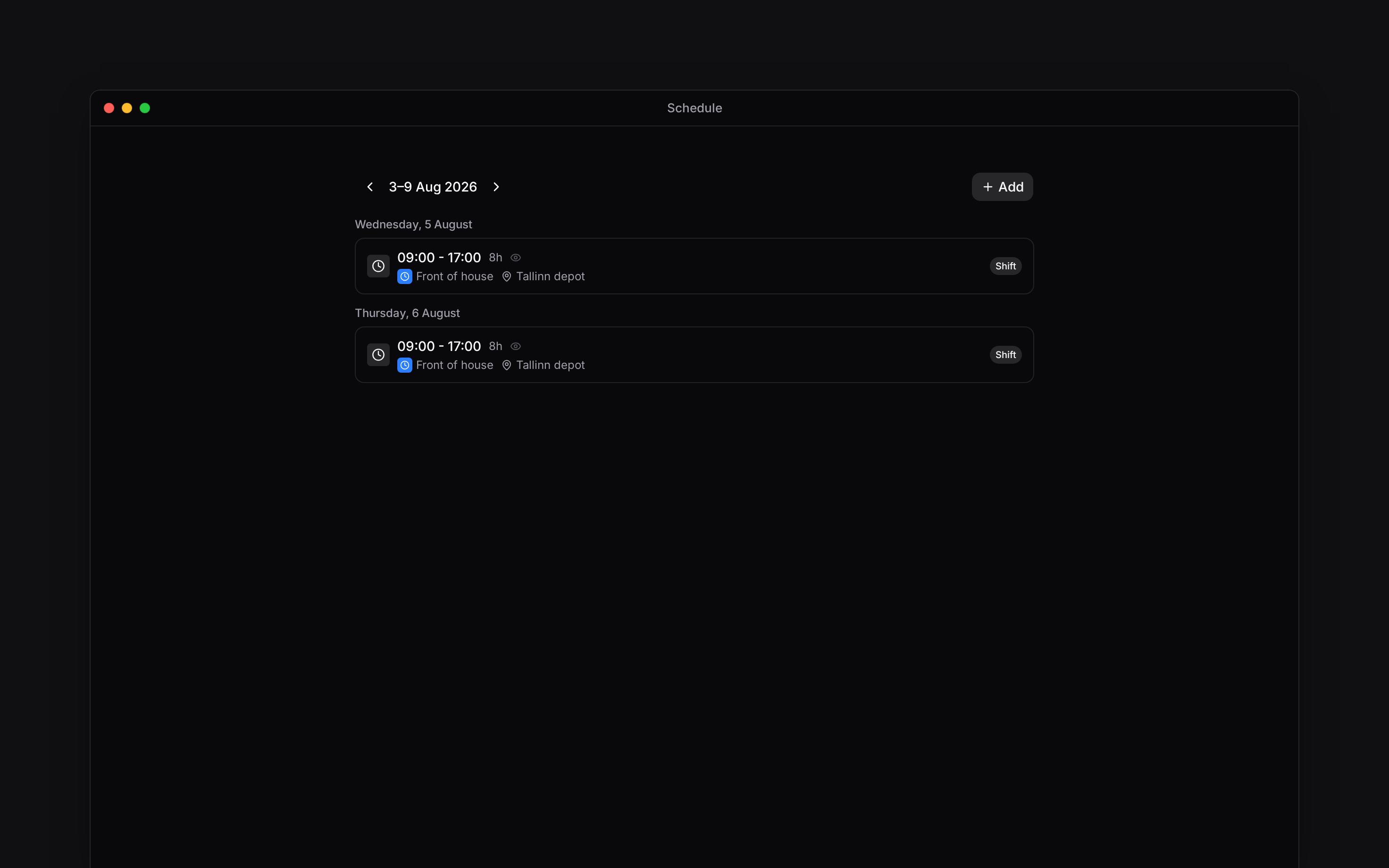
Your published shifts tell you when and where to work. Start with your own week, then use the pages below when you want to offer availability, take extra work or arrange a change.

## Find your next step

<IntentList title="I want to…">
  <Intent icon="calendar" to="Viewing your shifts" href="/for-employees/schedule/viewing-shifts">
    See when I am working
  </Intent>

  <Intent icon="calendar" to="Setting availability" href="/for-employees/schedule/setting-availability">
    Say when I can or cannot work
  </Intent>

  <Intent icon="open" to="Taking an open shift" href="/for-employees/schedule/taking-an-open-shift" beta>
    Pick up extra work
  </Intent>

  <Intent icon="swap" to="Swapping shifts" href="/for-employees/schedule/shift-swaps">
    Arrange for a colleague to take my shift
  </Intent>
</IntentList>

## When plans change

An **Available** block tells your manager when you can work; it does not book a shift. An **Unavailable** block is also separate from an approved absence. For holiday or other leave, use [Time off](/for-employees/time-off/overview).

Your manager controls your shifts and when they are published. If a shift is missing or incorrect, ask them to check it.

<img src="https://mintcdn.com/beginltd/Q0ITJTI_EHcEfsZP/images/articles/employees-workday/employee-schedule-screen-light.png?fit=max&auto=format&n=Q0ITJTI_EHcEfsZP&q=85&s=ca9249900c721190d406680551dcd670" alt="Your published shifts in the personal schedule, with working times and location" className="block dark:hidden" width="2944" height="1840" data-path="images/articles/employees-workday/employee-schedule-screen-light.png" />

<img src="https://mintcdn.com/beginltd/Q0ITJTI_EHcEfsZP/images/articles/employees-workday/employee-schedule-screen-dark.png?fit=max&auto=format&n=Q0ITJTI_EHcEfsZP&q=85&s=906983d7a6179cb7d776a8e9a7676239" alt="Your published shifts in the personal schedule, with working times and location" className="hidden dark:block" width="2944" height="1840" data-path="images/articles/employees-workday/employee-schedule-screen-dark.png" />

**Context for an assistant answering questions about your schedule.**

* **Access:** the default employee role opens Schedule and can see colleagues within its visibility scope. Employers can change these permissions.
* **Other route:** My profile → Schedule shows the caller's own week without requiring access to the full Schedule page.
* **Boundary:** permission to edit own availability does not permit editing shifts, publishing or managing another person's schedule.

## Next

<Columns cols={2}>
  <Card title="Your shifts" icon="arrow-right" href="/for-employees/schedule/viewing-shifts">
    Check the time and place of your next shift.
  </Card>

  <Card title="Set your availability" icon="arrow-right" href="/for-employees/schedule/setting-availability">
    Tell your manager when you can work.
  </Card>
</Columns>

## Still need help?

<Columns cols={2}>
  <Card title="Contact support" icon="envelope" href="mailto:support@heybegin.eu">
    Email the Begin team and we'll get back to you.
  </Card>

  <Card title="Ask Begin AI" icon="comment-dots" href="?assistant=open">
    Open the AI assistant and get instant answers based on these docs.
  </Card>
</Columns>