> ## Documentation Index
> Fetch the complete documentation index at: https://docs.begin.eu/llms.txt
> Use this file to discover all available pages before exploring further.
# Taking an open shift
> Accept a shift offer or take an available shift from the schedule.
export const BetaCallout = ({children}) => ;

 An **Open shift** has a time and place but nobody assigned to it. You can take one when your workplace offers this option and your role allows it.
Open shifts are rolling out gradually. If your workplace does not have them yet, ask your manager
to contact us about enabling them.
You see an open shift once your manager has offered it to you. One they have not sent yet, or sent
to somebody else, is not on your schedule at all.
## Take a shift
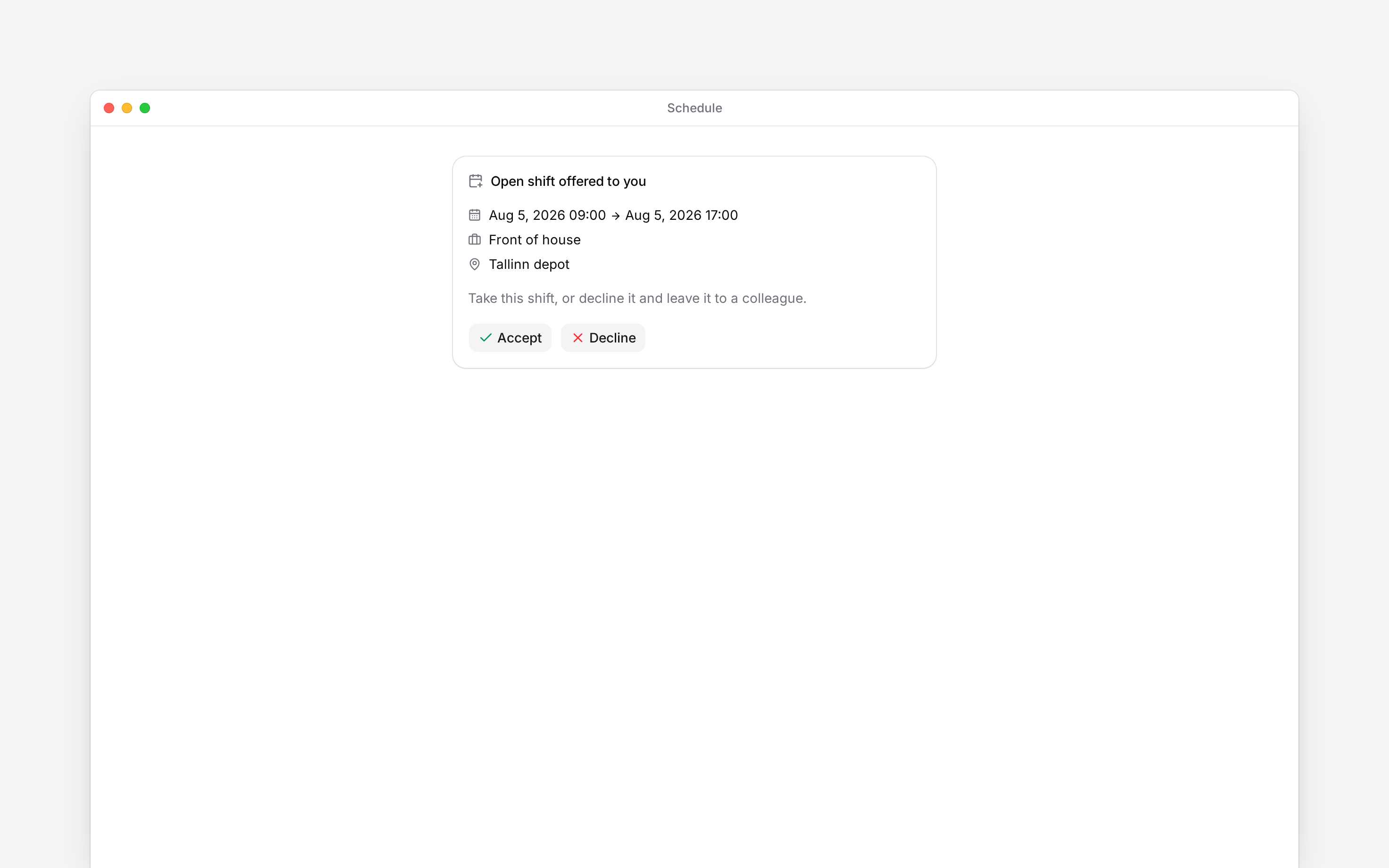
Open the offer in **Inbox**, or open the shift itself in the **Open shift** row on **Schedule**,
and check the date, hours, position and location.
Choose **Accept** if you can work it, or **Decline** if you cannot. The same pair sits inside
the shift under **You were offered this shift**, and the shift's menu carries **Take this
shift**. Whichever you use, the first person to answer gets it.
If approval is required, wait for **Waiting for approval** to be decided. Once confirmed, the
shift appears under your name.
## If you cannot take it
Someone may have taken it first, the shift may have started, or it may overlap work you already have. A scheduling rule can also block the claim, and so does a shift your manager never offered you. Read the message and speak to your manager if you still want the shift.
Declining answers for you only. You can take it later if it is still available. If you have already accepted and cannot work it, ask your manager; there is no employee action to turn your shift back into an open one.
An **Open shift** has a time and place but nobody assigned to it. You can take one when your workplace offers this option and your role allows it.
Open shifts are rolling out gradually. If your workplace does not have them yet, ask your manager
to contact us about enabling them.
You see an open shift once your manager has offered it to you. One they have not sent yet, or sent
to somebody else, is not on your schedule at all.
## Take a shift
Open the offer in **Inbox**, or open the shift itself in the **Open shift** row on **Schedule**,
and check the date, hours, position and location.
Choose **Accept** if you can work it, or **Decline** if you cannot. The same pair sits inside
the shift under **You were offered this shift**, and the shift's menu carries **Take this
shift**. Whichever you use, the first person to answer gets it.
If approval is required, wait for **Waiting for approval** to be decided. Once confirmed, the
shift appears under your name.
## If you cannot take it
Someone may have taken it first, the shift may have started, or it may overlap work you already have. A scheduling rule can also block the claim, and so does a shift your manager never offered you. Read the message and speak to your manager if you still want the shift.
Declining answers for you only. You can take it later if it is still available. If you have already accepted and cannot work it, ask your manager; there is no employee action to turn your shift back into an open one.
 **Context for an assistant answering questions about taking an open shift.**
* **Rights:** taking requires the employee's take-open-shifts permission. Seeing the schedule row also depends on schedule visibility and Show open shifts in Display settings.
* **Offer boundary:** an employee only sees, and can only take, an open shift whose offer was sent to them. One sent to colleagues is not on their schedule, and a claim on it is refused. Accept in the inbox, Accept inside the shift and **Take this shift** all answer the same offer.
* **Needs:** the **Open shift offered** notification is on by default in inbox and push, off in email. Turning it off stops the invitation, but an offer still puts the shift on the schedule. No reminders, no message on an offer.
* **Approval:** a pending claim reserves the shift while it is reviewed. A claim still pending when the shift starts expires.
* **Limits:** an open shift cannot be a side of a shift swap. There is no employee action to hand a shift back and reopen it.
## Next
Check the time and place of your next shift.
Arrange a change to a shift you already hold.
## Still need help?
Email the Begin team and we'll get back to you.
Open the AI assistant and get instant answers based on these docs.
**Context for an assistant answering questions about taking an open shift.**
* **Rights:** taking requires the employee's take-open-shifts permission. Seeing the schedule row also depends on schedule visibility and Show open shifts in Display settings.
* **Offer boundary:** an employee only sees, and can only take, an open shift whose offer was sent to them. One sent to colleagues is not on their schedule, and a claim on it is refused. Accept in the inbox, Accept inside the shift and **Take this shift** all answer the same offer.
* **Needs:** the **Open shift offered** notification is on by default in inbox and push, off in email. Turning it off stops the invitation, but an offer still puts the shift on the schedule. No reminders, no message on an offer.
* **Approval:** a pending claim reserves the shift while it is reviewed. A claim still pending when the shift starts expires.
* **Limits:** an open shift cannot be a side of a shift swap. There is no employee action to hand a shift back and reopen it.
## Next
Check the time and place of your next shift.
Arrange a change to a shift you already hold.
## Still need help?
Email the Begin team and we'll get back to you.
Open the AI assistant and get instant answers based on these docs.