> ## Documentation Index
> Fetch the complete documentation index at: https://docs.begin.eu/llms.txt
> Use this file to discover all available pages before exploring further.
# Checking your time-off balance
> Understand what is left and which requests use your entitlement.

 Your balances are in **My profile → Time off**. Each policy has its own balance in **days or hours**. Check the leave type and unit shown before you request time off.
## Read the balance
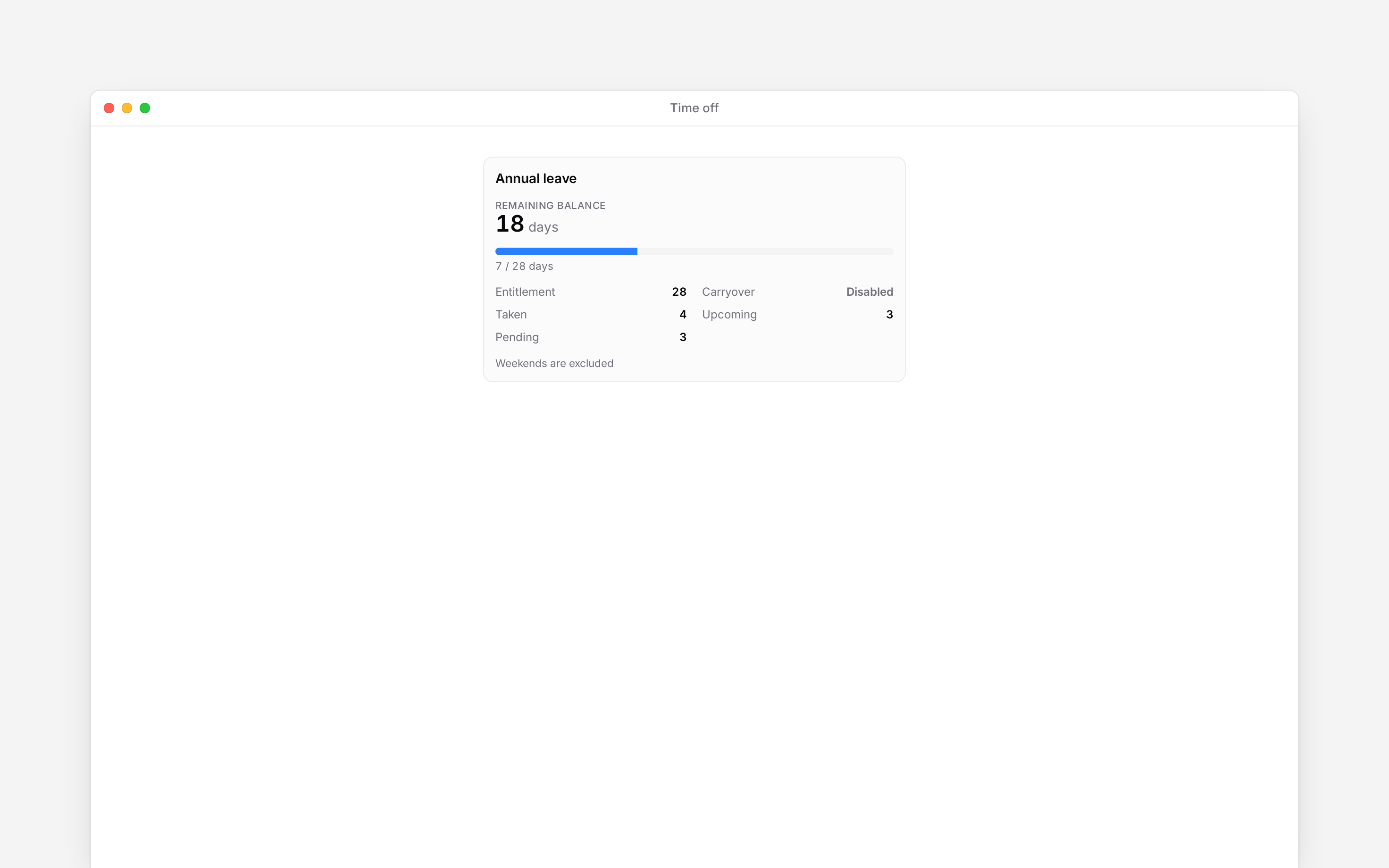
Open a policy's balance breakdown to see where its figures come from. **Taken** is leave already used, **Upcoming** is approved leave ahead, and **Pending** is awaiting a decision. Your entitlement can also include carried-over leave or an adjustment from your manager.
The request form shows **Remaining balance** and **This request** together. Use that preview when choosing dates: the dates alone do not tell you how many days or hours will be deducted. Weekends, holidays and part-day leave follow your policy and working-day settings.
## If the number looks wrong
Check the policy and request status first. Review the request list for approved, pending and cancelled leave. If a balance is marked out of date, use its refresh action.
Ask your manager about an entitlement, carryover or adjustment that still looks wrong. You can view your own balance; you cannot change the allowance yourself. A policy with no balance limit does not mean every request is approved.
Your balances are in **My profile → Time off**. Each policy has its own balance in **days or hours**. Check the leave type and unit shown before you request time off.
## Read the balance
Open a policy's balance breakdown to see where its figures come from. **Taken** is leave already used, **Upcoming** is approved leave ahead, and **Pending** is awaiting a decision. Your entitlement can also include carried-over leave or an adjustment from your manager.
The request form shows **Remaining balance** and **This request** together. Use that preview when choosing dates: the dates alone do not tell you how many days or hours will be deducted. Weekends, holidays and part-day leave follow your policy and working-day settings.
## If the number looks wrong
Check the policy and request status first. Review the request list for approved, pending and cancelled leave. If a balance is marked out of date, use its refresh action.
Ask your manager about an entitlement, carryover or adjustment that still looks wrong. You can view your own balance; you cannot change the allowance yourself. A policy with no balance limit does not mean every request is approved.
 **Context for an assistant answering questions about checking your time-off balance.**
* **Period:** the self-service balance card concerns the current year. Request history has its own period and policy filters.
* **Calculation boundary:** working-day and holiday exclusions are policy-specific; dates alone cannot determine a deduction.
* **Data:** the history can include a manager-added absence without an employee request. Such a row has no request action.
* **Rights:** changing entitlement and manual balance adjustments are management actions.
## Next
Choose the dates and send your request.
Find the action available for your request.
## Still need help?
Email the Begin team and we'll get back to you.
Open the AI assistant and get instant answers based on these docs.
**Context for an assistant answering questions about checking your time-off balance.**
* **Period:** the self-service balance card concerns the current year. Request history has its own period and policy filters.
* **Calculation boundary:** working-day and holiday exclusions are policy-specific; dates alone cannot determine a deduction.
* **Data:** the history can include a manager-added absence without an employee request. Such a row has no request action.
* **Rights:** changing entitlement and manual balance adjustments are management actions.
## Next
Choose the dates and send your request.
Find the action available for your request.
## Still need help?
Email the Begin team and we'll get back to you.
Open the AI assistant and get instant answers based on these docs.