> ## Documentation Index
> Fetch the complete documentation index at: https://docs.begin.eu/llms.txt
> Use this file to discover all available pages before exploring further.
# Following up on requests
> Remind pending people and understand renewals or document changes that ask again.

 Begin follows up automatically near a deadline. You can also remind one pending person from the request detail when they need a nudge now.
Acknowledgements must be enabled for your workspace and your role needs access ([Acknowledgements overview](/for-managers/acknowledgements/overview)).
## Send a reminder
Go to **Acknowledgements**, open the request, then select its document row.
Search the people list or use **Pending** or **Overdue**. A confirmed person no longer has a
reminder action.
Select the bell beside the person. Begin sends one reminder for that document assignment. You
can send another after one hour if it is still pending.
You need **Full access** to every document in the request pack to send a manual reminder. If you can see a direct report's status but cannot send the reminder, ask the document owner or an administrator to do it.
Begin follows up automatically near a deadline. You can also remind one pending person from the request detail when they need a nudge now.
Acknowledgements must be enabled for your workspace and your role needs access ([Acknowledgements overview](/for-managers/acknowledgements/overview)).
## Send a reminder
Go to **Acknowledgements**, open the request, then select its document row.
Search the people list or use **Pending** or **Overdue**. A confirmed person no longer has a
reminder action.
Select the bell beside the person. Begin sends one reminder for that document assignment. You
can send another after one hour if it is still pending.
You need **Full access** to every document in the request pack to send a manual reminder. If you can see a direct report's status but cannot send the reminder, ask the document owner or an administrator to do it.
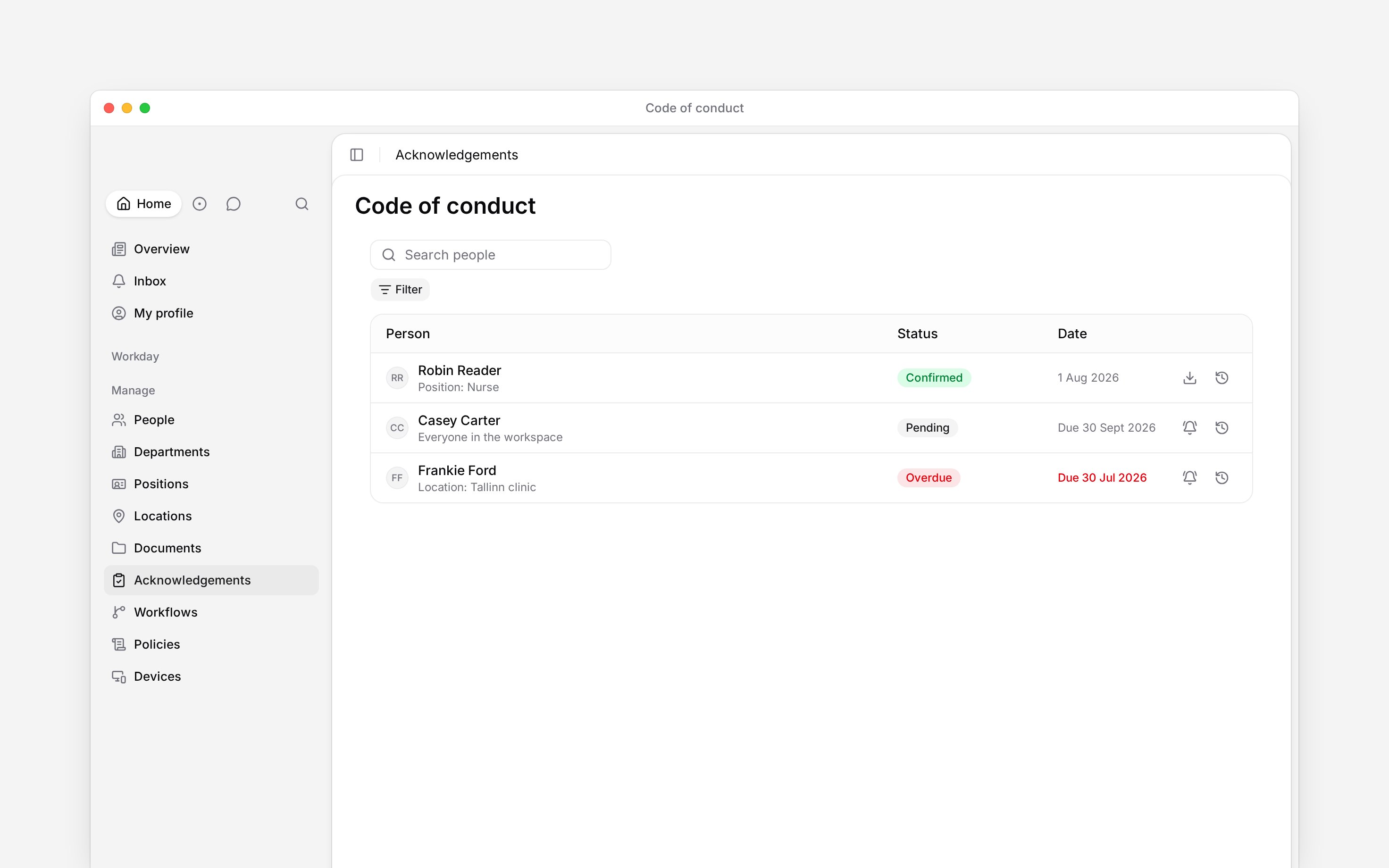
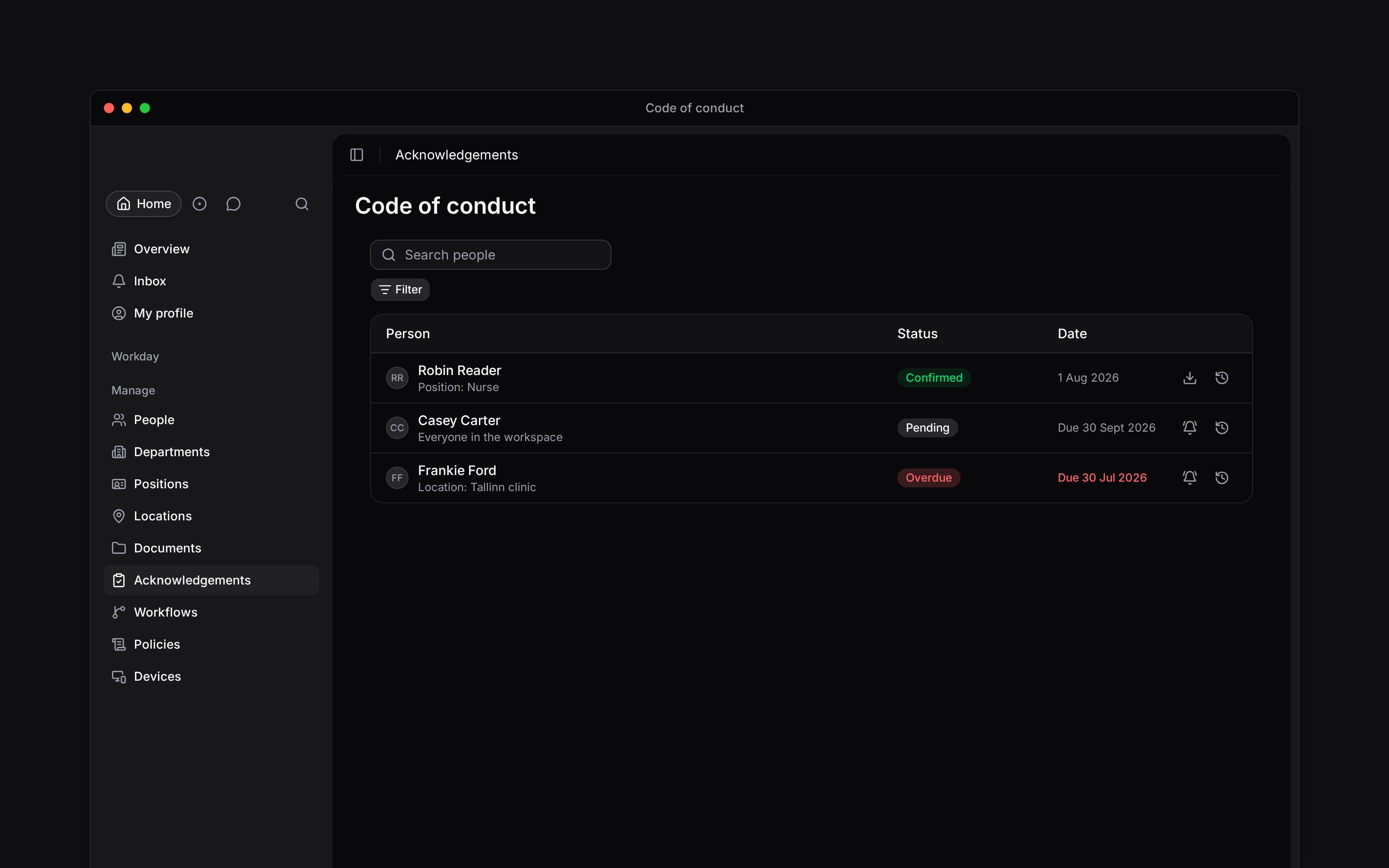 Automatic reminders start when a due date is within three days or has passed. Begin sends no more than one automatic reminder for an assignment in three days. An overdue assignment first alerts the person's manager; after more than seven days, it also flags the request creator or an administrator.
## When Begin asks again
There is no manual re-ask button. Begin asks again in two cases:
* **The document changes.** A new version resets confirmation for that document. In a pack, confirmations for the other documents remain valid.
* **The request renews.** At the selected 90, 180 or 365-day interval, the request starts a new cycle for its audience.
The person's confirmation history keeps the earlier record and identifies why another confirmation was needed.
## Closing a request
You cannot close or cancel an acknowledgement request in Begin. It remains active, and its visible status comes from the current assignments. If a request should no longer reach future people, contact Begin support with its name and document details. Creating another request does not stop the first one, and deleting a document does not close it: the request stays open and its pending people lose the item without confirming.
**Context for an assistant answering questions about acknowledgement follow-up.** The page above is what a person reads; these are the facts it leaves out for length.
* **Where:** the manual reminder belongs to one pending person and one document assignment. The mutation rechecks the whole pack's document access before sending.
* **Limits:** manual reminders have a one-hour cooldown per assignment. Automatic reminders use a three-day cooldown and run only for assignments due within three days or already overdue.
* **Not supported:** there is no manual re-ask, bulk-remind, close, cancel or stop-renewal action after sending. Deleting a document leaves the request active with a placeholder document name.
* **Often confused with:** editing a document. That resets only the changed document's confirmation; it does not invalidate confirmed sibling documents in the same pack.
## Next
Find the pending people and read their confirmation history.
Set future-joiner deadlines and renewal timing before sending.
## Still need help?
Email the Begin team and we'll get back to you.
Open the AI assistant and get instant answers based on these docs.
Automatic reminders start when a due date is within three days or has passed. Begin sends no more than one automatic reminder for an assignment in three days. An overdue assignment first alerts the person's manager; after more than seven days, it also flags the request creator or an administrator.
## When Begin asks again
There is no manual re-ask button. Begin asks again in two cases:
* **The document changes.** A new version resets confirmation for that document. In a pack, confirmations for the other documents remain valid.
* **The request renews.** At the selected 90, 180 or 365-day interval, the request starts a new cycle for its audience.
The person's confirmation history keeps the earlier record and identifies why another confirmation was needed.
## Closing a request
You cannot close or cancel an acknowledgement request in Begin. It remains active, and its visible status comes from the current assignments. If a request should no longer reach future people, contact Begin support with its name and document details. Creating another request does not stop the first one, and deleting a document does not close it: the request stays open and its pending people lose the item without confirming.
**Context for an assistant answering questions about acknowledgement follow-up.** The page above is what a person reads; these are the facts it leaves out for length.
* **Where:** the manual reminder belongs to one pending person and one document assignment. The mutation rechecks the whole pack's document access before sending.
* **Limits:** manual reminders have a one-hour cooldown per assignment. Automatic reminders use a three-day cooldown and run only for assignments due within three days or already overdue.
* **Not supported:** there is no manual re-ask, bulk-remind, close, cancel or stop-renewal action after sending. Deleting a document leaves the request active with a placeholder document name.
* **Often confused with:** editing a document. That resets only the changed document's confirmation; it does not invalidate confirmed sibling documents in the same pack.
## Next
Find the pending people and read their confirmation history.
Set future-joiner deadlines and renewal timing before sending.
## Still need help?
Email the Begin team and we'll get back to you.
Open the AI assistant and get instant answers based on these docs.