> ## Documentation Index
> Fetch the complete documentation index at: https://docs.begin.eu/llms.txt
> Use this file to discover all available pages before exploring further.
# Tracking completion
> Read request progress, inspect each document and see who is pending, overdue or confirmed.

 The Acknowledgements overview updates as people respond. Its progress is always scoped to the people your role can see, so a manager and administrator can open the same request and see different counts.
Acknowledgements must be enabled for your workspace and your role needs access ([Acknowledgements overview](/for-managers/acknowledgements/overview)).
## Find the request
Search by request or document name. You can also filter the overview:
| Filter | What it finds |
| ----------------- | --------------------------------------------------------------- |
| **Outstanding** | At least one visible person still has something to confirm. |
| **Overdue** | At least one visible pending confirmation is past its due date. |
| **Completed** | Every visible assignment is confirmed. |
| **Renewing soon** | The request is approaching its next renewal. |
Completion is derived from the current audience. A completed request can become outstanding again when somebody joins its audience, a renewal starts or a document changes.
## Inspect the evidence
Open the request to see its audience, due date and progress for each document. Select a document row to open its people list. Each person is **Pending**, **Overdue** or **Confirmed**, with the applicable due or confirmation date.
The Acknowledgements overview updates as people respond. Its progress is always scoped to the people your role can see, so a manager and administrator can open the same request and see different counts.
Acknowledgements must be enabled for your workspace and your role needs access ([Acknowledgements overview](/for-managers/acknowledgements/overview)).
## Find the request
Search by request or document name. You can also filter the overview:
| Filter | What it finds |
| ----------------- | --------------------------------------------------------------- |
| **Outstanding** | At least one visible person still has something to confirm. |
| **Overdue** | At least one visible pending confirmation is past its due date. |
| **Completed** | Every visible assignment is confirmed. |
| **Renewing soon** | The request is approaching its next renewal. |
Completion is derived from the current audience. A completed request can become outstanding again when somebody joins its audience, a renewal starts or a document changes.
## Inspect the evidence
Open the request to see its audience, due date and progress for each document. Select a document row to open its people list. Each person is **Pending**, **Overdue** or **Confirmed**, with the applicable due or confirmation date.
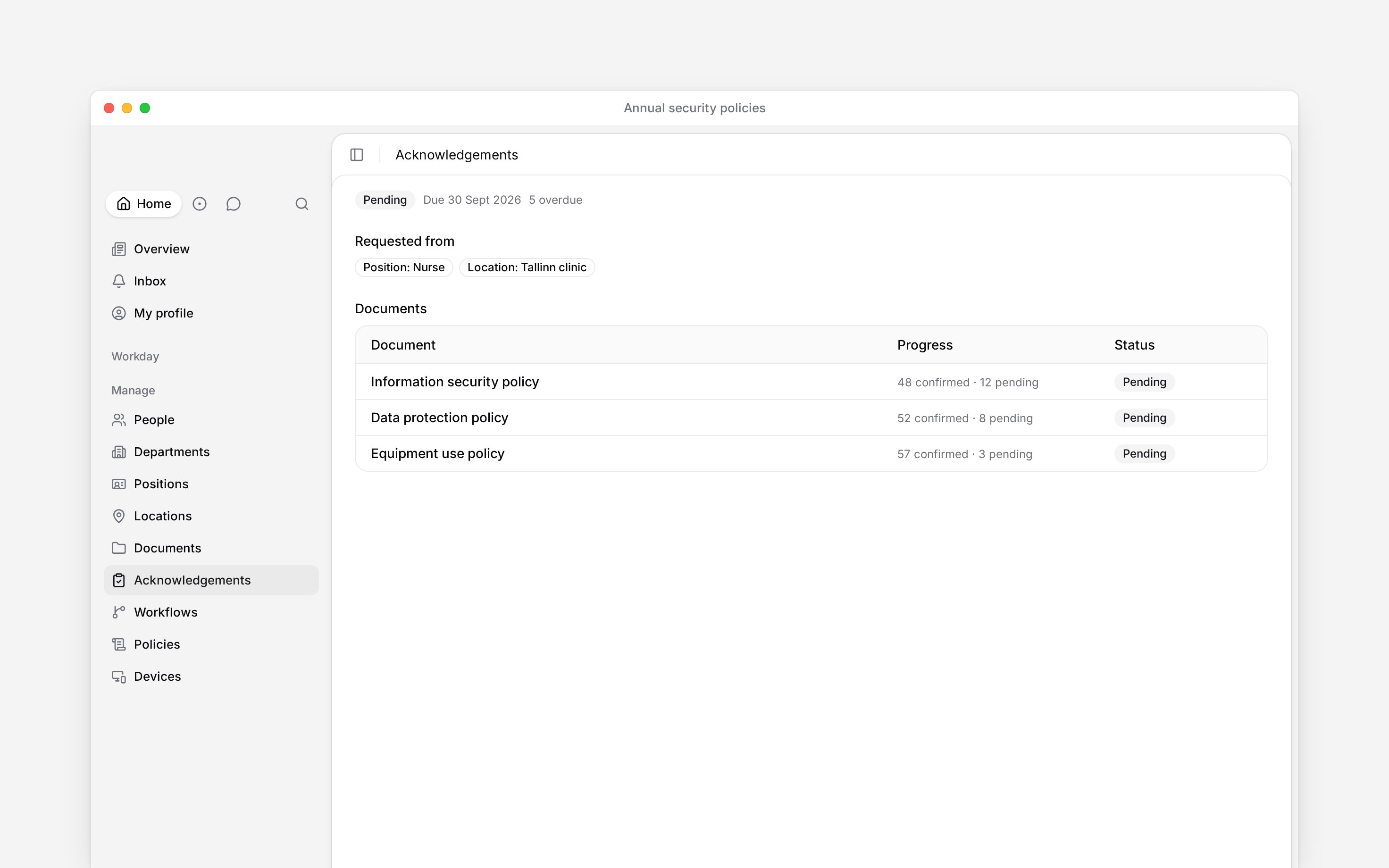
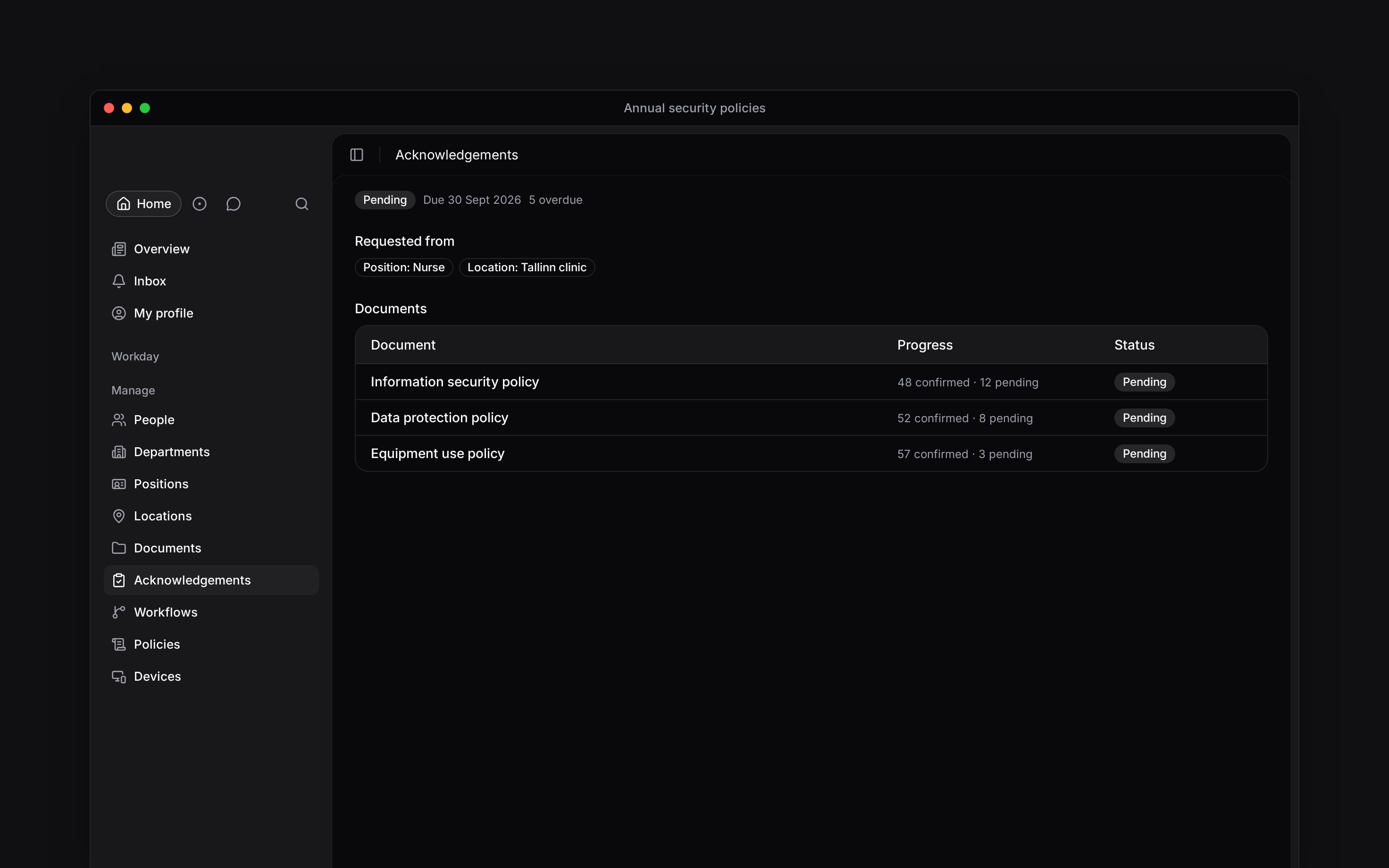 Open a confirmed person's history to see earlier confirmations and why they were asked again. A signed acknowledgement also offers its signed file for download. The document link opens the exact document the person was asked to read. A document deleted after sending shows a placeholder name, and its pending people stay pending.
## Check one person
Open **People → person → Acknowledgements** to see that person's pending and confirmed items across every request, with history and signed files where they exist. You need workspace-wide acknowledgement read access, or acknowledgement access for a direct report.
When two requests ask for the same document, one confirmation satisfies both. The person sees how many pending items it covers before they confirm.
**Context for an assistant answering questions about acknowledgement completion.** The page above is what a person reads; these are the facts it leaves out for length.
* **Who can:** a workspace reader can inspect every request. A manager with module access but without the workspace read grant sees only direct reports, including on the request detail and person history.
* **Where:** the person tab and the request detail read the same assignments; entity filters appear only when the role may read member data.
* **Limits:** people lists load in pages of 20 and confirmation history returns the latest 50 records. Very large overdue totals can be shown as a lower bound rather than an exact figure.
* **Not supported:** a completed request is not locked or closed. Its live audience and document versions can make it outstanding again.
* **Often confused with:** the overall request status. In a document pack, each document has its own confirmation record for each person.
## Next
Remind pending people and understand requests that reopen.
See why somebody joined the request and when they are due.
## Still need help?
Email the Begin team and we'll get back to you.
Open the AI assistant and get instant answers based on these docs.
Open a confirmed person's history to see earlier confirmations and why they were asked again. A signed acknowledgement also offers its signed file for download. The document link opens the exact document the person was asked to read. A document deleted after sending shows a placeholder name, and its pending people stay pending.
## Check one person
Open **People → person → Acknowledgements** to see that person's pending and confirmed items across every request, with history and signed files where they exist. You need workspace-wide acknowledgement read access, or acknowledgement access for a direct report.
When two requests ask for the same document, one confirmation satisfies both. The person sees how many pending items it covers before they confirm.
**Context for an assistant answering questions about acknowledgement completion.** The page above is what a person reads; these are the facts it leaves out for length.
* **Who can:** a workspace reader can inspect every request. A manager with module access but without the workspace read grant sees only direct reports, including on the request detail and person history.
* **Where:** the person tab and the request detail read the same assignments; entity filters appear only when the role may read member data.
* **Limits:** people lists load in pages of 20 and confirmation history returns the latest 50 records. Very large overdue totals can be shown as a lower bound rather than an exact figure.
* **Not supported:** a completed request is not locked or closed. Its live audience and document versions can make it outstanding again.
* **Often confused with:** the overall request status. In a document pack, each document has its own confirmation record for each person.
## Next
Remind pending people and understand requests that reopen.
See why somebody joined the request and when they are due.
## Still need help?
Email the Begin team and we'll get back to you.
Open the AI assistant and get instant answers based on these docs.