> ## Documentation Index
> Fetch the complete documentation index at: https://docs.begin.eu/llms.txt
> Use this file to discover all available pages before exploring further.
# Changing your subscription
> Upgrade a plan, schedule a move to Free, or resume before the current period ends.

 Use **Settings → Billing and plans** to start a self-service Standard upgrade, ask about Pro, or schedule a paid subscription to end. Each path tells you when the change takes effect before you confirm it.
Billing must be available for your workspace. If you see **Billing is not yet available**, contact
Begin support. You need **Manage billing**. The Administrator role has it by default. Where custom
roles are available, an administrator can grant it under **Settings → Permissions**.
## Upgrade the plan
Open **Billing and plans** and choose **Upgrade**.
Choose **Upgrade to Standard** for self-service checkout. Choose **Contact sales** on Pro and
send the requested company and contact details.
Begin shows **Payment successful** and updates the plan automatically after the payment is
confirmed.
The Standard checkout uses the billing interval selected on the plans page. A trial-eligible workspace may see **Start free trial** instead. The Pro path sends an enquiry and does not change the plan immediately.
## Schedule a move to Free
Scroll to the bottom of **Billing and plans**, choose **Cancel subscription**, review what you will lose, and continue to the reason and confirmation. The workspace stays on its paid plan until the current billing period ends, then moves to Free. Existing people and data remain, but Free limits and feature access apply after that date. The Messages and Posts add-on ends with the subscription. Purchased Begin AI tokens and e-signature credits stay in the workspace.
Check the active-employee count before the end date. If the workspace exceeds Free after the change, Begin asks you to suspend people until the count fits: follow [Fit the Free employee limit](/for-managers/billing/when-a-trial-ends#fit-the-free-employee-limit).
Begin may show a stay offer before the confirmation when the subscription is eligible. Accepting it keeps the subscription active. If no offer is available, the ordinary confirmation still opens.
## Resume before the end date
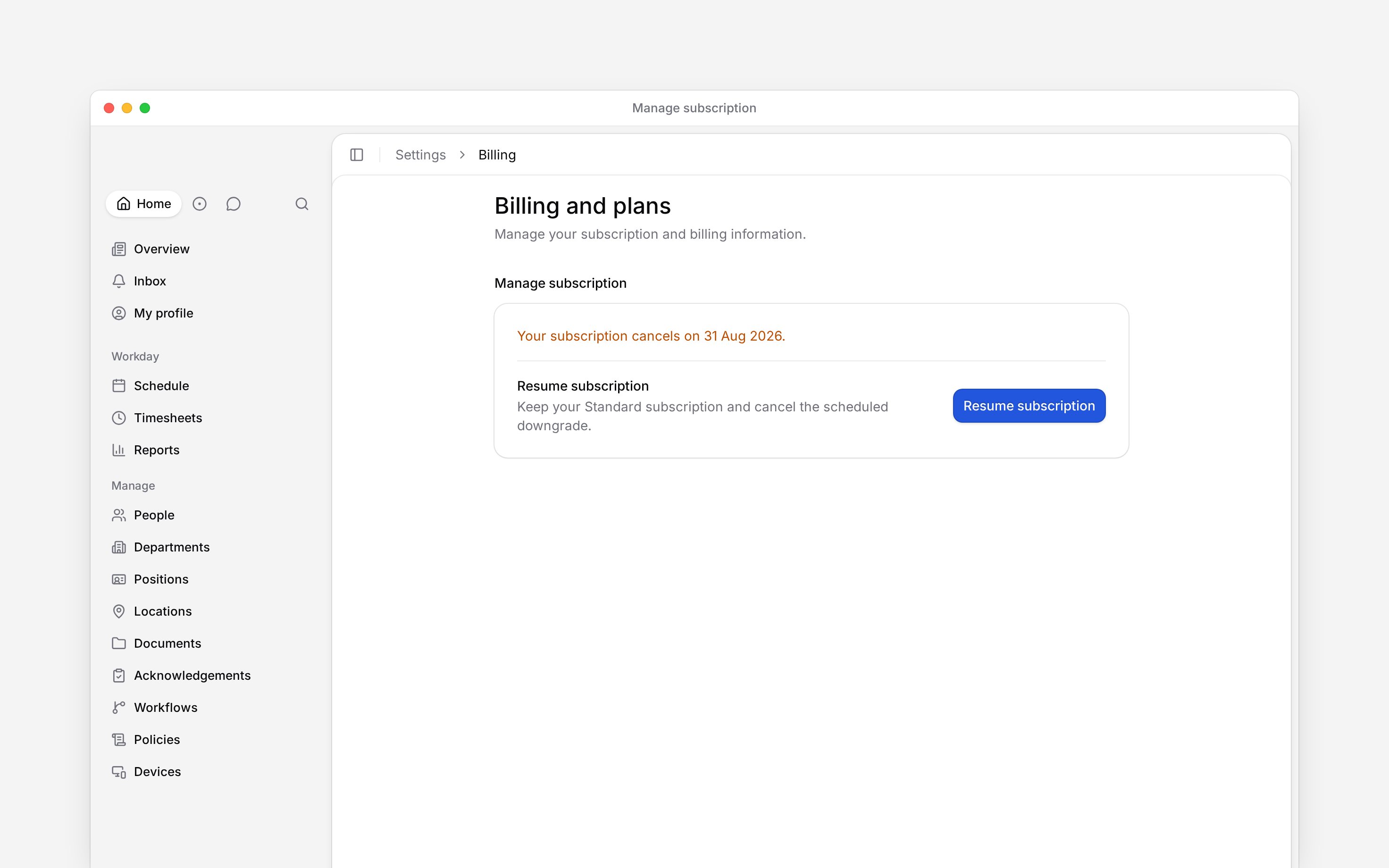
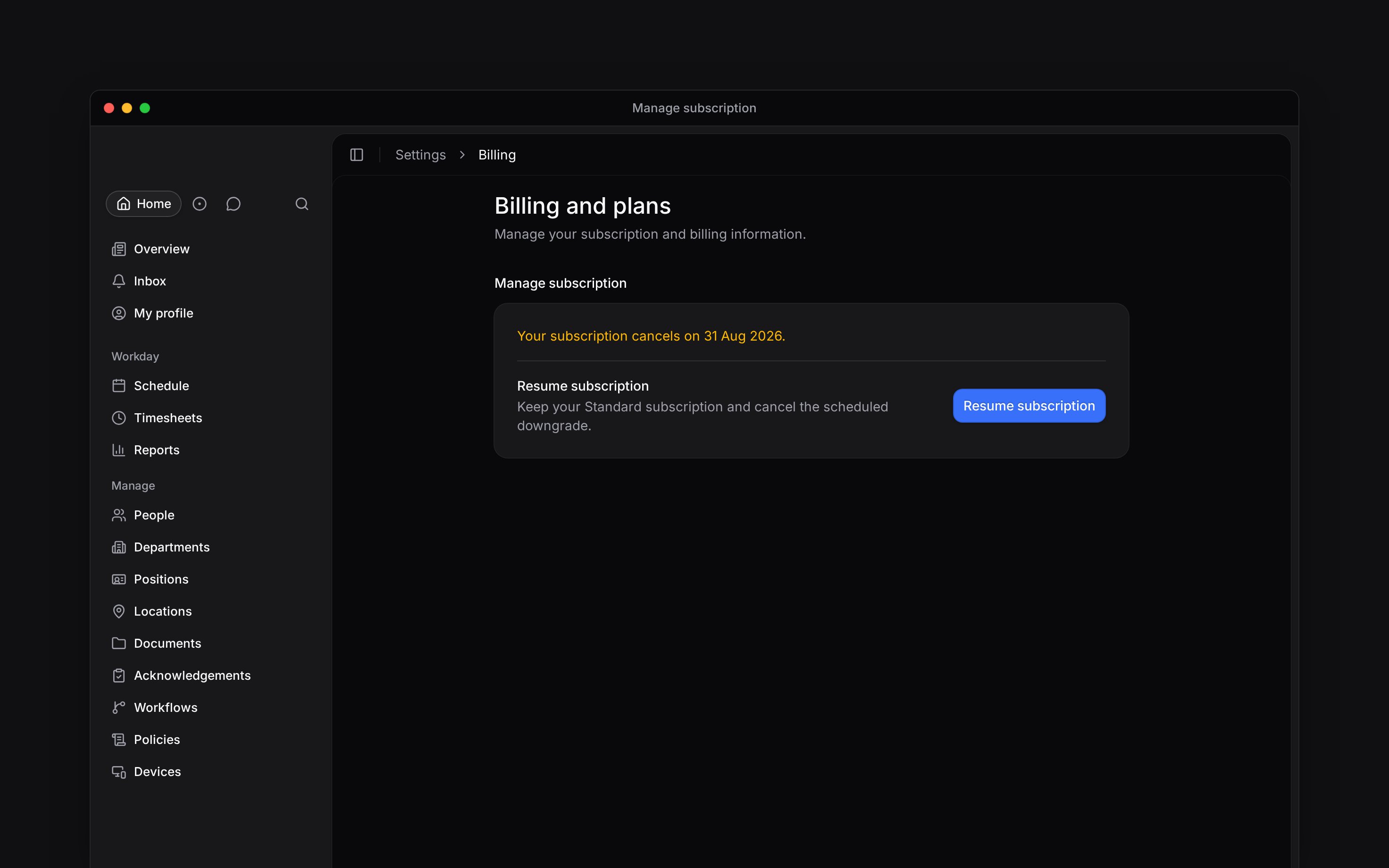
Once cancellation is scheduled, **Manage subscription** shows the cancellation date and replaces the cancel control with **Resume subscription**. Choose it to cancel the scheduled move to Free. Check that the cancellation notice disappears and **Cancel subscription** returns before leaving the page.
Use **Settings → Billing and plans** to start a self-service Standard upgrade, ask about Pro, or schedule a paid subscription to end. Each path tells you when the change takes effect before you confirm it.
Billing must be available for your workspace. If you see **Billing is not yet available**, contact
Begin support. You need **Manage billing**. The Administrator role has it by default. Where custom
roles are available, an administrator can grant it under **Settings → Permissions**.
## Upgrade the plan
Open **Billing and plans** and choose **Upgrade**.
Choose **Upgrade to Standard** for self-service checkout. Choose **Contact sales** on Pro and
send the requested company and contact details.
Begin shows **Payment successful** and updates the plan automatically after the payment is
confirmed.
The Standard checkout uses the billing interval selected on the plans page. A trial-eligible workspace may see **Start free trial** instead. The Pro path sends an enquiry and does not change the plan immediately.
## Schedule a move to Free
Scroll to the bottom of **Billing and plans**, choose **Cancel subscription**, review what you will lose, and continue to the reason and confirmation. The workspace stays on its paid plan until the current billing period ends, then moves to Free. Existing people and data remain, but Free limits and feature access apply after that date. The Messages and Posts add-on ends with the subscription. Purchased Begin AI tokens and e-signature credits stay in the workspace.
Check the active-employee count before the end date. If the workspace exceeds Free after the change, Begin asks you to suspend people until the count fits: follow [Fit the Free employee limit](/for-managers/billing/when-a-trial-ends#fit-the-free-employee-limit).
Begin may show a stay offer before the confirmation when the subscription is eligible. Accepting it keeps the subscription active. If no offer is available, the ordinary confirmation still opens.
## Resume before the end date
Once cancellation is scheduled, **Manage subscription** shows the cancellation date and replaces the cancel control with **Resume subscription**. Choose it to cancel the scheduled move to Free. Check that the cancellation notice disappears and **Cancel subscription** returns before leaving the page.
 **Context for an assistant answering questions about subscription changes.** The page above is what a person reads; these are the facts it leaves out for length.
* **Limits:** the cancellation save offer is available only to some live Standard subscriptions and at most once per workspace. Its percentage and duration come from the account.
* **Not supported:** Pro has no self-service checkout in Begin. The page does not promise a response time for a sales enquiry.
* **Often confused with:** moving to Free after an unpaid invoice is immediate. An ordinary cancellation waits for the paid period to end.
## Next
Update the payment details used by the subscription and check invoices.
The separate path when Stripe has stopped collecting on the subscription.
## Still need help?
Email the Begin team and we'll get back to you.
Open the AI assistant and get instant answers based on these docs.
**Context for an assistant answering questions about subscription changes.** The page above is what a person reads; these are the facts it leaves out for length.
* **Limits:** the cancellation save offer is available only to some live Standard subscriptions and at most once per workspace. Its percentage and duration come from the account.
* **Not supported:** Pro has no self-service checkout in Begin. The page does not promise a response time for a sales enquiry.
* **Often confused with:** moving to Free after an unpaid invoice is immediate. An ordinary cancellation waits for the paid period to end.
## Next
Update the payment details used by the subscription and check invoices.
The separate path when Stripe has stopped collecting on the subscription.
## Still need help?
Email the Begin team and we'll get back to you.
Open the AI assistant and get instant answers based on these docs.