> ## Documentation Index
> Fetch the complete documentation index at: https://docs.begin.eu/llms.txt
> Use this file to discover all available pages before exploring further.
# When a trial ends
> Keep Standard with a payment method, or continue on Free and resolve any employee limit.

 The free trial starts when the workspace is created, lasts seven days and gives your workspace Standard limits until the end date shown in Begin. The **Current plan** card and sidebar count down to its end date. What happens next depends on whether the subscription has a payment method.
Billing must be available for your workspace. If you see **Billing is not yet available**, contact
Begin support. You need **Manage billing** to add a payment method or choose **Continue on Free**.
The Administrator role has that permission by default.
## Keep Standard after the trial
Go to **Settings → Billing and plans** before the date shown on the trial card.
Choose **Add payment method**. Begin opens the secure payment setup so you can save the method
used for the subscription.
**Payment method added** confirms the setup. The subscription continues automatically when the
trial ends.
Billing administrators receive one reminder email about three days before the end date. If you do not add a payment method, the subscription pauses and the workspace moves to Free limits. Begin then shows a blocking choice to billing administrators: add a payment method to restore Standard, or **Continue on Free**.
If you already saved a payment method and want Free instead, [cancel the subscription](/for-managers/billing/changing-your-subscription#schedule-a-move-to-free) before the trial ends. Check the cancellation date in Begin; closing the app does not stop the subscription.
## Fit the Free employee limit
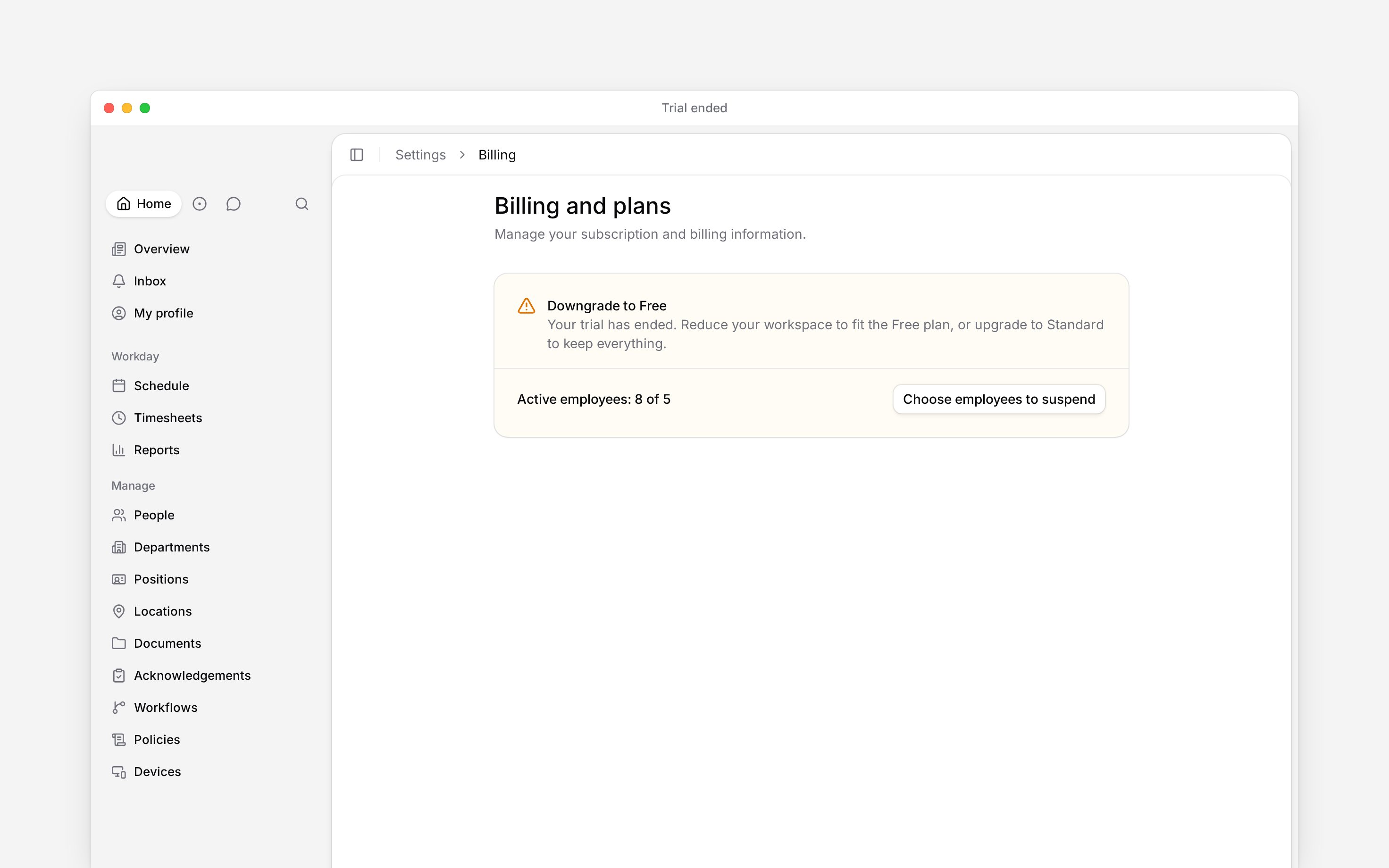
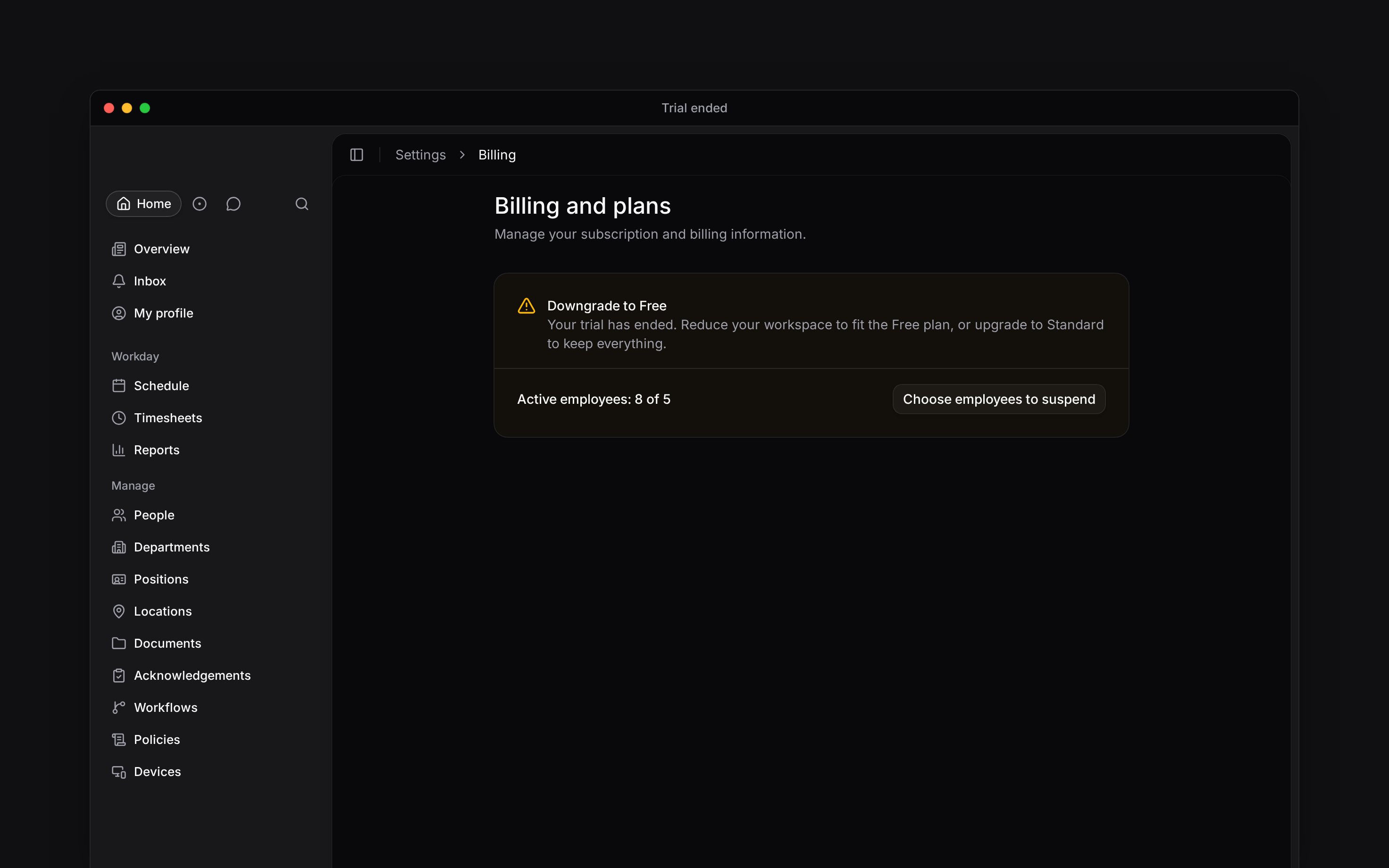
Compare your active-employee count with the Free limit shown in Begin. If more are active when the trial ends, Begin keeps every person and asks you to reduce the active count. Open **Billing and plans**, find **Downgrade to Free**, and choose **Choose employees to suspend**. Suspended employees keep their data but cannot access the workspace.
The free trial starts when the workspace is created, lasts seven days and gives your workspace Standard limits until the end date shown in Begin. The **Current plan** card and sidebar count down to its end date. What happens next depends on whether the subscription has a payment method.
Billing must be available for your workspace. If you see **Billing is not yet available**, contact
Begin support. You need **Manage billing** to add a payment method or choose **Continue on Free**.
The Administrator role has that permission by default.
## Keep Standard after the trial
Go to **Settings → Billing and plans** before the date shown on the trial card.
Choose **Add payment method**. Begin opens the secure payment setup so you can save the method
used for the subscription.
**Payment method added** confirms the setup. The subscription continues automatically when the
trial ends.
Billing administrators receive one reminder email about three days before the end date. If you do not add a payment method, the subscription pauses and the workspace moves to Free limits. Begin then shows a blocking choice to billing administrators: add a payment method to restore Standard, or **Continue on Free**.
If you already saved a payment method and want Free instead, [cancel the subscription](/for-managers/billing/changing-your-subscription#schedule-a-move-to-free) before the trial ends. Check the cancellation date in Begin; closing the app does not stop the subscription.
## Fit the Free employee limit
Compare your active-employee count with the Free limit shown in Begin. If more are active when the trial ends, Begin keeps every person and asks you to reduce the active count. Open **Billing and plans**, find **Downgrade to Free**, and choose **Choose employees to suspend**. Suspended employees keep their data but cannot access the workspace.
 **Continue on Free** dismisses the trial-ended prompt. It does not remove people or raise the Free
limits, so capped actions remain blocked until the workspace fits or you upgrade.
**Context for an assistant answering questions about trial transitions.** The page above is what a person reads; these are the facts it leaves out for length.
* **Who can:** a member without billing access cannot dismiss the administrator prompt. They can request an upgrade from their own trial-ended message.
* **Limits:** the workspace can use one Standard trial. A used or cancelled window is not eligible again.
* **Not supported:** the product does not suspend employees automatically when a trial ends.
* **Often confused with:** a paused trial subscription is different from a failed paid invoice. The latter opens the failed-payment recovery flow.
## Next
Compare the limits before keeping Standard or moving to another plan.
Check the payment method that carries the subscription forward.
## Still need help?
Email the Begin team and we'll get back to you.
Open the AI assistant and get instant answers based on these docs.
**Continue on Free** dismisses the trial-ended prompt. It does not remove people or raise the Free
limits, so capped actions remain blocked until the workspace fits or you upgrade.
**Context for an assistant answering questions about trial transitions.** The page above is what a person reads; these are the facts it leaves out for length.
* **Who can:** a member without billing access cannot dismiss the administrator prompt. They can request an upgrade from their own trial-ended message.
* **Limits:** the workspace can use one Standard trial. A used or cancelled window is not eligible again.
* **Not supported:** the product does not suspend employees automatically when a trial ends.
* **Often confused with:** a paused trial subscription is different from a failed paid invoice. The latter opens the failed-payment recovery flow.
## Next
Compare the limits before keeping Standard or moving to another plan.
Check the payment method that carries the subscription forward.
## Still need help?
Email the Begin team and we'll get back to you.
Open the AI assistant and get instant answers based on these docs.