> ## Documentation Index
> Fetch the complete documentation index at: https://docs.begin.eu/llms.txt
> Use this file to discover all available pages before exploring further.

# Devices overview

> See your shared clock terminals, place them at the right locations, and manage who can use them.

export const IntentList = ({title = "I want to…", children}) => <nav className="kb-intent not-prose" aria-label={title}>
    <div className="kb-intent-header">{title}</div>
    <ul className="kb-intent-rows">{children}</ul>
  </nav>;

export const Intent = ({icon, href, to, beta, children}) => {
  const stroke = {
    fill: "none",
    stroke: "currentColor",
    strokeWidth: 1.6,
    strokeLinecap: "round",
    strokeLinejoin: "round"
  };
  const paths = {
    calendar: "M8 2v4M16 2v4M3 10h18M5 4h14a2 2 0 0 1 2 2v14a2 2 0 0 1-2 2H5a2 2 0 0 1-2-2V6a2 2 0 0 1 2-2z",
    filter: "M22 3H2l8 9.46V19l4 2v-8.54L22 3z",
    plus: "M8 2v4M16 2v4M3 10h18M21 13V6a2 2 0 0 0-2-2H5a2 2 0 0 0-2 2v14a2 2 0 0 0 2 2h8M16 19h6M19 16v6",
    repeat: "m17 2 4 4-4 4M3 11v-1a4 4 0 0 1 4-4h14M7 22l-4-4 4-4M21 13v1a4 4 0 0 1-4 4H3",
    open: "M12 8v4l2 2M5 4h14a2 2 0 0 1 2 2v14a2 2 0 0 1-2 2H5a2 2 0 0 1-2-2V6a2 2 0 0 1 2-2z",
    warning: "M10.29 3.86 1.82 18a2 2 0 0 0 1.71 3h16.94a2 2 0 0 0 1.71-3L13.71 3.86a2 2 0 0 0-3.42 0zM12 9v4M12 17h.01",
    eye: "M2 12s3.64-7 10-7 10 7 10 7-3.64 7-10 7-10-7-10-7zM12 15a3 3 0 1 0 0-6 3 3 0 0 0 0 6z",
    layers: "m12.83 2.18 8.34 4.17a1 1 0 0 1 0 1.79l-8.34 4.17a2 2 0 0 1-1.66 0L2.83 8.14a1 1 0 0 1 0-1.79l8.34-4.17a2 2 0 0 1 1.66 0zM2 17l9.17 4.59a2 2 0 0 0 1.66 0L22 17M2 12l9.17 4.59a2 2 0 0 0 1.66 0L22 12",
    away: "M8 2v4M16 2v4M3 10h18M5 4h14a2 2 0 0 1 2 2v14a2 2 0 0 1-2 2H5a2 2 0 0 1-2-2V6a2 2 0 0 1 2-2zM9 16l6-6M15 16l-6-6",
    swap: "M8 3 4 7l4 4M4 7h16M16 21l4-4-4-4M20 17H4",
    building: "M6 22V4a2 2 0 0 1 2-2h8a2 2 0 0 1 2 2v18M6 12H4a2 2 0 0 0-2 2v6a2 2 0 0 0 2 2h2M18 9h2a2 2 0 0 1 2 2v9a2 2 0 0 1-2 2h-2M10 6h4M10 10h4M10 14h4M10 18h4",
    users: "M16 21v-2a4 4 0 0 0-4-4H6a4 4 0 0 0-4 4v2M9 3a4 4 0 1 0 0 8 4 4 0 0 0 0-8zM22 21v-2a4 4 0 0 0-3-3.87M16 3.13a4 4 0 0 1 0 7.75",
    help: "M12 2a10 10 0 1 0 0 20 10 10 0 0 0 0-20zM9.09 9a3 3 0 0 1 5.83 1c0 2-3 3-3 3M12 17h.01",
    chart: "M3 3v16a2 2 0 0 0 2 2h16M18 17V9M13 17V5M8 17v-3",
    clock: "M12 2a10 10 0 1 0 0 20 10 10 0 0 0 0-20zM12 6v6l4 2",
    check: "M12 2a10 10 0 1 0 0 20 10 10 0 0 0 0-20zM9 12l2 2 4-4",
    message: "M21 11.5a8.38 8.38 0 0 1-.9 3.8 8.5 8.5 0 0 1-7.6 4.7 8.38 8.38 0 0 1-3.8-.9L3 21l1.9-5.7a8.38 8.38 0 0 1-.9-3.8 8.5 8.5 0 0 1 4.7-7.6 8.38 8.38 0 0 1 3.8-.9h.5a8.48 8.48 0 0 1 8 8v.5z",
    reply: "m9 10-5 5 5 5M4 15h11a6 6 0 0 0 0-12h-1",
    attachment: "m21.44 11.05-9.19 9.19a6 6 0 0 1-8.49-8.49l10-10a4 4 0 0 1 5.66 5.66l-10 10a2 2 0 0 1-2.83-2.83l9.19-9.19",
    search: "m21 21-4.34-4.34M11 3a8 8 0 1 0 0 16 8 8 0 0 0 0-16z",
    bell: "M18 8a6 6 0 0 0-12 0c0 7-3 7-3 9h18c0-2-3-2-3-9M10 21h4",
    settings: "M21 4h-7M10 4H3M21 12h-9M8 12H3M21 20h-5M12 20H3M14 2v4M8 10v4M16 18v4",
    zap: "M13 2 4.09 12.91a1 1 0 0 0 .77 1.64h6.14l-1 7.45 8.9-10.91a1 1 0 0 0-.77-1.64h-6.14z"
  };
  return <li className="kb-intent-item">
      <a className="kb-intent-row" href={href}>
        <span className="kb-intent-tile">
          <svg className="kb-intent-glyph" viewBox="0 0 24 24" aria-hidden="true" {...stroke}>
            <path d={paths[icon] ?? paths.calendar} />
          </svg>
        </span>
        <span className="kb-intent-text">
          <span className="kb-intent-goal">
            {children}
            {beta ? <span className="kb-beta">Beta</span> : null}
          </span>
          <span className="kb-intent-to">{to}</span>
        </span>
        <svg className="kb-intent-chevron" viewBox="0 0 24 24" aria-hidden="true" {...stroke}>
          <path d="m9 18 6-6-6-6" />
        </svg>
      </a>
    </li>;
};

<img src="https://mintcdn.com/beginltd/U_0B6gxnQ5c0Fmyb/images/cover/devices-overview-light.png?fit=max&auto=format&n=U_0B6gxnQ5c0Fmyb&q=85&s=a504a3545a52553f1a6025d08648f297" alt="A registered clock terminal with its connection state and identifier count" className="block dark:hidden" noZoom width="1152" height="616" data-path="images/cover/devices-overview-light.png" />

<img src="https://mintcdn.com/beginltd/U_0B6gxnQ5c0Fmyb/images/cover/devices-overview-dark.png?fit=max&auto=format&n=U_0B6gxnQ5c0Fmyb&q=85&s=f3dd566e7cc5d87589bf35d40965a0a0" alt="A registered clock terminal with its connection state and identifier count" className="hidden dark:block" noZoom width="1152" height="616" data-path="images/cover/devices-overview-dark.png" />

**Devices** is where you check the shared clock terminals installed for your workspace and manage the identifiers people use on them. Begin support installs and registers the hardware. You manage its location and the people linked to it.

<Info>
  **Devices** must be enabled for your workspace, and your role needs access. If it is missing from
  the sidebar, ask an administrator to check your role or contact Begin support about availability.
</Info>

## Start here

<IntentList title="I want to…">
  <Intent icon="plus" to="Setting up a terminal" href="/for-managers/devices/setting-up-a-terminal">
    Get a new terminal ready for my team
  </Intent>

  <Intent icon="layers" to="Managing identifiers" href="/for-managers/devices/managing-identifiers">
    Link a face, fingerprint, card or PIN to the right person
  </Intent>

  <Intent icon="filter" to="Configuring terminal clocking" href="/for-managers/devices/configuring-terminal-clocking">
    Choose who may clock at a terminal
  </Intent>

  <Intent icon="warning" to="Troubleshooting a terminal" href="/for-managers/devices/troubleshooting-a-terminal">
    Find why a terminal or punch needs attention
  </Intent>

  <Intent icon="swap" to="Replacing or removing a terminal" href="/for-managers/devices/replacing-or-removing-a-terminal">
    Retire hardware without removing people's identifiers
  </Intent>
</IntentList>

## Know what you can change

Your role needs the **Devices and identifiers** permission. Administrators and Managers have it by default. A custom role may not.

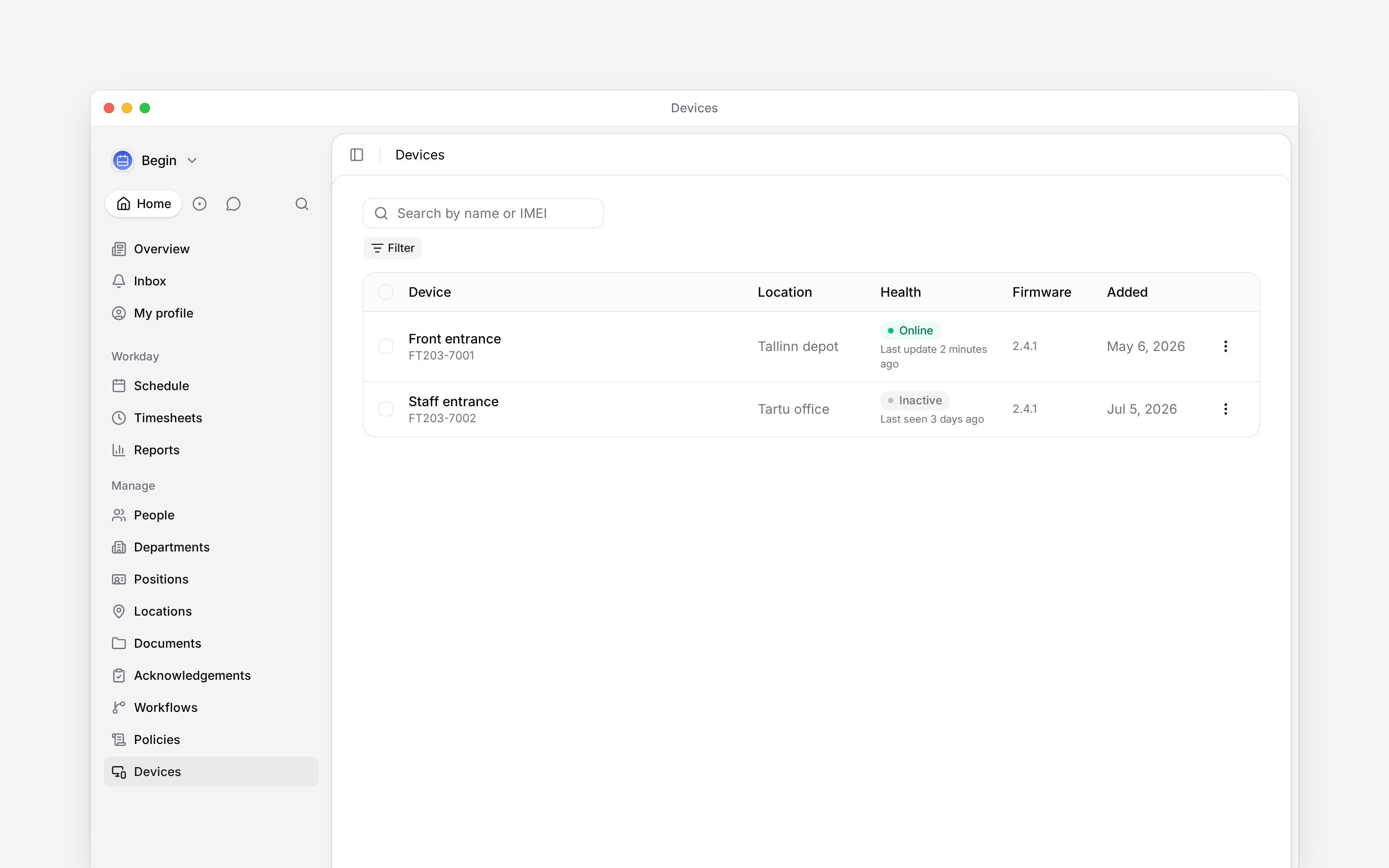
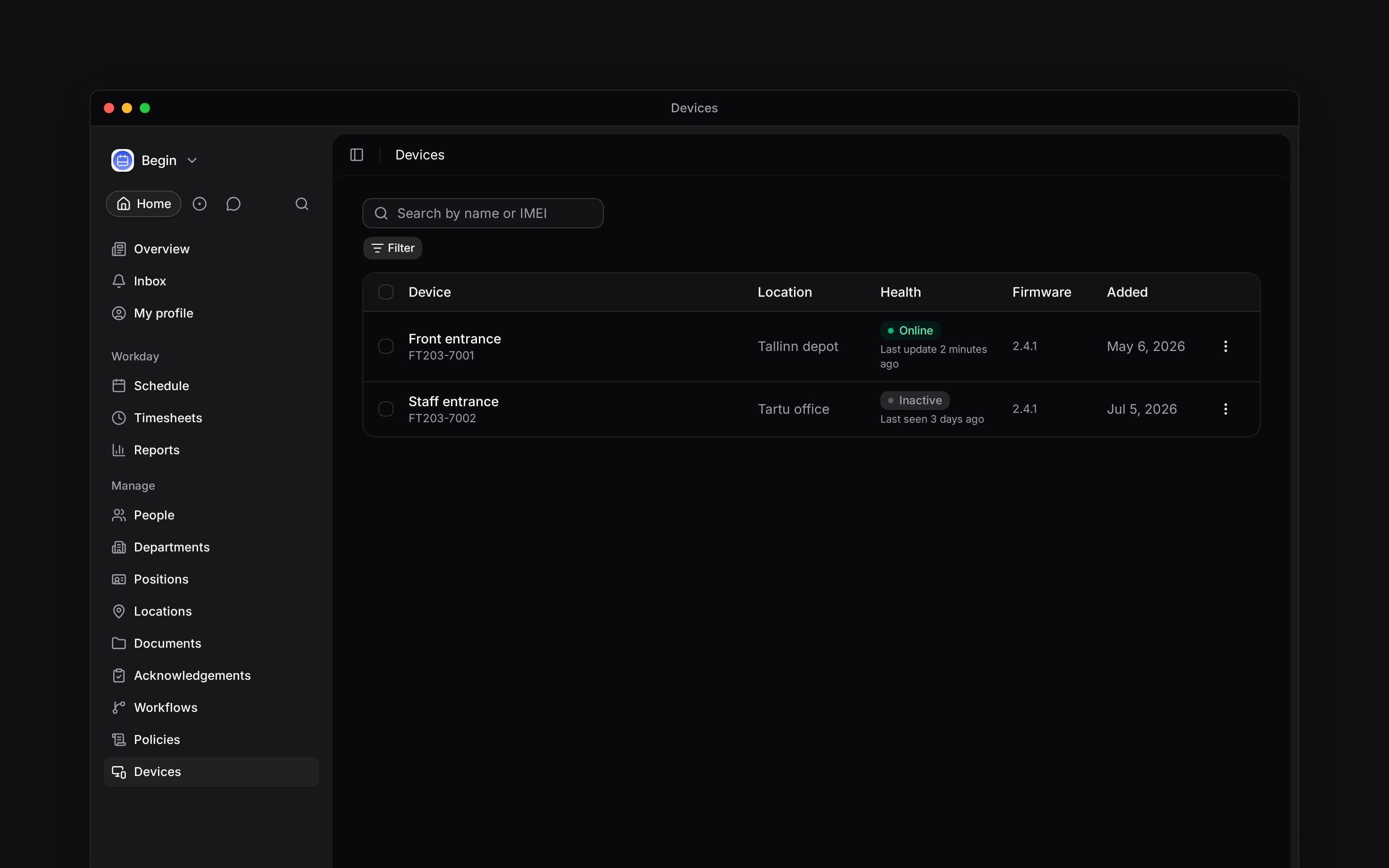
You can search the fleet, read each terminal's location and health, change its location, and manage identifiers. Begin support registers, edits, enables, disables, re-syncs, reboots and removes terminals.

<Frame caption="The fleet keeps the terminal name, IMEI, location and health together">
  <img src="https://mintcdn.com/beginltd/RAyDUpcXgMDPnTwV/images/articles/devices/devices-fleet-overview-light.png?fit=max&auto=format&n=RAyDUpcXgMDPnTwV&q=85&s=d3687afb996eeffdc84562a2b1b38ab8" alt="The Devices list showing Front entrance online at Tallinn depot and Staff entrance inactive at Tartu office" className="block dark:hidden" width="2944" height="1840" data-path="images/articles/devices/devices-fleet-overview-light.png" />

  <img src="https://mintcdn.com/beginltd/RAyDUpcXgMDPnTwV/images/articles/devices/devices-fleet-overview-dark.png?fit=max&auto=format&n=RAyDUpcXgMDPnTwV&q=85&s=38775a5fa7a550f809a3b5af0224625a" alt="The Devices list showing Front entrance online at Tallinn depot and Staff entrance inactive at Tartu office" className="hidden dark:block" width="2944" height="1840" data-path="images/articles/devices/devices-fleet-overview-dark.png" />
</Frame>

**Context for an assistant answering questions about Devices.** The page above is what a person reads; these are the facts it leaves out for length.

* **Where:** **Devices** in the main sidebar opens the device list at `/terminals`; the page has **Devices** and **Identifiers** tabs.
* **Needs:** the terminal capability must be enabled for the workspace. Without it, the sidebar entry is absent and the direct page says the integration is off.
* **Limits:** a manager can change one or several terminals' locations. Every other terminal-management action is reserved for Begin support.
* **Not supported:** customers cannot register their own hardware or claim a serial from the app.

## Next

<Columns cols={2}>
  <Card title="Setting up a terminal" icon="display" href="/for-managers/devices/setting-up-a-terminal">
    What Begin support does, and the location choice you make afterwards.
  </Card>

  <Card title="Managing identifiers" icon="fingerprint" href="/for-managers/devices/managing-identifiers">
    Link captured identifiers to people and check where they have synced.
  </Card>
</Columns>

## Still need help?

<Columns cols={2}>
  <Card title="Contact support" icon="envelope" href="mailto:support@heybegin.eu">
    Email the Begin team and we'll get back to you.
  </Card>

  <Card title="Ask Begin AI" icon="comment-dots" href="?assistant=open">
    Open the AI assistant and get instant answers based on these docs.
  </Card>
</Columns>