> ## Documentation Index
> Fetch the complete documentation index at: https://docs.begin.eu/llms.txt
> Use this file to discover all available pages before exploring further.
# Troubleshooting a terminal
> Read terminal health and identifier sync states, then collect the details Begin support needs.

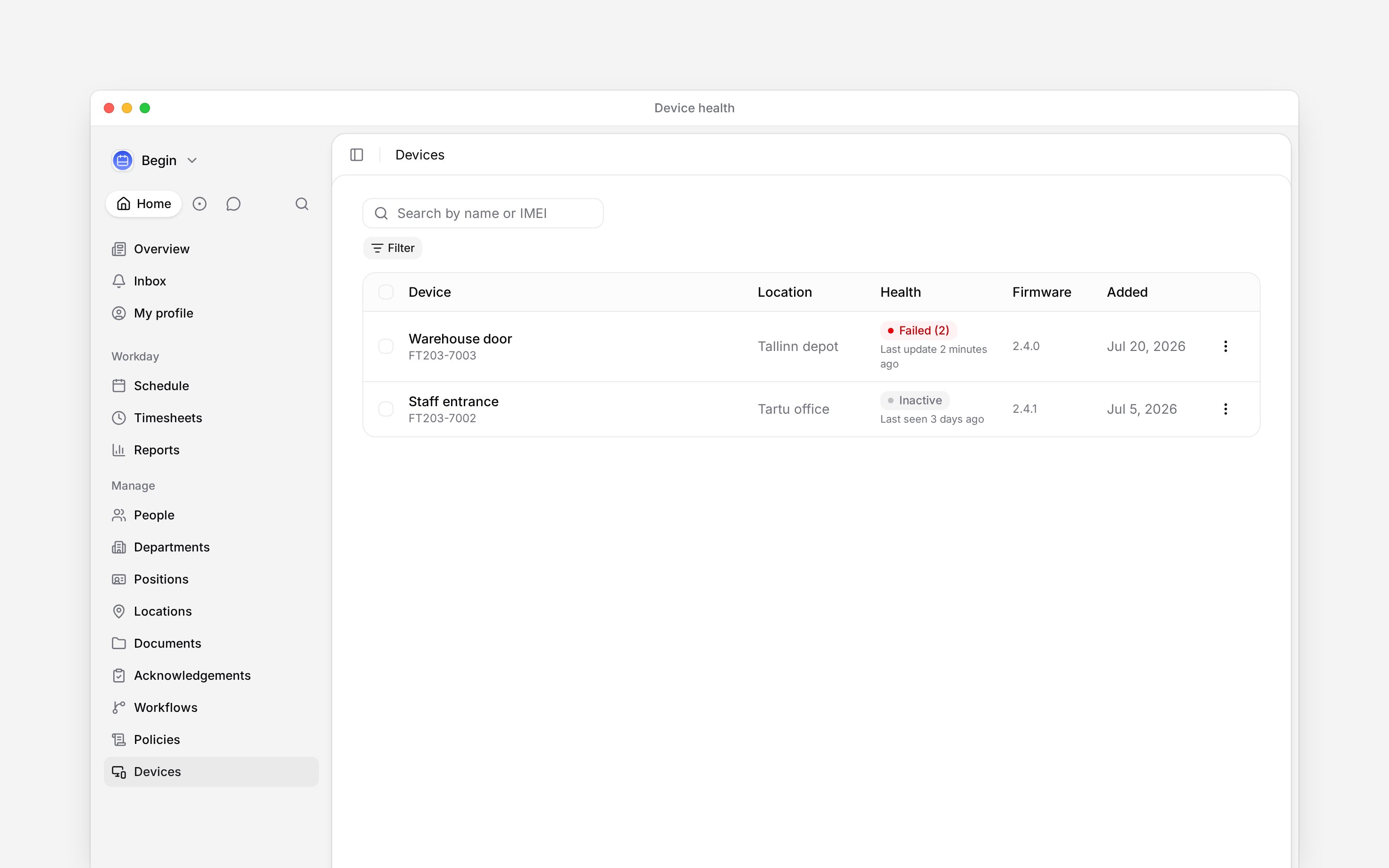
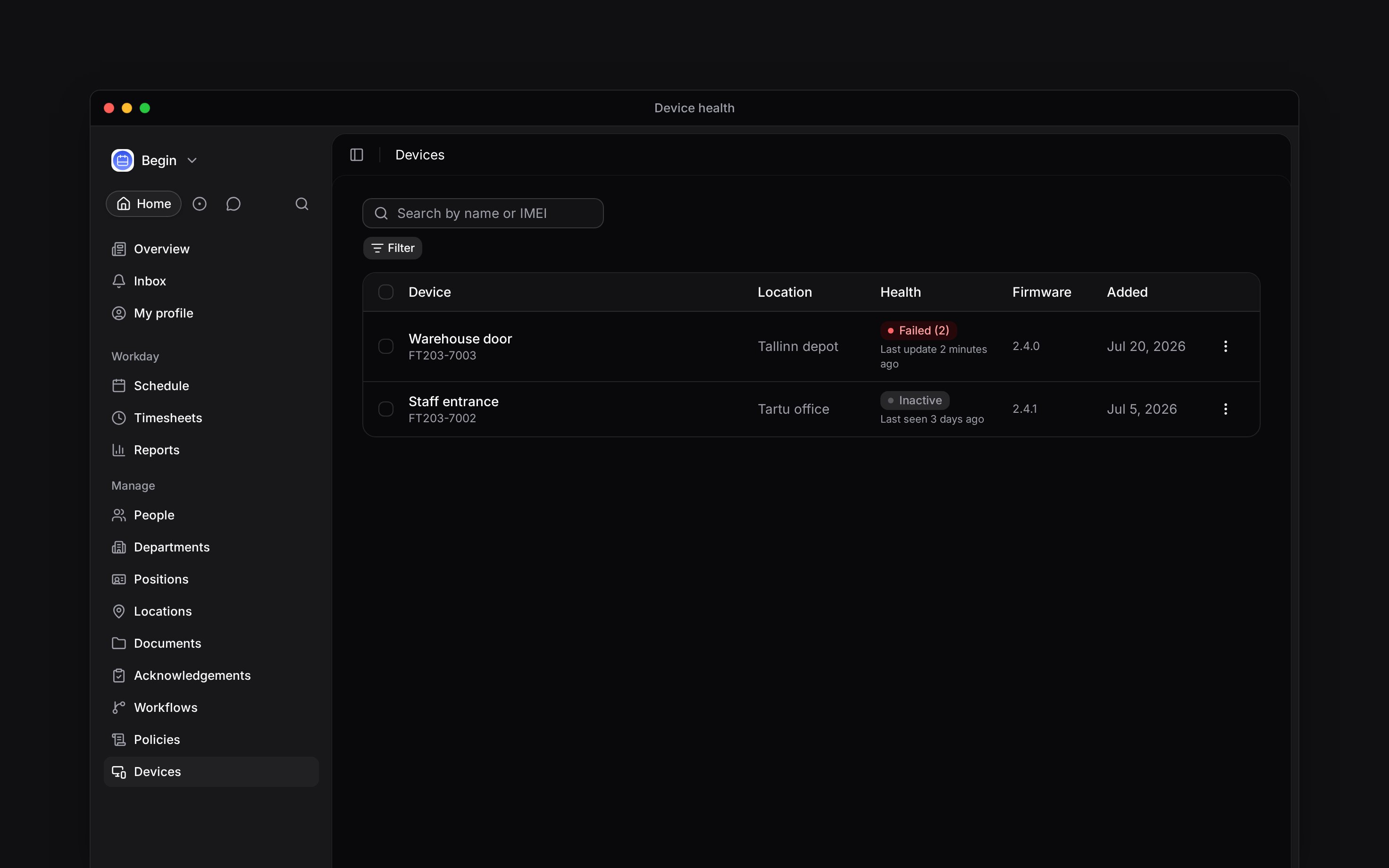
 Start with the terminal's **Health** badge and **Last seen** caption. They separate a connection problem from an identifier that did not reach an otherwise connected terminal.
**Devices** must be enabled for your workspace, and your role needs access. If it is missing from
the sidebar, ask an administrator to check your role or contact Begin support about availability.
## Read the health badge
| What you see | What to check next |
| ------------------- | --------------------------------------------------------------------------------------------- |
| **Online** | The terminal is connected. Check the person's identifier and clocking policy. |
| **Syncing** | The terminal is connected and still applying changes. Wait for the badge to settle. |
| **Failed (number)** | That many identifier copies failed. Open **Identifiers** and find the failed device badge. |
| **Offline** | A recently connected terminal has disconnected. Check its local power and network connection. |
| **Inactive** | The terminal has never connected or has not been seen for more than a day. |
| **Disabled** | Begin support has disabled the terminal. |
Start with the terminal's **Health** badge and **Last seen** caption. They separate a connection problem from an identifier that did not reach an otherwise connected terminal.
**Devices** must be enabled for your workspace, and your role needs access. If it is missing from
the sidebar, ask an administrator to check your role or contact Begin support about availability.
## Read the health badge
| What you see | What to check next |
| ------------------- | --------------------------------------------------------------------------------------------- |
| **Online** | The terminal is connected. Check the person's identifier and clocking policy. |
| **Syncing** | The terminal is connected and still applying changes. Wait for the badge to settle. |
| **Failed (number)** | That many identifier copies failed. Open **Identifiers** and find the failed device badge. |
| **Offline** | A recently connected terminal has disconnected. Check its local power and network connection. |
| **Inactive** | The terminal has never connected or has not been seen for more than a day. |
| **Disabled** | Begin support has disabled the terminal. |
 ## Check a refused punch
Search by member, identifier ID, type or device. An **Unclaimed** capture must be linked to the
person first.
**Pending** is waiting to reach the terminal. **Failed** needs Begin support. **Removing** means
the terminal is dropping that identifier.
A suspended or departed person is refused. So is a second clock-in, a clock-out with no open
entry, or a break the policy does not allow; check **Timesheets** for the open entry.
Use **Reassign** if the capture belongs to the wrong person. For a PIN, open their **People →
Identifiers** tab and follow the warning if PIN clock-in is off.
Send the terminal's display name, IMEI, location, **Health** badge and **Last seen** time. For
one failed person, include the identifier type and template ID.
Re-sync, reboot, reset passcode, enable and disable are Begin support actions. A customer role
cannot send them from the device row.
**Context for an assistant answering questions about terminal troubleshooting.** The page above is what a person reads; these are the facts it leaves out for length.
* **Limits:** a failed identifier sync outranks connection state in the Health badge. **Offline** means a fresh disconnect; after 24 hours the row becomes **Inactive**. A connected state older than seven hours is treated as offline.
* **Terms:** **Pending** and **Removing** are desired changes waiting for the terminal. **Failed** stays in the desired set and can be retried by support.
* **Not supported:** the customer device menu has no remote maintenance actions. It offers only **View identifiers** and **Change location**.
* **Often confused with:** a wrong PIN and a policy-blocked PIN deliberately look the same at the terminal. The member's profile shows when PIN clock-in is blocked.
## Next
Fix an unclaimed capture, wrong owner or manual device assignment.
Move to replacement hardware and retire the old terminal safely.
## Still need help?
Email the Begin team and we'll get back to you.
Open the AI assistant and get instant answers based on these docs.
## Check a refused punch
Search by member, identifier ID, type or device. An **Unclaimed** capture must be linked to the
person first.
**Pending** is waiting to reach the terminal. **Failed** needs Begin support. **Removing** means
the terminal is dropping that identifier.
A suspended or departed person is refused. So is a second clock-in, a clock-out with no open
entry, or a break the policy does not allow; check **Timesheets** for the open entry.
Use **Reassign** if the capture belongs to the wrong person. For a PIN, open their **People →
Identifiers** tab and follow the warning if PIN clock-in is off.
Send the terminal's display name, IMEI, location, **Health** badge and **Last seen** time. For
one failed person, include the identifier type and template ID.
Re-sync, reboot, reset passcode, enable and disable are Begin support actions. A customer role
cannot send them from the device row.
**Context for an assistant answering questions about terminal troubleshooting.** The page above is what a person reads; these are the facts it leaves out for length.
* **Limits:** a failed identifier sync outranks connection state in the Health badge. **Offline** means a fresh disconnect; after 24 hours the row becomes **Inactive**. A connected state older than seven hours is treated as offline.
* **Terms:** **Pending** and **Removing** are desired changes waiting for the terminal. **Failed** stays in the desired set and can be retried by support.
* **Not supported:** the customer device menu has no remote maintenance actions. It offers only **View identifiers** and **Change location**.
* **Often confused with:** a wrong PIN and a policy-blocked PIN deliberately look the same at the terminal. The member's profile shows when PIN clock-in is blocked.
## Next
Fix an unclaimed capture, wrong owner or manual device assignment.
Move to replacement hardware and retire the old terminal safely.
## Still need help?
Email the Begin team and we'll get back to you.
Open the AI assistant and get instant answers based on these docs.