> ## Documentation Index
> Fetch the complete documentation index at: https://docs.begin.eu/llms.txt
> Use this file to discover all available pages before exploring further.
# Rivilė
> Export actual or scheduled hours in a Rivilė Excel workbook.
export const BetaCallout = ({children}) => ;

 Create the fixed-format Excel workbook used by Rivilė. Choose whether it carries actual or scheduled hours, then download it for import into Rivilė.
Payroll integrations are rolling out gradually. If **Settings → Integrations** is missing, ask us
about enabling it for your workspace. Your role also needs permission to manage integrations.
## Set up Rivilė
Open **Settings → Integrations → Rivilė** and turn on the header switch. No API credentials are
needed.
Check each person’s **Payroll export code** on their
[profile](/for-managers/people/member-profiles) against the code used in Rivilė. A person
without one still appears in the workbook with a blank code, so check the file rather than the
count.
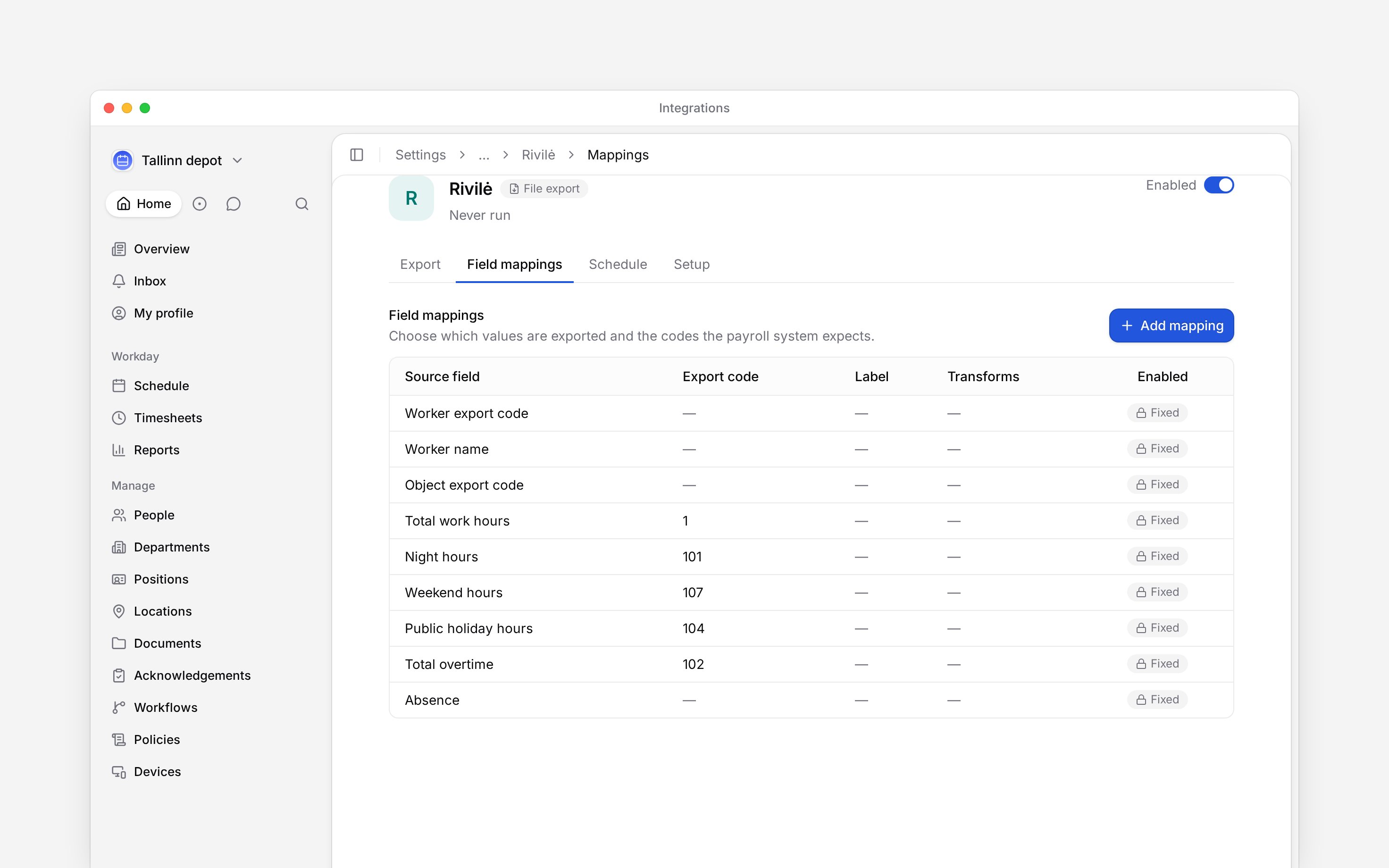
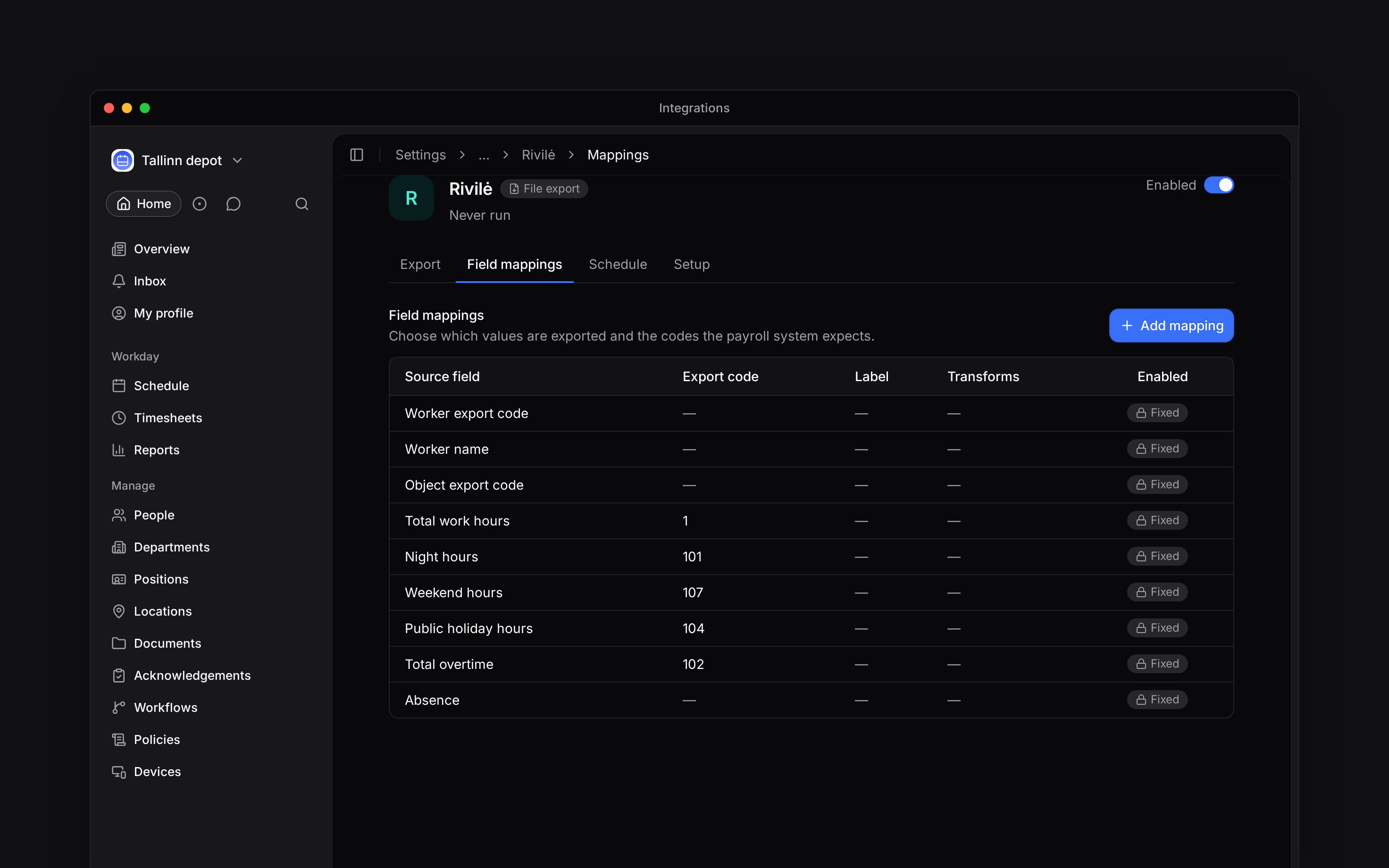
Open **Field mappings** to see the fixed workbook columns. Their codes and layout are prescribed
by the format.
To include absences, add a mapping for each time-off policy in **Field mappings**, enter its **Export code**, and enable **Include in export**. The fixed absence row alone does not map your policies.
Create the fixed-format Excel workbook used by Rivilė. Choose whether it carries actual or scheduled hours, then download it for import into Rivilė.
Payroll integrations are rolling out gradually. If **Settings → Integrations** is missing, ask us
about enabling it for your workspace. Your role also needs permission to manage integrations.
## Set up Rivilė
Open **Settings → Integrations → Rivilė** and turn on the header switch. No API credentials are
needed.
Check each person’s **Payroll export code** on their
[profile](/for-managers/people/member-profiles) against the code used in Rivilė. A person
without one still appears in the workbook with a blank code, so check the file rather than the
count.
Open **Field mappings** to see the fixed workbook columns. Their codes and layout are prescribed
by the format.
To include absences, add a mapping for each time-off policy in **Field mappings**, enter its **Export code**, and enable **Include in export**. The fixed absence row alone does not map your policies.
 ## Choose the hours
In **Export**, select the month. Under **Data source**, keep **Actual worked time** for payroll or choose **Planned schedule** for the roster. **Subtract unpaid breaks** is on by default; set it for each run deliberately.
Leave **Include unconfirmed hours** off in Setup when exporting actual hours unless payroll should include work that has not been approved. Rejected and cancelled hours are always excluded, even when this setting is on.
Actual hours and scheduled hours answer different questions. Check the source before comparing a
workbook with a timesheet total or a planned schedule.
## Download the workbook
Filter the run to the people, locations or departments you need, then start the export. Download the finished workbook from the history and import it into Rivilė.
The workbook includes employee identifiers and departments, work-hour categories and absences. Read skipped-record and error details before treating the download as complete. A downloadable file alone does not prove every requested person was included.
**Rivilė: access and limits**
* **Who can:** the default Administrator role manages integrations; Manager and Employee do not. A custom role can carry that permission.
* **Where:** integration access is controlled per role in **Settings → Permissions**.
* **Not supported:** the export does not upload the workbook to Rivilė or import employee details.
* **Limits:** preset columns include work hours, night, weekend, holiday and overtime. Fixed mapping rows are informational; their disabled-looking state does not switch those columns off.
## Next
Choose a month, run it and check the result.
Compare providers and connection methods.
## Still need help?
Email the Begin team and we'll get back to you.
Open the AI assistant and get instant answers based on these docs.
## Choose the hours
In **Export**, select the month. Under **Data source**, keep **Actual worked time** for payroll or choose **Planned schedule** for the roster. **Subtract unpaid breaks** is on by default; set it for each run deliberately.
Leave **Include unconfirmed hours** off in Setup when exporting actual hours unless payroll should include work that has not been approved. Rejected and cancelled hours are always excluded, even when this setting is on.
Actual hours and scheduled hours answer different questions. Check the source before comparing a
workbook with a timesheet total or a planned schedule.
## Download the workbook
Filter the run to the people, locations or departments you need, then start the export. Download the finished workbook from the history and import it into Rivilė.
The workbook includes employee identifiers and departments, work-hour categories and absences. Read skipped-record and error details before treating the download as complete. A downloadable file alone does not prove every requested person was included.
**Rivilė: access and limits**
* **Who can:** the default Administrator role manages integrations; Manager and Employee do not. A custom role can carry that permission.
* **Where:** integration access is controlled per role in **Settings → Permissions**.
* **Not supported:** the export does not upload the workbook to Rivilė or import employee details.
* **Limits:** preset columns include work hours, night, weekend, holiday and overtime. Fixed mapping rows are informational; their disabled-looking state does not switch those columns off.
## Next
Choose a month, run it and check the result.
Compare providers and connection methods.
## Still need help?
Email the Begin team and we'll get back to you.
Open the AI assistant and get instant answers based on these docs.