> ## Documentation Index
> Fetch the complete documentation index at: https://docs.begin.eu/llms.txt
> Use this file to discover all available pages before exploring further.
# Running payroll integrations
> Run a month, check the result and control automatic payroll transfers.
export const BetaCallout = ({children}) => ;

 Run payroll from the provider’s **Sync** or **Export** tab after setting up its connection and mappings. A sync sends data to the provider; an export produces a file you still need to import there.
Payroll integrations are rolling out gradually. If **Settings → Integrations** is missing, ask us
about enabling it for your workspace. Your role also needs permission to manage integrations.
## Run and check a month
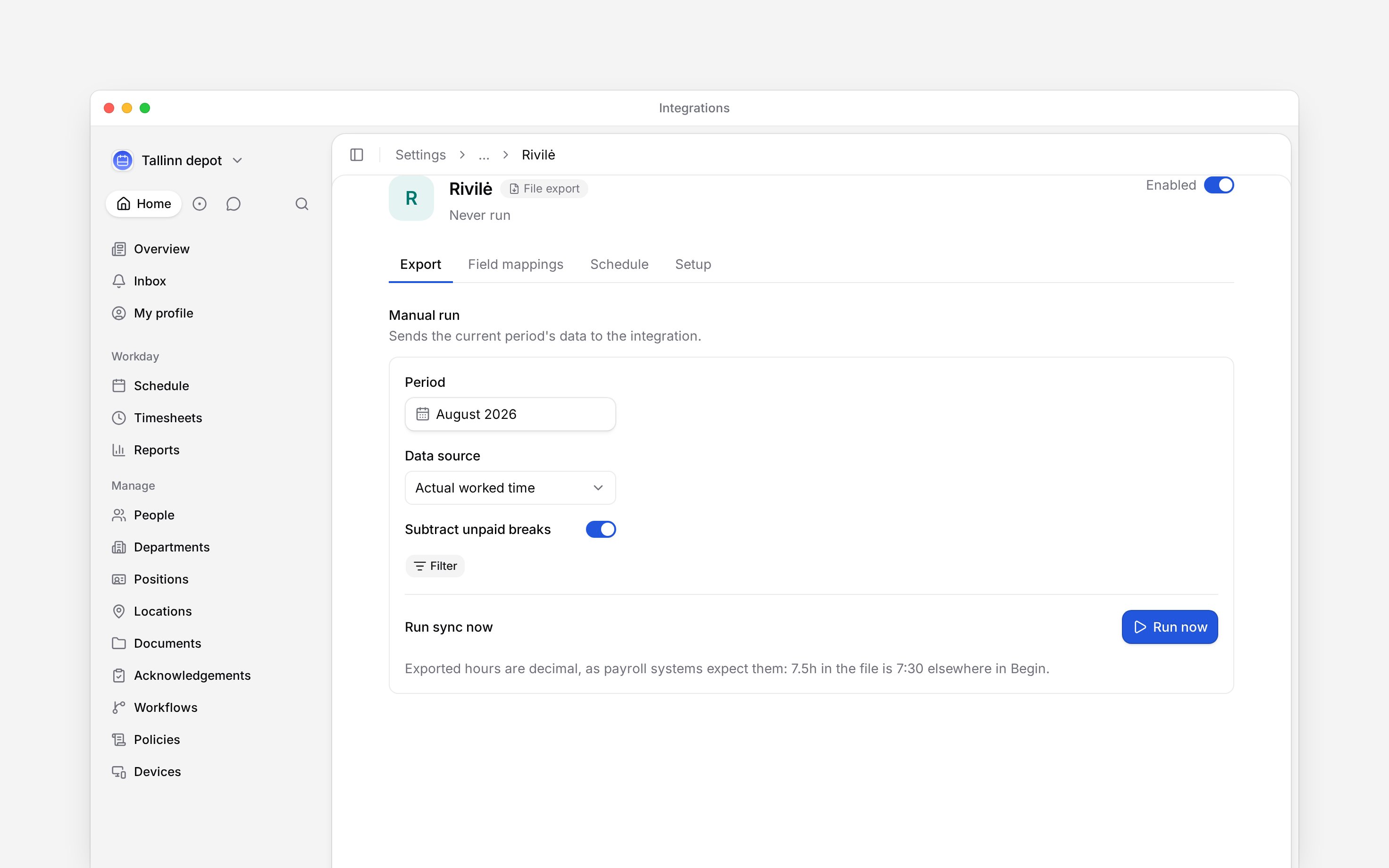
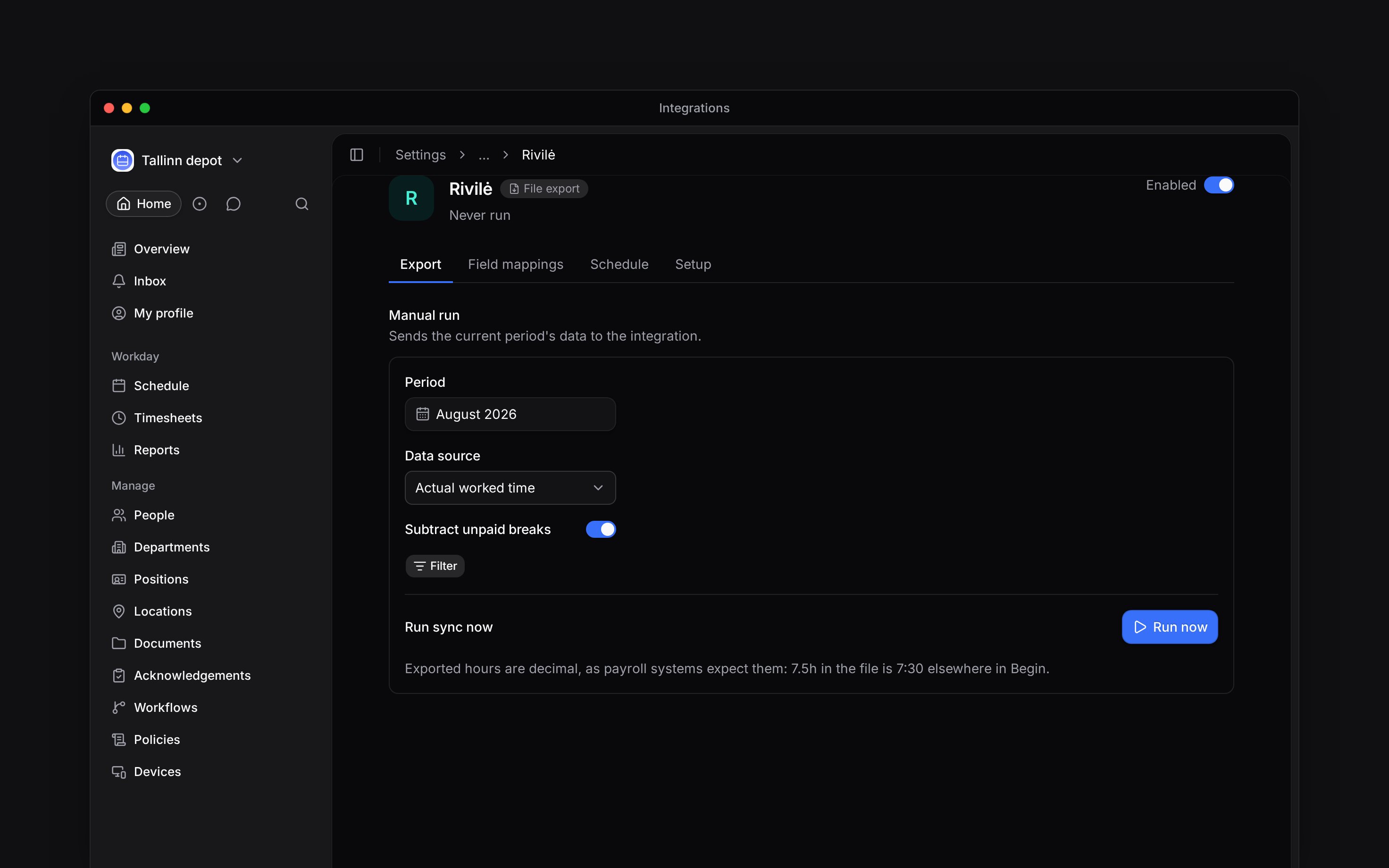
Open your integration and select the month. The period follows your workspace’s timezone.
Use the people, location or department filters if you only want part of the company. Check any
provider-specific options, such as Rivilė’s hour source and break handling.
Choose **Run now**. If it cannot run, check the explanation: the integration may be off,
credentials may be missing, or the catalogue entry may not support runs yet.
Wait for the run to end as **Success**, **Partly done**, **Warning** or **Failed**. Review
processed, failed and skipped records and open the errors. For a file export, download the
result from **History** and import it into payroll.
Run payroll from the provider’s **Sync** or **Export** tab after setting up its connection and mappings. A sync sends data to the provider; an export produces a file you still need to import there.
Payroll integrations are rolling out gradually. If **Settings → Integrations** is missing, ask us
about enabling it for your workspace. Your role also needs permission to manage integrations.
## Run and check a month
Open your integration and select the month. The period follows your workspace’s timezone.
Use the people, location or department filters if you only want part of the company. Check any
provider-specific options, such as Rivilė’s hour source and break handling.
Choose **Run now**. If it cannot run, check the explanation: the integration may be off,
credentials may be missing, or the catalogue entry may not support runs yet.
Wait for the run to end as **Success**, **Partly done**, **Warning** or **Failed**. Review
processed, failed and skipped records and open the errors. For a file export, download the
result from **History** and import it into payroll.
 ## Resolve incomplete results
**Warning** means records were skipped and need attention, even if other records went through. **Partly done** means some records succeeded and others failed. Read the errors before repeating the entire run: sending again is not a universal undo or replacement operation.
Payroll people who are not in Begin do not cause a warning or count as skipped records. Employee and contract imports can still list their unmatched counts in the run details. Unchanged import values do not cause a warning either.
Check personal and export codes, enabled mappings, payroll document types, and whether the hours are approved. Credentials can be replaced in **Setup**. Saved secret values are not shown again.
Pay attention to the unit: payroll files use decimal hours, so 7.5 means seven hours and thirty minutes. It is not 7 hours and 50 minutes.
## Control automatic runs
Open **Schedule**, turn on **Sync on a schedule**, and choose **Frequency**. The page shows the next run; automatic runs use your workspace’s timezone. A scheduled Taavi or Rivilė run also leaves a file in **History**, but nobody imports it for you: download it and import it into payroll each month.
Automatic runs select the month containing yesterday’s date in that timezone. On the first day of a month, that means the previous month. They do not reuse the month and filters you picked for a manual run. A scheduled slot is skipped while an earlier run is still going, and a run that makes no progress for 30 minutes is marked **Failed**.
Turn off **Sync on a schedule** to stop automatic runs. Turn off the integration’s header switch to disable the connection. Removing credentials also disables it and stops scheduled syncs until new credentials are saved. To start over, use **Remove** in the **Danger zone** on the **Sync** tab: it deletes the connection, credentials and field mappings and keeps the run history. None of these actions recalls data already sent to payroll.
**Running payroll integrations: access and limits**
* **Who can:** the default Administrator role manages integrations; Manager and Employee do not. A custom role can carry that permission.
* **Where:** integration access is controlled per role in **Settings → Permissions**.
* **Limits:** automatic frequencies range from every 15 minutes to once a day.
* **Not supported:** the run history is not proof that somebody imported a downloaded file into the payroll system.
## Next
Compare providers and connection methods.
Check data groups and contract-export restrictions.
## Still need help?
Email the Begin team and we'll get back to you.
Open the AI assistant and get instant answers based on these docs.
## Resolve incomplete results
**Warning** means records were skipped and need attention, even if other records went through. **Partly done** means some records succeeded and others failed. Read the errors before repeating the entire run: sending again is not a universal undo or replacement operation.
Payroll people who are not in Begin do not cause a warning or count as skipped records. Employee and contract imports can still list their unmatched counts in the run details. Unchanged import values do not cause a warning either.
Check personal and export codes, enabled mappings, payroll document types, and whether the hours are approved. Credentials can be replaced in **Setup**. Saved secret values are not shown again.
Pay attention to the unit: payroll files use decimal hours, so 7.5 means seven hours and thirty minutes. It is not 7 hours and 50 minutes.
## Control automatic runs
Open **Schedule**, turn on **Sync on a schedule**, and choose **Frequency**. The page shows the next run; automatic runs use your workspace’s timezone. A scheduled Taavi or Rivilė run also leaves a file in **History**, but nobody imports it for you: download it and import it into payroll each month.
Automatic runs select the month containing yesterday’s date in that timezone. On the first day of a month, that means the previous month. They do not reuse the month and filters you picked for a manual run. A scheduled slot is skipped while an earlier run is still going, and a run that makes no progress for 30 minutes is marked **Failed**.
Turn off **Sync on a schedule** to stop automatic runs. Turn off the integration’s header switch to disable the connection. Removing credentials also disables it and stops scheduled syncs until new credentials are saved. To start over, use **Remove** in the **Danger zone** on the **Sync** tab: it deletes the connection, credentials and field mappings and keeps the run history. None of these actions recalls data already sent to payroll.
**Running payroll integrations: access and limits**
* **Who can:** the default Administrator role manages integrations; Manager and Employee do not. A custom role can carry that permission.
* **Where:** integration access is controlled per role in **Settings → Permissions**.
* **Limits:** automatic frequencies range from every 15 minutes to once a day.
* **Not supported:** the run history is not proof that somebody imported a downloaded file into the payroll system.
## Next
Compare providers and connection methods.
Check data groups and contract-export restrictions.
## Still need help?
Email the Begin team and we'll get back to you.
Open the AI assistant and get instant answers based on these docs.