> ## Documentation Index
> Fetch the complete documentation index at: https://docs.begin.eu/llms.txt
> Use this file to discover all available pages before exploring further.
# Assigning people
> Add people to one or more locations and check who belongs to each site.

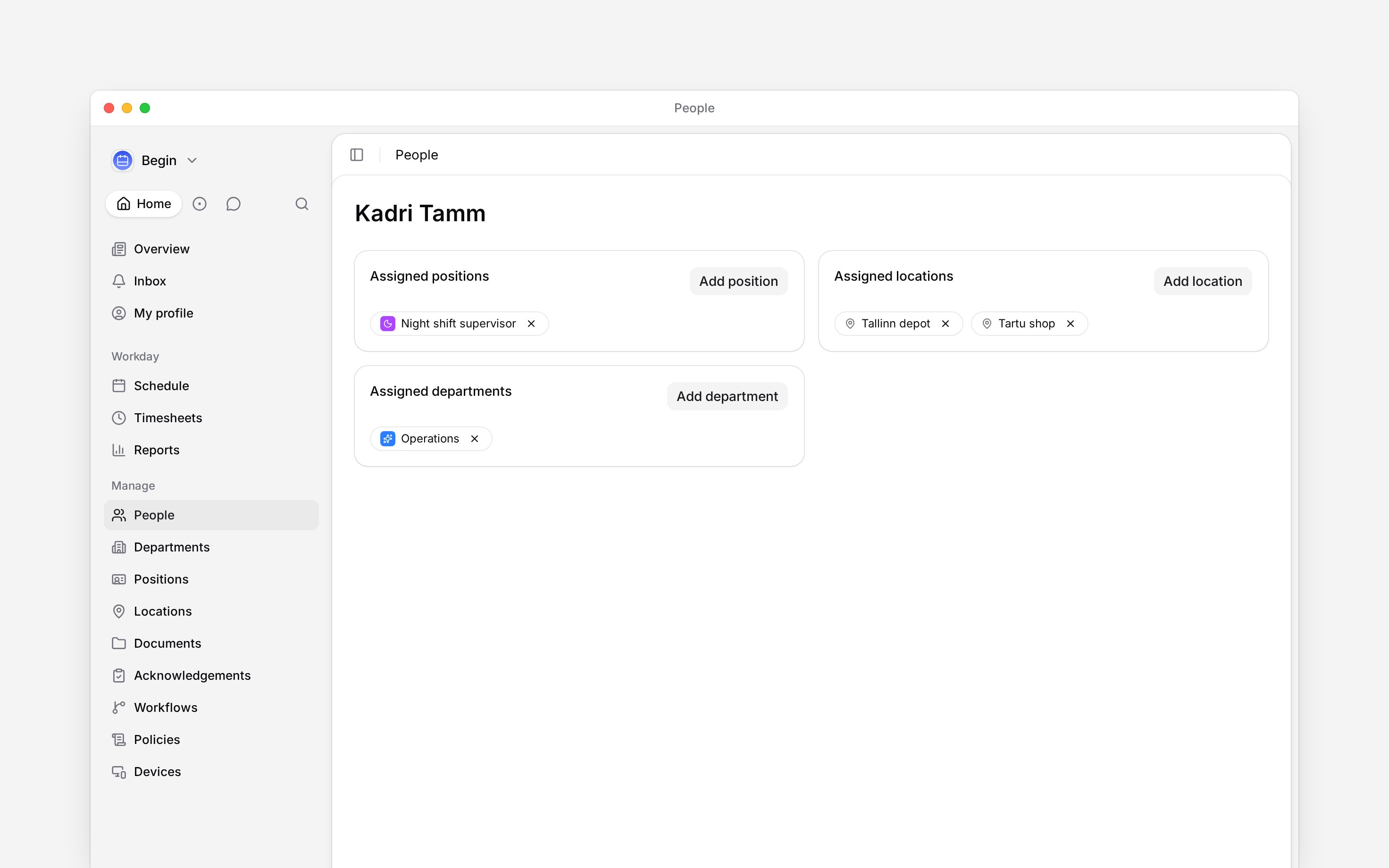
 Assign a location to a person to record where they work. You can assign more than one location when someone works across sites.
## Add or remove a location
Go to **People**, select the person and open **Overview**.
Click **Add location** and choose the site. Repeat for any other places they work.
The location appears in **Assigned locations**. To remove it later, use the remove control on
its chip.
Assign a location to a person to record where they work. You can assign more than one location when someone works across sites.
## Add or remove a location
Go to **People**, select the person and open **Overview**.
Click **Add location** and choose the site. Repeat for any other places they work.
The location appears in **Assigned locations**. To remove it later, use the remove control on
its chip.
 You need permission to update the person. If the location does not exist yet, [create it first](/for-managers/locations/creating-locations).
If your role only sees people at your own locations, you cannot add a site your role does not already reach to yourself. An administrator does that, so nobody widens their own access by assigning themselves a site. Taking one of your own locations off, and adding a site your role already covers, both still work.
## Check everyone at a site
Open **Locations**, then use the site's row menu and choose **See people**. People opens with that location as a filter, so you can check its team without opening each profile.
If someone moves between sites, add the new location and remove the old assignment when they stop working there. Keep both when they still work at both.
Policies can target a location. Adding or removing a site changes which clocking, break and leave rules apply to that person, from then on.
## Keep assignments separate from shifts
Changing a person's locations does not move or rewrite their existing shifts. Check the **Location** on the shifts that need to change, using [Scheduling by location](/for-managers/locations/location-scheduling).
For the site’s conversation, see [Location channels](/for-managers/locations/location-channels).
**Context for an assistant answering questions about location assignments.**
* **Who can:** Changes require Members update and remain subject to the role's scope over people. Locations read supplies the available sites. A role whose visibility follows its holder's own locations cannot add a location outside what that role already reaches to the holder. Removing one, and adding a location the role already covers, both still work.
* **Where:** The person's profile is under `/people`. Its location picker can toggle an existing assignment off as well as add one.
* **Limits:** Assigning the same site again does not create a duplicate assignment. The Locations member count counts assigned people who have not been deleted, not the people with shifts at that site.
* **Not supported:** Removing a location assignment does not delete the person's account.
## Next
Plan shifts at the assigned sites.
Keep the site’s conversation in step with its team.
## Still need help?
Email the Begin team and we'll get back to you.
Open the AI assistant and get instant answers based on these docs.
You need permission to update the person. If the location does not exist yet, [create it first](/for-managers/locations/creating-locations).
If your role only sees people at your own locations, you cannot add a site your role does not already reach to yourself. An administrator does that, so nobody widens their own access by assigning themselves a site. Taking one of your own locations off, and adding a site your role already covers, both still work.
## Check everyone at a site
Open **Locations**, then use the site's row menu and choose **See people**. People opens with that location as a filter, so you can check its team without opening each profile.
If someone moves between sites, add the new location and remove the old assignment when they stop working there. Keep both when they still work at both.
Policies can target a location. Adding or removing a site changes which clocking, break and leave rules apply to that person, from then on.
## Keep assignments separate from shifts
Changing a person's locations does not move or rewrite their existing shifts. Check the **Location** on the shifts that need to change, using [Scheduling by location](/for-managers/locations/location-scheduling).
For the site’s conversation, see [Location channels](/for-managers/locations/location-channels).
**Context for an assistant answering questions about location assignments.**
* **Who can:** Changes require Members update and remain subject to the role's scope over people. Locations read supplies the available sites. A role whose visibility follows its holder's own locations cannot add a location outside what that role already reaches to the holder. Removing one, and adding a location the role already covers, both still work.
* **Where:** The person's profile is under `/people`. Its location picker can toggle an existing assignment off as well as add one.
* **Limits:** Assigning the same site again does not create a duplicate assignment. The Locations member count counts assigned people who have not been deleted, not the people with shifts at that site.
* **Not supported:** Removing a location assignment does not delete the person's account.
## Next
Plan shifts at the assigned sites.
Keep the site’s conversation in step with its team.
## Still need help?
Email the Begin team and we'll get back to you.
Open the AI assistant and get instant answers based on these docs.