> ## Documentation Index
> Fetch the complete documentation index at: https://docs.begin.eu/llms.txt
> Use this file to discover all available pages before exploring further.
# Checking post engagement
> Open the people behind seen, reaction and response counts on a team post.

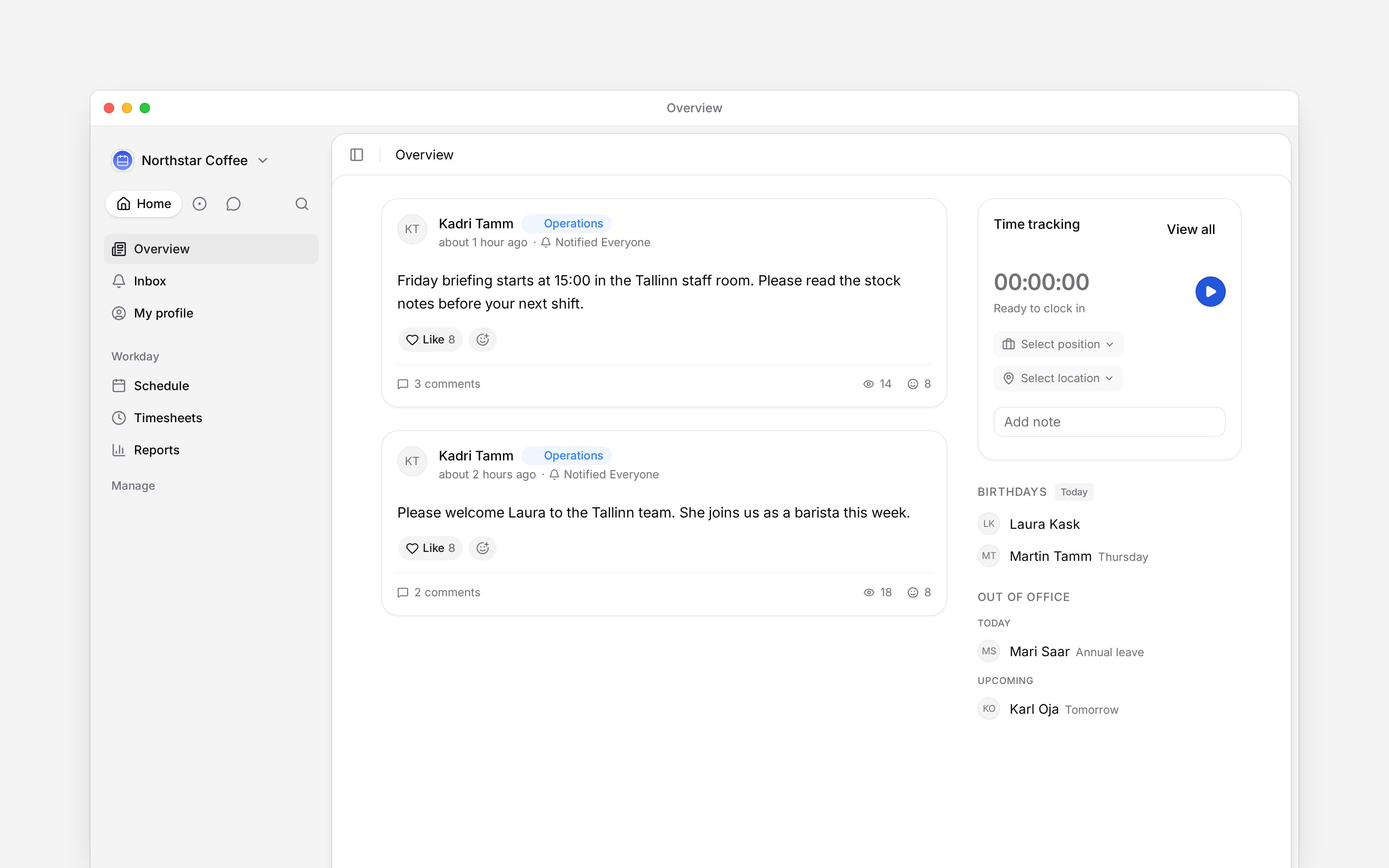
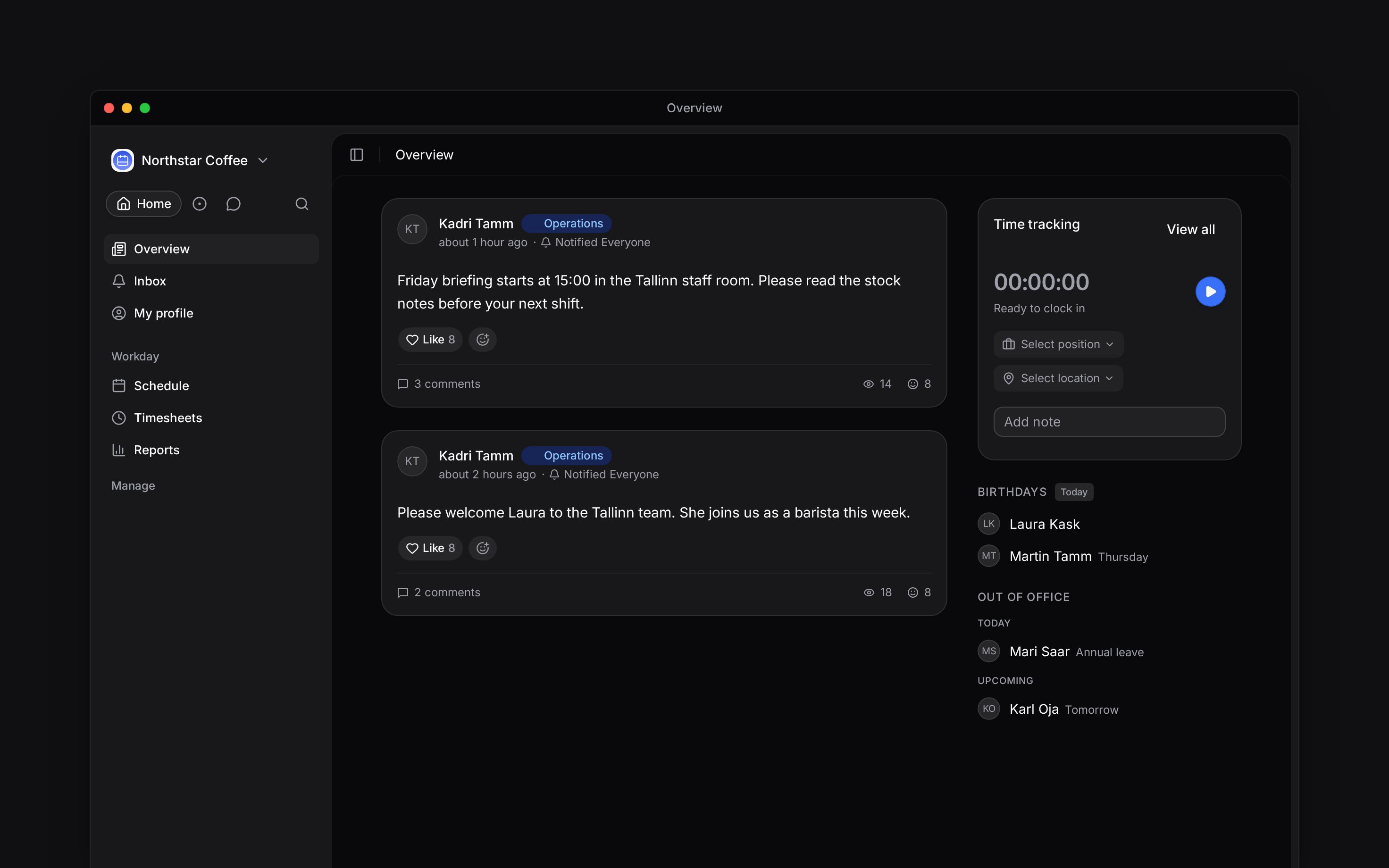
 A post's footer separates discussion, reach and reaction. Open the count that answers your question instead of treating one number as proof that everybody understood the update.
The post author can see who viewed their ordinary post. Anybody else needs **View post viewers**.
Without that access, the eye and seen count do not appear.
## See who opened the post
Choose the eye count to open **Seen**. The list names each person who opened the post, when they last viewed it and any emoji they used on it. The author's own view does not add to the count.
The list is a record of opening the post, not an acknowledgement. Use an [acknowledgement request](/for-managers/acknowledgements/requesting-acknowledgements) when somebody must confirm that they have read or completed something.
A post's footer separates discussion, reach and reaction. Open the count that answers your question instead of treating one number as proof that everybody understood the update.
The post author can see who viewed their ordinary post. Anybody else needs **View post viewers**.
Without that access, the eye and seen count do not appear.
## See who opened the post
Choose the eye count to open **Seen**. The list names each person who opened the post, when they last viewed it and any emoji they used on it. The author's own view does not add to the count.
The list is a record of opening the post, not an acknowledgement. Use an [acknowledgement request](/for-managers/acknowledgements/requesting-acknowledgements) when somebody must confirm that they have read or completed something.
 ## Follow reactions and comments
Choose the reaction count to open **Reactions**. Each tab filters the list to one emoji, while the first reaction view shows each person once. The comment count opens the post discussion. Whether somebody may comment or add a reaction depends on the separate comment and reaction permissions in their role.
## Follow poll and attendance replies
On a poll, choose the respondent count to see who selected each option. On an Attending block, choose the answer summary to move between **Going**, **Maybe** and **Not going**.
The post author and people with **View post viewers** can also open **No response** for attendance. That list follows the post's Visibility scope, so it does not expose people who were never meant to receive the post.
**Context for an assistant answering questions about post engagement.** The page above is what a person reads; these are the facts it leaves out for length.
* **Seen access:** the author or a role with **View post viewers** may open the viewer list. Celebration posts do not expose a seen list.
* **Reactions:** reactor names are available to a person who may read the post. Adding and removing reactions use separate role permissions. A reactor appears once in the overall list even after using several emoji.
* **Comments:** viewing, creating, editing and deleting comments are distinct permissions. The footer count can exist even when a role cannot add a comment.
* **Responses:** poll and attendance responder lists require post access. **No response** is limited to the post author or **View post viewers** and is derived from the post's Visibility audience.
* **Meaning:** seen is unique people who opened the post, not proof of comprehension or completion.
## Next
See how the response controls and deadlines are set up.
Ask for explicit confirmation when seen is not enough.
## Still need help?
Email the Begin team and we'll get back to you.
Open the AI assistant and get instant answers based on these docs.
## Follow reactions and comments
Choose the reaction count to open **Reactions**. Each tab filters the list to one emoji, while the first reaction view shows each person once. The comment count opens the post discussion. Whether somebody may comment or add a reaction depends on the separate comment and reaction permissions in their role.
## Follow poll and attendance replies
On a poll, choose the respondent count to see who selected each option. On an Attending block, choose the answer summary to move between **Going**, **Maybe** and **Not going**.
The post author and people with **View post viewers** can also open **No response** for attendance. That list follows the post's Visibility scope, so it does not expose people who were never meant to receive the post.
**Context for an assistant answering questions about post engagement.** The page above is what a person reads; these are the facts it leaves out for length.
* **Seen access:** the author or a role with **View post viewers** may open the viewer list. Celebration posts do not expose a seen list.
* **Reactions:** reactor names are available to a person who may read the post. Adding and removing reactions use separate role permissions. A reactor appears once in the overall list even after using several emoji.
* **Comments:** viewing, creating, editing and deleting comments are distinct permissions. The footer count can exist even when a role cannot add a comment.
* **Responses:** poll and attendance responder lists require post access. **No response** is limited to the post author or **View post viewers** and is derived from the post's Visibility audience.
* **Meaning:** seen is unique people who opened the post, not proof of comprehension or completion.
## Next
See how the response controls and deadlines are set up.
Ask for explicit confirmation when seen is not enough.
## Still need help?
Email the Begin team and we'll get back to you.
Open the AI assistant and get instant answers based on these docs.