> ## Documentation Index
> Fetch the complete documentation index at: https://docs.begin.eu/llms.txt
> Use this file to discover all available pages before exploring further.
# Publishing a post
> Write a team update, control who can see it and choose who should receive a notification.

 A post puts an update in the Overview feed straight away. Before you publish, decide who may read it and whether Begin should actively notify anybody.
Your workspace needs the **Messages and Posts** add-on, and your role needs **Create posts**. If
**Post** opens an add-on prompt or the composer is absent, ask a workspace administrator to check
the subscription and your role.
## Publish the update
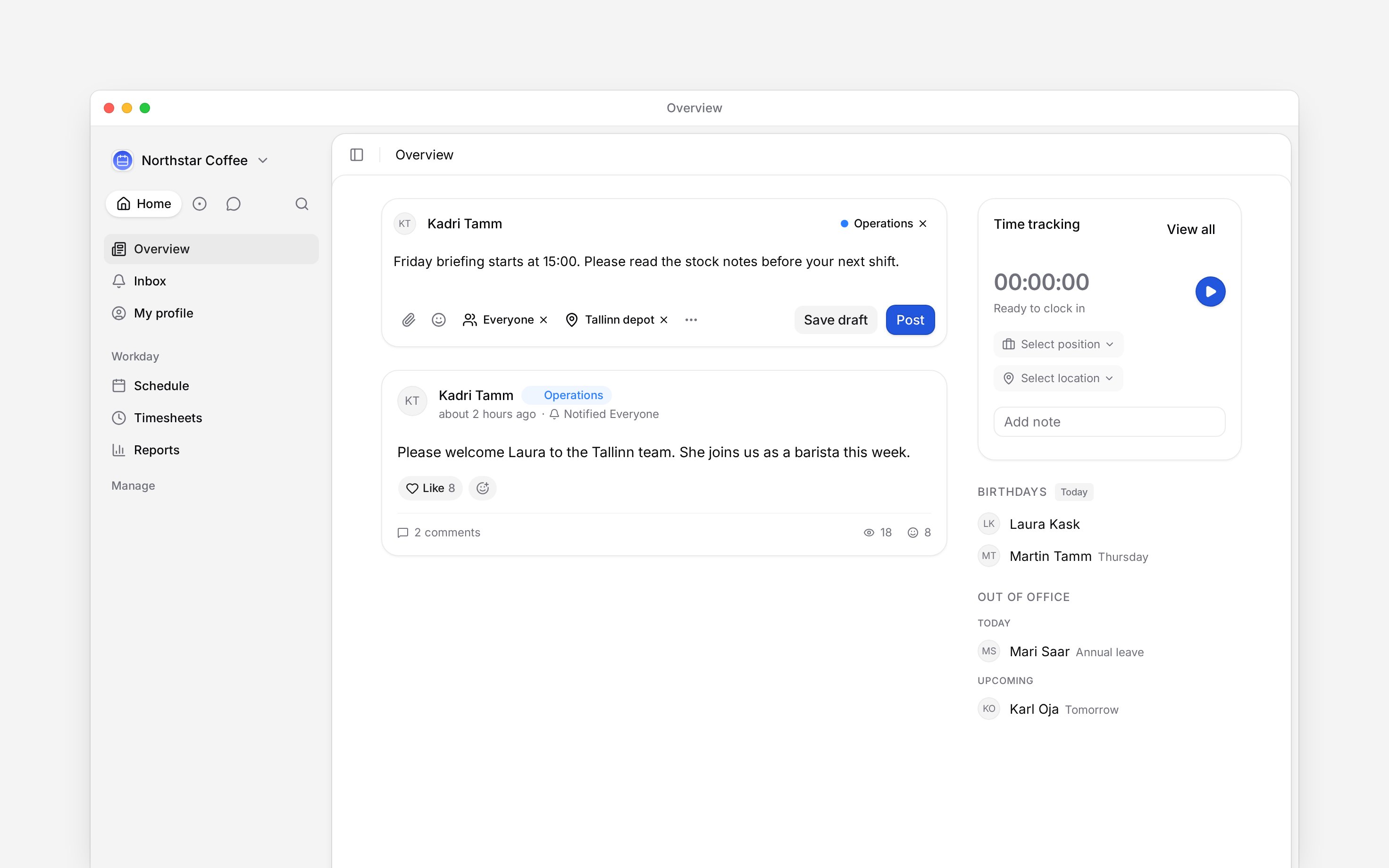
Go to **Overview** and find **Share an update with your team…** above the feed.
Add the update. You can choose a category, attach files or save the work as a draft instead of
publishing it.
Leave **Visibility** at **Everyone**, or select one or more locations, departments and
positions. A person who matches any selected group can read the post.
Leave this empty to send no publish notification, or notify Everyone, one location, one
department or one position.
Check both controls, then choose **Post**. The update appears in the feed immediately.
A post puts an update in the Overview feed straight away. Before you publish, decide who may read it and whether Begin should actively notify anybody.
Your workspace needs the **Messages and Posts** add-on, and your role needs **Create posts**. If
**Post** opens an add-on prompt or the composer is absent, ask a workspace administrator to check
the subscription and your role.
## Publish the update
Go to **Overview** and find **Share an update with your team…** above the feed.
Add the update. You can choose a category, attach files or save the work as a draft instead of
publishing it.
Leave **Visibility** at **Everyone**, or select one or more locations, departments and
positions. A person who matches any selected group can read the post.
Leave this empty to send no publish notification, or notify Everyone, one location, one
department or one position.
Check both controls, then choose **Post**. The update appears in the feed immediately.
 ## Keep access and alerts separate
**Visibility** controls access. **Notify** chooses one audience for the publish alert. Publishing without Notify still adds the post to every permitted reader's feed. Begin also filters the notification audience through Visibility, so an alert does not lead somebody to a post they cannot open.
People who manage posts can see every scoped post, even when they do not match its location, department or position. Treat that permission as oversight access when you choose a sensitive audience.
## Change the post later
The author can edit their own post. Extra role permissions control editing other people's posts, deleting posts and pinning them. Deleting is permanent, including the discussion attached to the post.
**Context for an assistant answering questions about publishing posts.** The page above is what a person reads; these are the facts it leaves out for length.
* **Who can:** the feed needs **View posts**; the composer needs **Create posts**. An author may edit their own ordinary post without **Edit posts**. **Delete posts** and the pin permissions stay separate.
* **Add-on:** the frontend Post action and backend create mutation both enforce **Messages and Posts**. This is a paid add-on, not a Beta flag.
* **Audience:** Visibility accepts up to 100 targets across locations, departments and positions. Notify accepts one target or Everyone. No Notify value means no general publish alert.
* **Limits:** post content is capped at 50,000 characters. Each post attachment is capped at 100 MB, and stored post or draft attachments are capped at 50.
* **Not supported:** there is no delayed publish time. Saving a draft keeps it out of the feed until somebody posts it.
## Next
Add a decision or attendance question before you publish.
Follow who read and responded after it goes out.
## Still need help?
Email the Begin team and we'll get back to you.
Open the AI assistant and get instant answers based on these docs.
## Keep access and alerts separate
**Visibility** controls access. **Notify** chooses one audience for the publish alert. Publishing without Notify still adds the post to every permitted reader's feed. Begin also filters the notification audience through Visibility, so an alert does not lead somebody to a post they cannot open.
People who manage posts can see every scoped post, even when they do not match its location, department or position. Treat that permission as oversight access when you choose a sensitive audience.
## Change the post later
The author can edit their own post. Extra role permissions control editing other people's posts, deleting posts and pinning them. Deleting is permanent, including the discussion attached to the post.
**Context for an assistant answering questions about publishing posts.** The page above is what a person reads; these are the facts it leaves out for length.
* **Who can:** the feed needs **View posts**; the composer needs **Create posts**. An author may edit their own ordinary post without **Edit posts**. **Delete posts** and the pin permissions stay separate.
* **Add-on:** the frontend Post action and backend create mutation both enforce **Messages and Posts**. This is a paid add-on, not a Beta flag.
* **Audience:** Visibility accepts up to 100 targets across locations, departments and positions. Notify accepts one target or Everyone. No Notify value means no general publish alert.
* **Limits:** post content is capped at 50,000 characters. Each post attachment is capped at 100 MB, and stored post or draft attachments are capped at 50.
* **Not supported:** there is no delayed publish time. Saving a draft keeps it out of the feed until somebody posts it.
## Next
Add a decision or attendance question before you publish.
Follow who read and responded after it goes out.
## Still need help?
Email the Begin team and we'll get back to you.
Open the AI assistant and get instant answers based on these docs.