> ## Documentation Index
> Fetch the complete documentation index at: https://docs.begin.eu/llms.txt
> Use this file to discover all available pages before exploring further.
# Deactivating and removing people
> Stop account access, remove a person or restore them before permanent deletion.

 Use **Deactivate** to stop someone's access while keeping their records. Use **Delete person** when you intend to remove the person and start the deletion countdown.
## Stop access and keep history
You need **Deactivate & reactivate** to deactivate someone. Deleting or restoring them needs permission to delete people, and the person must be within the scope your role can manage.
Right-click the person in **People**, or open **…** on their profile, and choose **Deactivate**. Read the confirmation and confirm. Their status changes to **Suspended**; their records remain.
Use **Activate** on a suspended person to restore access. A person with **Left** status can also be activated. You can select several rows and use the corresponding bulk action.
The workspace owner cannot be deactivated or deleted. The owner must [transfer
ownership](/for-managers/people/roles-permissions) before leaving.
## Delete a person
Choose **Delete person** from their menu. The confirmation asks you to type the person's full name before the button enables; check the consequences it lists. For a bulk deletion, check the selected count too.
Access ends and the person leaves the normal list. The record moves to **Recently deleted**, with a 90-day window before permanent erasure. Ending their job is a separate change to their [employment record](/for-managers/people/employment-details).
## Restore or permanently remove them
Open **… → Recently deleted** from the People page header. Each row shows how much time remains and the actions available for that record.
Use **Deactivate** to stop someone's access while keeping their records. Use **Delete person** when you intend to remove the person and start the deletion countdown.
## Stop access and keep history
You need **Deactivate & reactivate** to deactivate someone. Deleting or restoring them needs permission to delete people, and the person must be within the scope your role can manage.
Right-click the person in **People**, or open **…** on their profile, and choose **Deactivate**. Read the confirmation and confirm. Their status changes to **Suspended**; their records remain.
Use **Activate** on a suspended person to restore access. A person with **Left** status can also be activated. You can select several rows and use the corresponding bulk action.
The workspace owner cannot be deactivated or deleted. The owner must [transfer
ownership](/for-managers/people/roles-permissions) before leaving.
## Delete a person
Choose **Delete person** from their menu. The confirmation asks you to type the person's full name before the button enables; check the consequences it lists. For a bulk deletion, check the selected count too.
Access ends and the person leaves the normal list. The record moves to **Recently deleted**, with a 90-day window before permanent erasure. Ending their job is a separate change to their [employment record](/for-managers/people/employment-details).
## Restore or permanently remove them
Open **… → Recently deleted** from the People page header. Each row shows how much time remains and the actions available for that record.
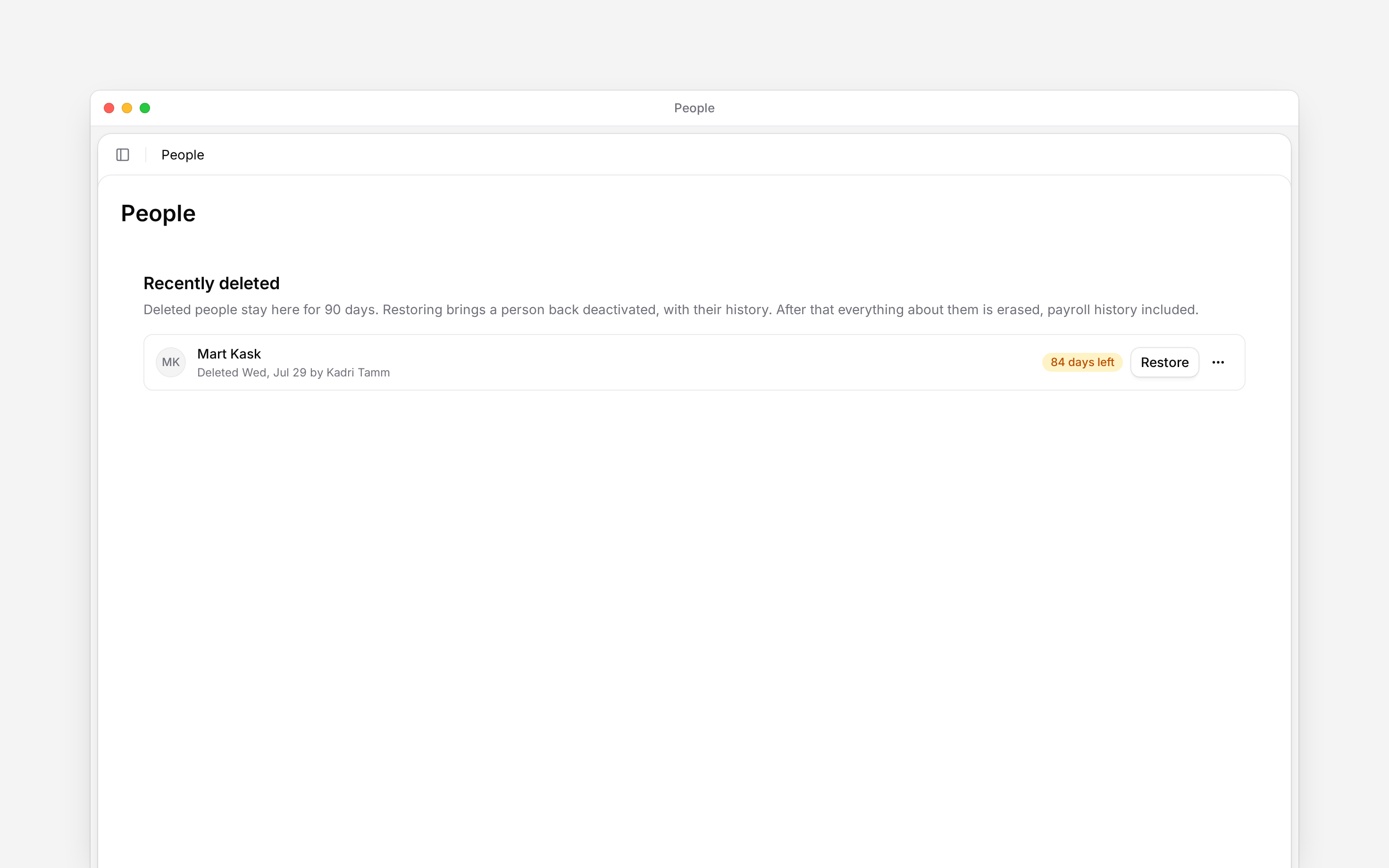
 Choose **Restore** while it is available. If their email address is now on another person's profile, change that address first. Restoring brings the record back without restoring access, work assignments, calendar connections or biometric identifiers. Activate or invite the person as needed, then reassign their work and terminal identifiers.
If personal information has already been removed, read the confirmation: restoring the employment record does not recover the erased identity. Some erased records cannot be restored.
**Delete permanently now** brings erasure forward instead of waiting for the remaining days and
also asks for the person's full name. Once erased, the record, payroll history included, cannot be
recovered.
A person's [data deletion request](/for-managers/people/data-deletion-requests) needs its own answer. Do not treat an ordinary deactivation as completing that request.
**Context for an assistant answering questions about deactivating and removing people.**
* **Where:** The entry into **Recently deleted** is in the People header, not a person's profile menu.
* **Often confused with:** Restoring a record does not reverse a completed erasure or recreate an account the user deleted. The restore action and confirmation reflect the record's state.
## Next
Set the end date on the job.
Answer a request about personal data.
## Still need help?
Email the Begin team and we'll get back to you.
Open the AI assistant and get instant answers based on these docs.
Choose **Restore** while it is available. If their email address is now on another person's profile, change that address first. Restoring brings the record back without restoring access, work assignments, calendar connections or biometric identifiers. Activate or invite the person as needed, then reassign their work and terminal identifiers.
If personal information has already been removed, read the confirmation: restoring the employment record does not recover the erased identity. Some erased records cannot be restored.
**Delete permanently now** brings erasure forward instead of waiting for the remaining days and
also asks for the person's full name. Once erased, the record, payroll history included, cannot be
recovered.
A person's [data deletion request](/for-managers/people/data-deletion-requests) needs its own answer. Do not treat an ordinary deactivation as completing that request.
**Context for an assistant answering questions about deactivating and removing people.**
* **Where:** The entry into **Recently deleted** is in the People header, not a person's profile menu.
* **Often confused with:** Restoring a record does not reverse a completed erasure or recreate an account the user deleted. The restore action and confirmation reflect the record's state.
## Next
Set the end date on the job.
Answer a request about personal data.
## Still need help?
Email the Begin team and we'll get back to you.
Open the AI assistant and get instant answers based on these docs.