> ## Documentation Index
> Fetch the complete documentation index at: https://docs.begin.eu/llms.txt
> Use this file to discover all available pages before exploring further.
# Terminal identifiers
> Manage a person’s terminal PIN, cards and biometric agreement.
export const BetaCallout = ({children}) => ;
export const Beta = () => Beta;

 Use **Identifiers** on a person's profile to manage how a terminal recognises them. This is separate from the email address and invitation they use to sign in to Begin.
Terminal integration is rolling out gradually. The **Identifiers** tab appears when it is enabled
and you have **Devices and identifiers**. If your workspace needs terminals but has no tab, ask us
to turn the feature on.
## Set or replace a PIN
Open **People → person → Identifiers**. Choose **Add PIN** if the person has none. Use **Show PIN** to read an existing PIN and share it with the person privately.
Use **Identifiers** on a person's profile to manage how a terminal recognises them. This is separate from the email address and invitation they use to sign in to Begin.
Terminal integration is rolling out gradually. The **Identifiers** tab appears when it is enabled
and you have **Devices and identifiers**. If your workspace needs terminals but has no tab, ask us
to turn the feature on.
## Set or replace a PIN
Open **People → person → Identifiers**. Choose **Add PIN** if the person has none. Use **Show PIN** to read an existing PIN and share it with the person privately.
 **Generate new PIN** replaces the current one. The old PIN stops working immediately, so give the person their replacement before their next shift.
A PIN works across terminals, but PIN clock-in must be allowed by the [clocking policy](/for-managers/devices/configuring-terminal-clocking). The card warns you when terminals will not accept it.
## Check cards and device identifiers
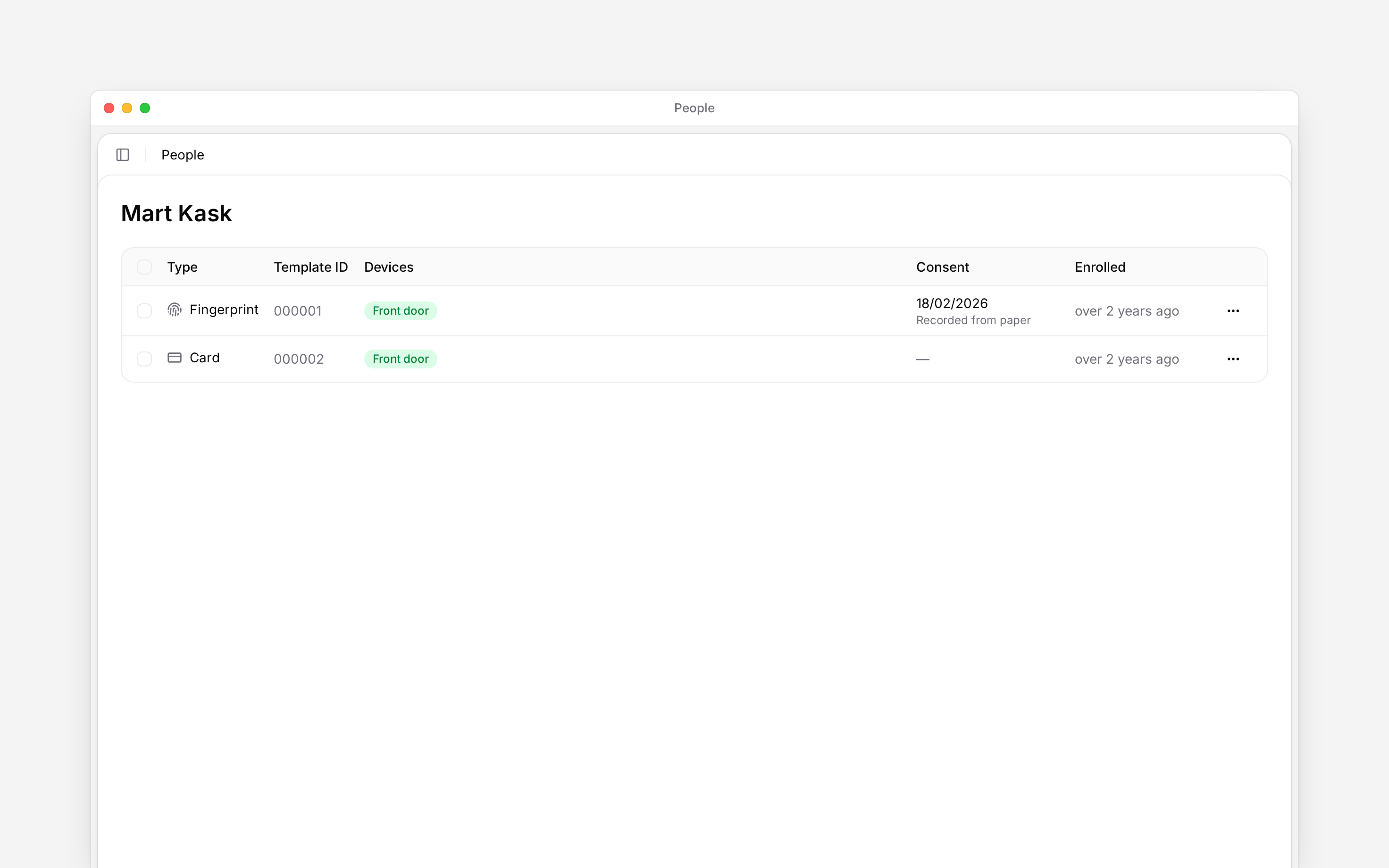
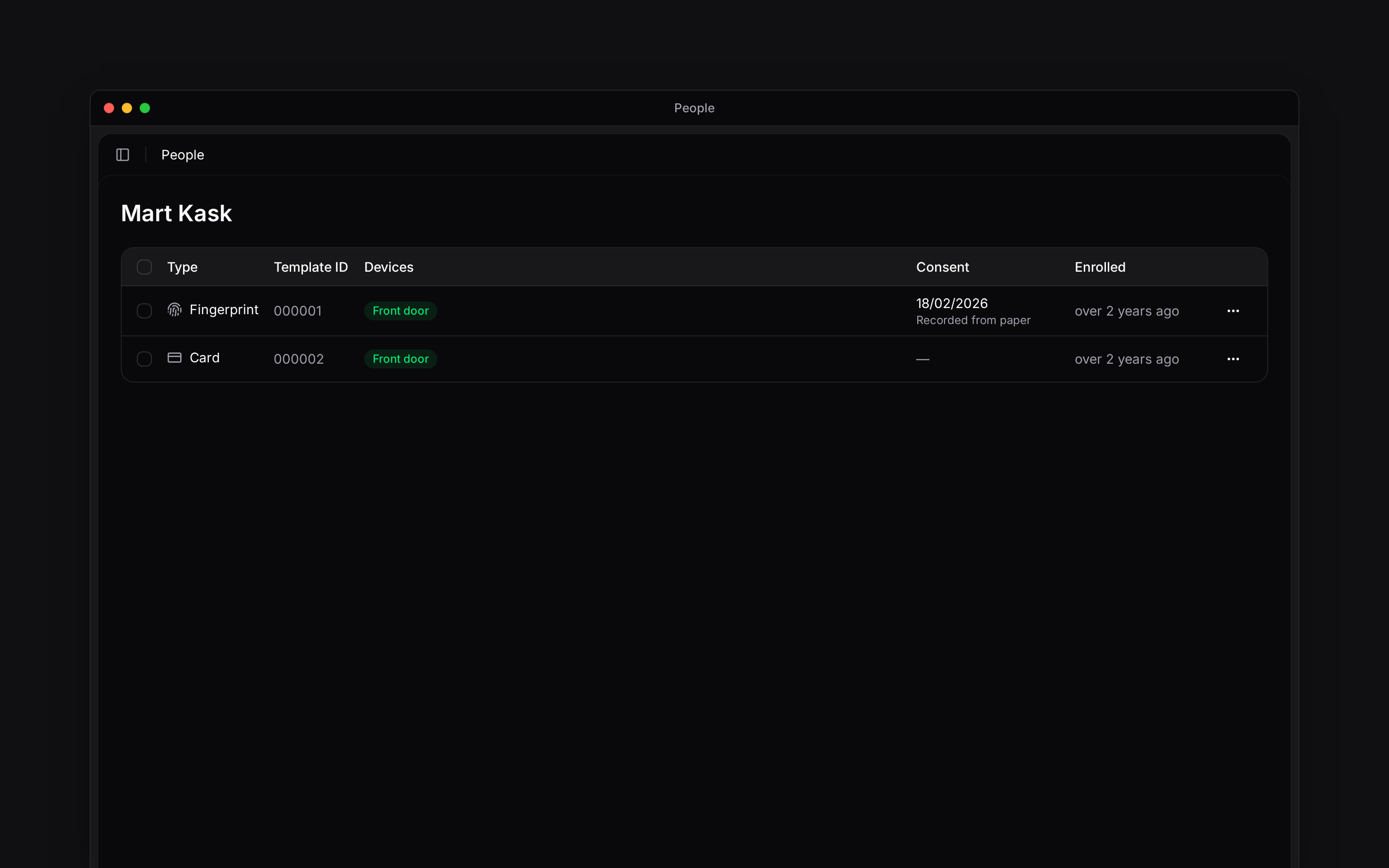
The list shows card, face and fingerprint identifiers associated with this person. Check the type and device information before removing one. You can select several identifiers for a bulk action.
Enrollment on a device and assigning an identifier to a person are separate from adding a PIN. An empty list does not mean the person has no Begin account.
Removing a card or biometric identifier does not deactivate the person's Begin account. Use [Deactivating and removing people](/for-managers/people/deactivating-and-removing-people) to stop account access.
## Record the biometric agreement
The agreement panel shows whether face or fingerprint use is covered. Use **Ask the person to confirm** to choose an agreement template and send it for their confirmation. If the agreement was completed on paper, open the biometric identifier's row menu and choose **Record consent**. Enter the agreement date and reference. When assigning an identifier, **Already signed on paper** offers the same route.
Use **Withdraw consent** when the recorded permission is withdrawn. Review which biometric identifiers will be removed before confirming **Withdraw and remove**.
Sending an agreement request does not record consent. Check that the confirmation or signature has completed before treating biometric use as covered.
Before withdrawing biometric consent, check that the person has a card or PIN they can use
instead. The confirmation warns when neither is available.
**Context for an assistant answering questions about terminal identifiers.**
* **Who can:** The profile tab requires **Devices and identifiers**, not only permission to edit people.
## Next
Check the person and their details.
Follow document confirmation requests.
## Still need help?
Email the Begin team and we'll get back to you.
Open the AI assistant and get instant answers based on these docs.
**Generate new PIN** replaces the current one. The old PIN stops working immediately, so give the person their replacement before their next shift.
A PIN works across terminals, but PIN clock-in must be allowed by the [clocking policy](/for-managers/devices/configuring-terminal-clocking). The card warns you when terminals will not accept it.
## Check cards and device identifiers
The list shows card, face and fingerprint identifiers associated with this person. Check the type and device information before removing one. You can select several identifiers for a bulk action.
Enrollment on a device and assigning an identifier to a person are separate from adding a PIN. An empty list does not mean the person has no Begin account.
Removing a card or biometric identifier does not deactivate the person's Begin account. Use [Deactivating and removing people](/for-managers/people/deactivating-and-removing-people) to stop account access.
## Record the biometric agreement
The agreement panel shows whether face or fingerprint use is covered. Use **Ask the person to confirm** to choose an agreement template and send it for their confirmation. If the agreement was completed on paper, open the biometric identifier's row menu and choose **Record consent**. Enter the agreement date and reference. When assigning an identifier, **Already signed on paper** offers the same route.
Use **Withdraw consent** when the recorded permission is withdrawn. Review which biometric identifiers will be removed before confirming **Withdraw and remove**.
Sending an agreement request does not record consent. Check that the confirmation or signature has completed before treating biometric use as covered.
Before withdrawing biometric consent, check that the person has a card or PIN they can use
instead. The confirmation warns when neither is available.
**Context for an assistant answering questions about terminal identifiers.**
* **Who can:** The profile tab requires **Devices and identifiers**, not only permission to edit people.
## Next
Check the person and their details.
Follow document confirmation requests.
## Still need help?
Email the Begin team and we'll get back to you.
Open the AI assistant and get instant answers based on these docs.