> ## Documentation Index
> Fetch the complete documentation index at: https://docs.begin.eu/llms.txt
> Use this file to discover all available pages before exploring further.
# Reading a day breakdown
> Follow a person’s report total into days and records, or compare days as columns.

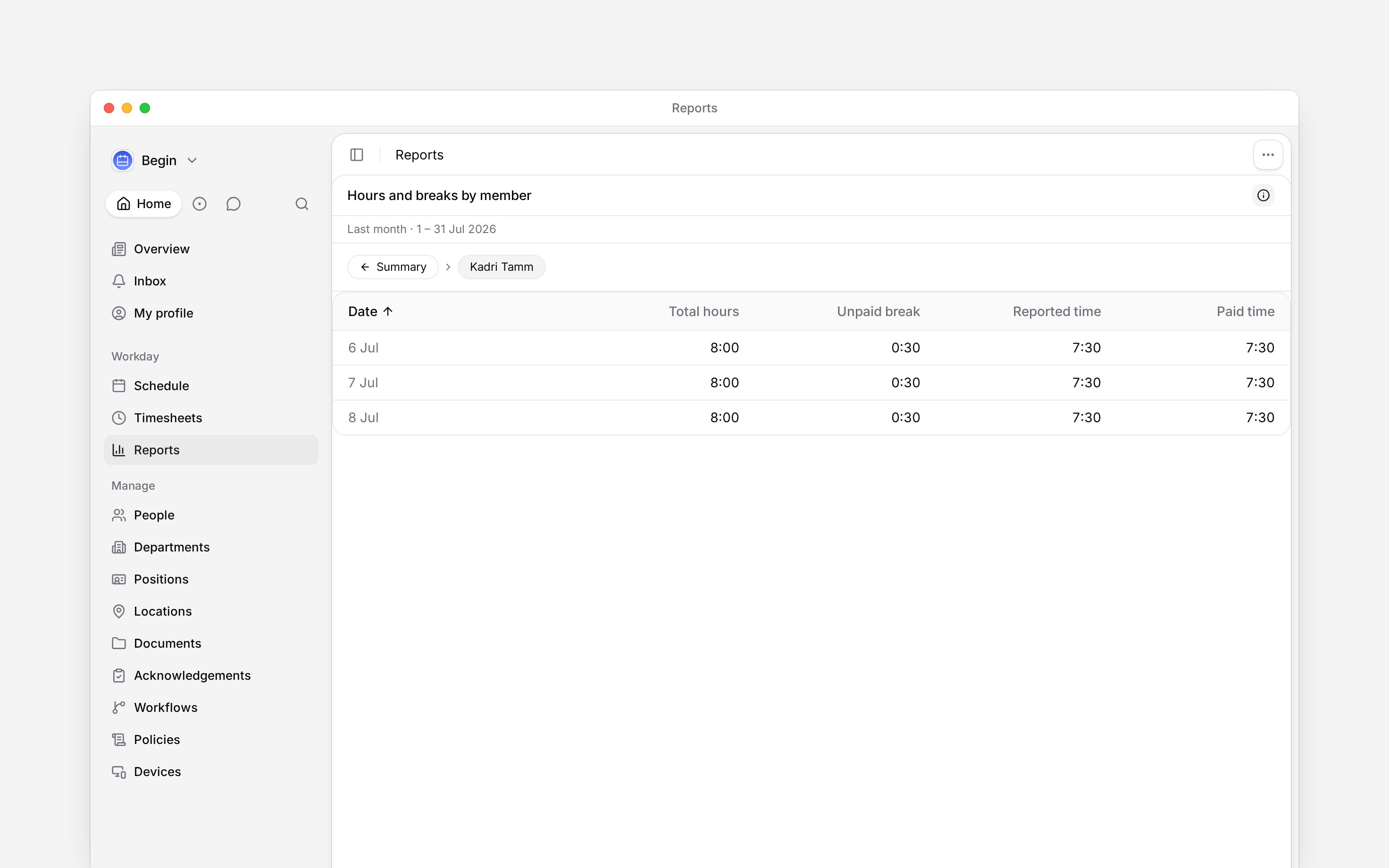
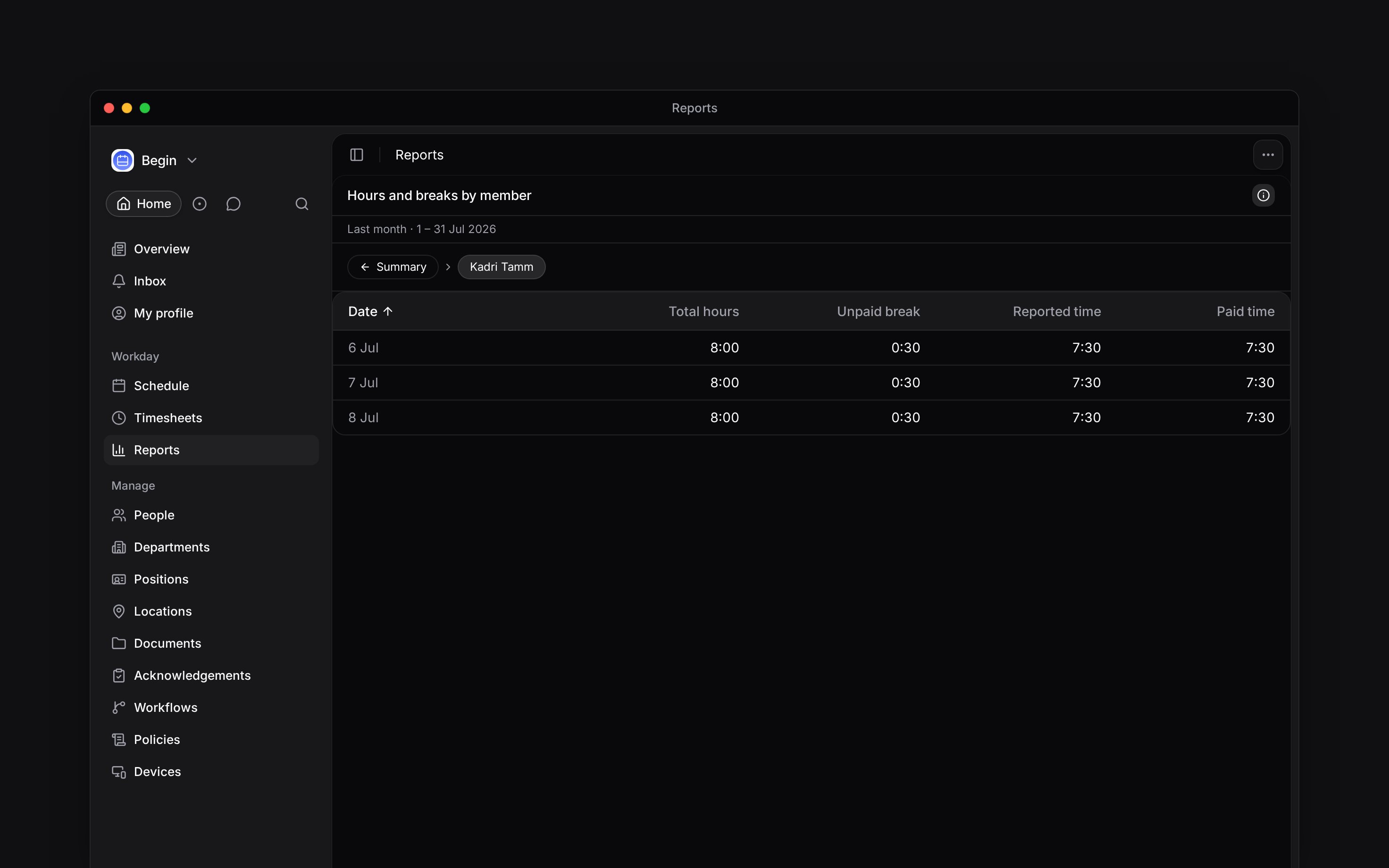
 Click a person's summary row to see the days behind their total. You can then open a day to inspect the shifts or time entries that contributed to it.
Day breakdowns are available on **Shifts** and **Time entries** tables grouped by **Person**.
Other groupings open the underlying records instead.
## Follow a total into its records
Click their row in the summary.
Choose the date you want to check to see its shifts or time entries.
Use the trail above the table to return to the person or the full summary.
The trail names whose records you are reading. Ranges covering up to 31 calendar days use daily intervals. Longer ranges use weeks or months; a range with only one interval opens the records directly.
Click a person's summary row to see the days behind their total. You can then open a day to inspect the shifts or time entries that contributed to it.
Day breakdowns are available on **Shifts** and **Time entries** tables grouped by **Person**.
Other groupings open the underlying records instead.
## Follow a total into its records
Click their row in the summary.
Choose the date you want to check to see its shifts or time entries.
Use the trail above the table to return to the person or the full summary.
The trail names whose records you are reading. Ranges covering up to 31 calendar days use daily intervals. Longer ranges use weeks or months; a range with only one interval opens the records directly.
 A record list does not carry every calculated column from the summary. Premium hours, for example, are calculated across a person's day and cannot be assigned to one individual clock record.
## Compare days side by side
Choose a range with daily intervals, such as one calendar month, then select **Days as columns** to put people down the page and dates across it. Longer ranges that use weeks or months display rows instead. Each cell shows the selected measure, with the period total at the end. Use this when you need to compare daily hours across your team without opening each person.
The full breakdown is limited to 10,000 rows, counting both people and their interval rows. For a 31-day month, 312 people fit within that row limit; 313 do not. Other processing limits can apply sooner. If the report says **Too wide to open by day**, shorten the range or add a filter.
An empty cell is not a measured zero. Open **Info** and read **Help** to distinguish a day with no measurement from a zero or a figure withheld by a rule.
## Check overnight work and rounding
A shift is counted once, on the day it starts. Its hours can belong to the start day, the end day, or both, depending on the workspace's overtime rule. **Info** explains the rule in use under **Help**.
Each interval is rounded separately. Its displayed hours may not add up to the period total to the
last minute. For someone whose overtime settles over a longer period, their daily over-or-under
figures also need not add up to the final period balance.
When you download the report, the selected breakdown affects the file's shape. See [Downloading a report](/for-managers/reports/downloading-a-report) before combining daily rows with period totals in a spreadsheet.
**Context for an assistant answering questions about reading a day breakdown.** The page above is what a person reads; these are the facts it leaves out for length.
* **Begin AI:** can configure a day breakdown and read daily rows included in a saved summary. Its report-reading tools cannot navigate into a chosen person or day like a row click. Daily rows count towards its report-reading limit, alongside person totals.
* **Not supported:** position, location and label summaries cannot produce person-level calculated day figures.
## Next
Understand missing figures or a difference between totals.
Choose between daily summary figures and underlying records.
## Still need help?
Email the Begin team and we'll get back to you.
Open the AI assistant and get instant answers based on these docs.
A record list does not carry every calculated column from the summary. Premium hours, for example, are calculated across a person's day and cannot be assigned to one individual clock record.
## Compare days side by side
Choose a range with daily intervals, such as one calendar month, then select **Days as columns** to put people down the page and dates across it. Longer ranges that use weeks or months display rows instead. Each cell shows the selected measure, with the period total at the end. Use this when you need to compare daily hours across your team without opening each person.
The full breakdown is limited to 10,000 rows, counting both people and their interval rows. For a 31-day month, 312 people fit within that row limit; 313 do not. Other processing limits can apply sooner. If the report says **Too wide to open by day**, shorten the range or add a filter.
An empty cell is not a measured zero. Open **Info** and read **Help** to distinguish a day with no measurement from a zero or a figure withheld by a rule.
## Check overnight work and rounding
A shift is counted once, on the day it starts. Its hours can belong to the start day, the end day, or both, depending on the workspace's overtime rule. **Info** explains the rule in use under **Help**.
Each interval is rounded separately. Its displayed hours may not add up to the period total to the
last minute. For someone whose overtime settles over a longer period, their daily over-or-under
figures also need not add up to the final period balance.
When you download the report, the selected breakdown affects the file's shape. See [Downloading a report](/for-managers/reports/downloading-a-report) before combining daily rows with period totals in a spreadsheet.
**Context for an assistant answering questions about reading a day breakdown.** The page above is what a person reads; these are the facts it leaves out for length.
* **Begin AI:** can configure a day breakdown and read daily rows included in a saved summary. Its report-reading tools cannot navigate into a chosen person or day like a row click. Daily rows count towards its report-reading limit, alongside person totals.
* **Not supported:** position, location and label summaries cannot produce person-level calculated day figures.
## Next
Understand missing figures or a difference between totals.
Choose between daily summary figures and underlying records.
## Still need help?
Email the Begin team and we'll get back to you.
Open the AI assistant and get instant answers based on these docs.