> ## Documentation Index
> Fetch the complete documentation index at: https://docs.begin.eu/llms.txt
> Use this file to discover all available pages before exploring further.
# Create labels and groups
> Create reusable work labels for shifts, time entries and report filters.
export const BetaCallout = ({children}) => ;

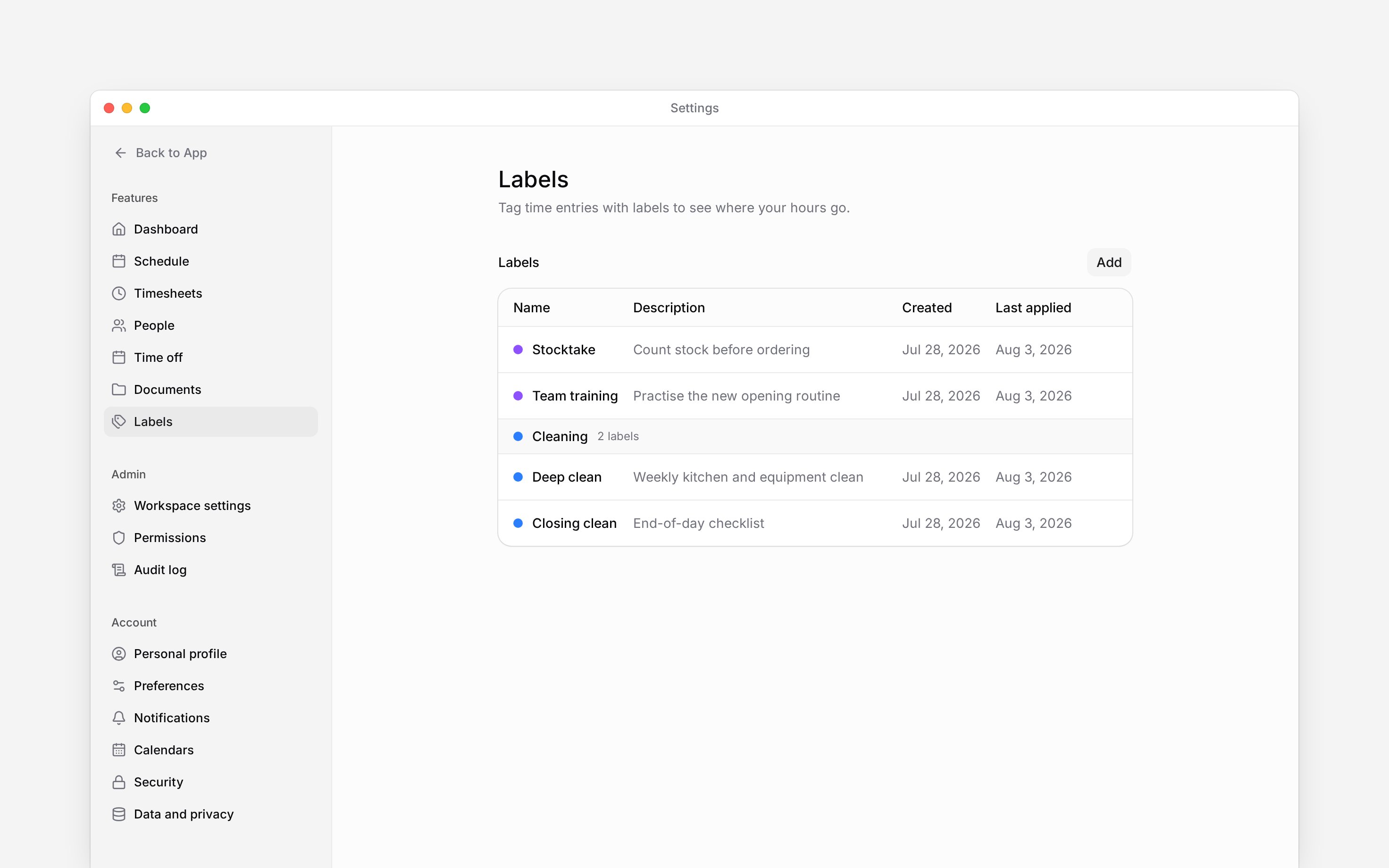
 Labels describe the work a shift or time entry belongs to, such as **Deep clean** or **Stocktake**. Create a shared set in **Settings → Labels** so people use the same terms and you can filter reports consistently.
Labels are in Beta and switched on per workspace. If **Settings → Labels** says **Labels are
off**, ask us to turn it on.
You need access to **Labels settings**. Creating, editing and deleting labels and groups also require the corresponding **Labels** permissions.
## Build your label list
Choose **Add → Group**, enter its name and choose a colour, then save. A group such as
`Cleaning` keeps related labels together; a label can also have no group.
Choose **Add → Label**. Give it a distinct name, an optional description and a colour. Select
its group if it belongs to one, then save.
Select the label from **Labels** on a shift or time entry. In Reports, use the labels filter to
narrow the records to that work. A clocking policy can make a label compulsory at clock-in;
while the workspace has no labels that rule is ignored.
Use descriptions to distinguish similar jobs. For example, explain that **Deep clean** means the end-of-week kitchen clean rather than the normal closing routine. A group organises the picker; it does not apply all its labels at once.
## Keep the list consistent
Open a label to edit its name, description, colour or group. Its three-dot menu has **Move up** and **Move down**. On desktop, right-click a label for **Move to group**, including **No group**.
Open a group to rename or recolour it. Use its menu to add a label directly into that group or move the group up or down. Renaming a label changes the name readers see when they look at work already tagged with it.
## Remove a label or group
Choose **Delete** from the label's menu and confirm. It disappears from the choices for new work. Existing shifts and time entries keep their historical reference, shown with **(deleted)** where that label is displayed. Deleting a label does not delete their hours.
Deleting a group leaves its labels intact and moves them to **No group**. If you only want to tidy the list, regroup or rename it first.
There is no **Archive** action for labels in the current interface. Do not delete a label expecting to restore it from an archive later.
Labels describe the work a shift or time entry belongs to, such as **Deep clean** or **Stocktake**. Create a shared set in **Settings → Labels** so people use the same terms and you can filter reports consistently.
Labels are in Beta and switched on per workspace. If **Settings → Labels** says **Labels are
off**, ask us to turn it on.
You need access to **Labels settings**. Creating, editing and deleting labels and groups also require the corresponding **Labels** permissions.
## Build your label list
Choose **Add → Group**, enter its name and choose a colour, then save. A group such as
`Cleaning` keeps related labels together; a label can also have no group.
Choose **Add → Label**. Give it a distinct name, an optional description and a colour. Select
its group if it belongs to one, then save.
Select the label from **Labels** on a shift or time entry. In Reports, use the labels filter to
narrow the records to that work. A clocking policy can make a label compulsory at clock-in;
while the workspace has no labels that rule is ignored.
Use descriptions to distinguish similar jobs. For example, explain that **Deep clean** means the end-of-week kitchen clean rather than the normal closing routine. A group organises the picker; it does not apply all its labels at once.
## Keep the list consistent
Open a label to edit its name, description, colour or group. Its three-dot menu has **Move up** and **Move down**. On desktop, right-click a label for **Move to group**, including **No group**.
Open a group to rename or recolour it. Use its menu to add a label directly into that group or move the group up or down. Renaming a label changes the name readers see when they look at work already tagged with it.
## Remove a label or group
Choose **Delete** from the label's menu and confirm. It disappears from the choices for new work. Existing shifts and time entries keep their historical reference, shown with **(deleted)** where that label is displayed. Deleting a label does not delete their hours.
Deleting a group leaves its labels intact and moves them to **No group**. If you only want to tidy the list, regroup or rename it first.
There is no **Archive** action for labels in the current interface. Do not delete a label expecting to restore it from an archive later.
 * **Limits:** label names are unique within the workspace ignoring case, up to 60 characters;
descriptions allow 500. A label belongs to at most one group, and a time record can have multiple
labels.
* **History:** deleted labels resolve for existing attached records, but are excluded from
active pickers and filters. Group deletion never deletes its labels.
* **Scope:** changing the
catalogue does not grant permission to edit the shifts or time entries carrying its labels. Report
visibility still follows the reader's own permissions.
## Next
Tag scheduled work with the right labels.
Filter worked time to the records you need.
## Still need help?
Email the Begin team and we'll get back to you.
Open the AI assistant and get instant answers based on these docs.
* **Limits:** label names are unique within the workspace ignoring case, up to 60 characters;
descriptions allow 500. A label belongs to at most one group, and a time record can have multiple
labels.
* **History:** deleted labels resolve for existing attached records, but are excluded from
active pickers and filters. Group deletion never deletes its labels.
* **Scope:** changing the
catalogue does not grant permission to edit the shifts or time entries carrying its labels. Report
visibility still follows the reader's own permissions.
## Next
Tag scheduled work with the right labels.
Filter worked time to the records you need.
## Still need help?
Email the Begin team and we'll get back to you.
Open the AI assistant and get instant answers based on these docs.