> ## Documentation Index
> Fetch the complete documentation index at: https://docs.begin.eu/llms.txt
> Use this file to discover all available pages before exploring further.
# Reading the timesheet
> Choose the period, stack the rows the way you are checking, and know what the totals at the top count.
export const BetaCallout = ({children}) => ;

 The timesheets page shows one period at a time. Three controls decide what you are looking at: the period itself, how the rows are stacked, and the filters narrowing them. Get those right and the question you came with usually answers itself.
## Pick the period
**Day**, **Week** and **Month** are under **Display**, and 1, 2 and 3 switch between them. A new workspace opens on the month. The arrows either side of the date move a period at a time and **Today** brings you back.
In the day and week views a strip of seven cells sits under the toolbar, one per day with the period's **Total** at the end. Click a day to narrow to it. The period you land on is remembered, so the page opens where you left it.
## Stack the rows the way you are checking
**Group by** is the setting that changes the page most, and there are ten options. You need three of them.
| What you are checking | Set **Group by** to |
| -------------------------- | -------------------------------------------------------- |
| One person's week or month | **Member** |
| Who was on, and when | **Day**, which is where a new workspace starts |
| What still needs you | **Status**, which puts pending and flagged work together |
Among the others: **Position** and **Location** for one job or one site, **Linked shift** for entries nobody matched to a shift, **Source** (the **Clocking mode** column) for how people are clocking in, **GPS** for where they were standing.
Rows inside a group run by time, latest first, and that is the only order offered. The table loads more as you scroll rather than all at once, so sorting by name or by longest day would put the window in the wrong order and is deliberately not there.
## What the totals at the top count
Four cards sit above the table, and two of them count something narrower than the rows underneath.
| The card | What it counts |
| ------------------------------------------------------- | ---------------------------------------------------------------- |
| **Weekly paid hours** or **Monthly paid hours** | Paid hours for the period, from **approved** entries only |
| **Weekly reported hours** or **Monthly reported hours** | Worked hours net of breaks, again from **approved** entries only |
| **Active timers** | People clocked in right now who have not clocked out |
| **Total entries** | Every entry in the period, in every status |
So the hour cards and the entry count answer different questions by design: the cards leave out every entry nobody has approved, including cancelled entries, and the count includes them. Cancelling keeps the row, its raw duration and its audit history visible. Approve what is pending and the hour cards rise to cover it. Where a filter puts the figures beyond what the calculator can produce, the card says **Not calculated for this filter** rather than showing a misleading zero.
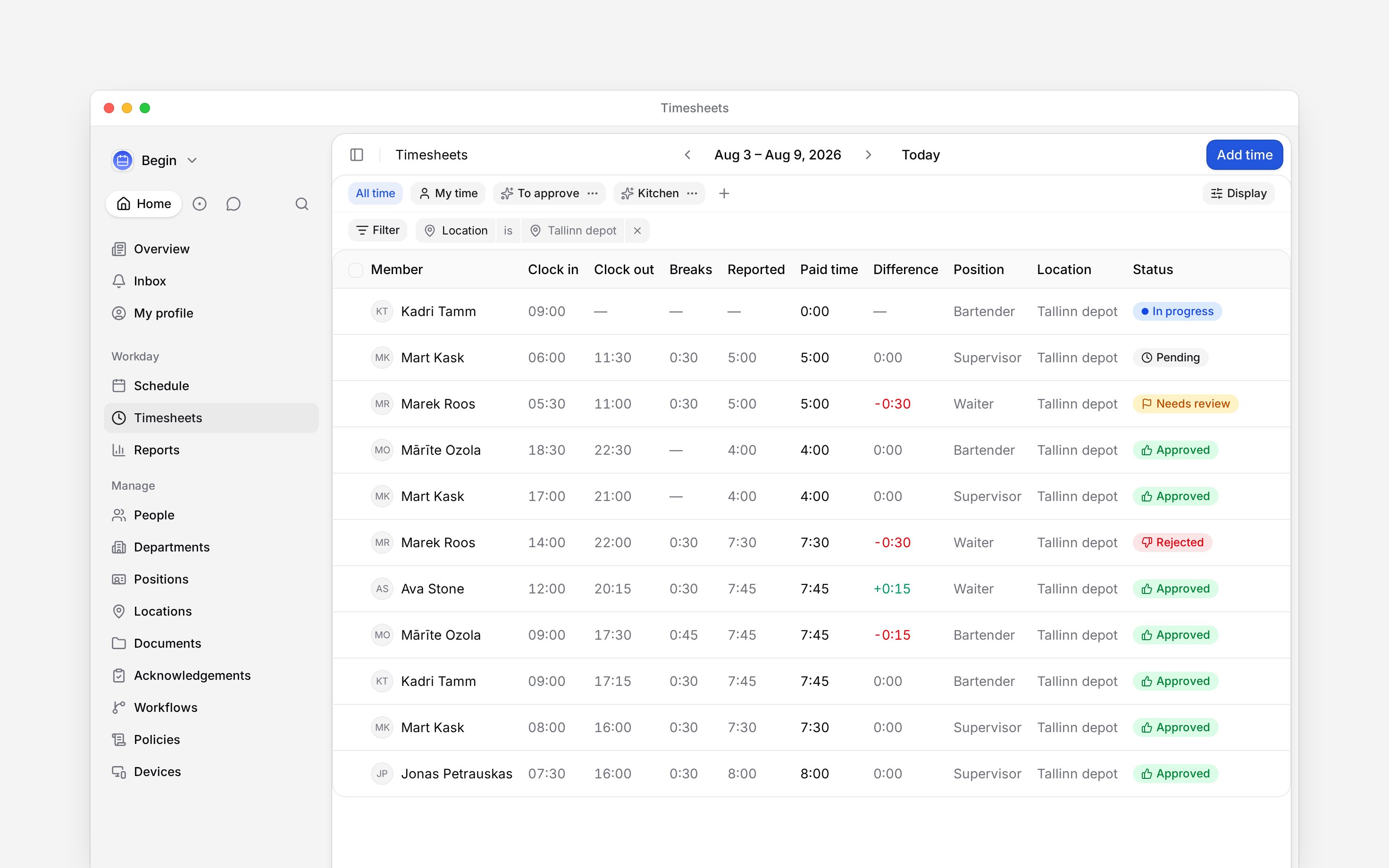
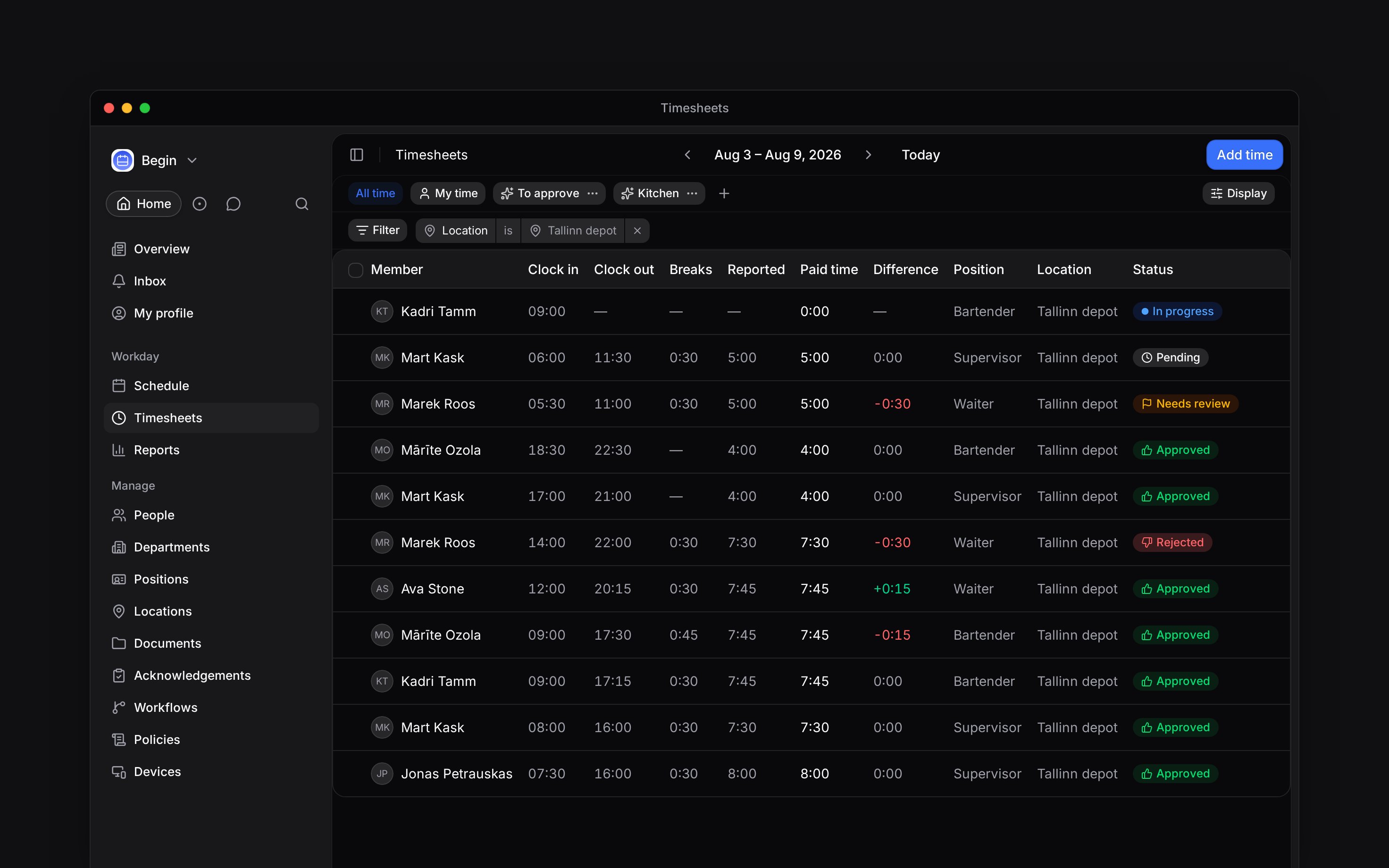
In the rows themselves, **Reported** is the clock time with every break taken out, **Paid time** adds the paid breaks back, and **Difference** compares that against the shift the entry is linked to. **Difference** stays empty rather than showing zero when there is no linked shift to compare with.
The timesheets page shows one period at a time. Three controls decide what you are looking at: the period itself, how the rows are stacked, and the filters narrowing them. Get those right and the question you came with usually answers itself.
## Pick the period
**Day**, **Week** and **Month** are under **Display**, and 1, 2 and 3 switch between them. A new workspace opens on the month. The arrows either side of the date move a period at a time and **Today** brings you back.
In the day and week views a strip of seven cells sits under the toolbar, one per day with the period's **Total** at the end. Click a day to narrow to it. The period you land on is remembered, so the page opens where you left it.
## Stack the rows the way you are checking
**Group by** is the setting that changes the page most, and there are ten options. You need three of them.
| What you are checking | Set **Group by** to |
| -------------------------- | -------------------------------------------------------- |
| One person's week or month | **Member** |
| Who was on, and when | **Day**, which is where a new workspace starts |
| What still needs you | **Status**, which puts pending and flagged work together |
Among the others: **Position** and **Location** for one job or one site, **Linked shift** for entries nobody matched to a shift, **Source** (the **Clocking mode** column) for how people are clocking in, **GPS** for where they were standing.
Rows inside a group run by time, latest first, and that is the only order offered. The table loads more as you scroll rather than all at once, so sorting by name or by longest day would put the window in the wrong order and is deliberately not there.
## What the totals at the top count
Four cards sit above the table, and two of them count something narrower than the rows underneath.
| The card | What it counts |
| ------------------------------------------------------- | ---------------------------------------------------------------- |
| **Weekly paid hours** or **Monthly paid hours** | Paid hours for the period, from **approved** entries only |
| **Weekly reported hours** or **Monthly reported hours** | Worked hours net of breaks, again from **approved** entries only |
| **Active timers** | People clocked in right now who have not clocked out |
| **Total entries** | Every entry in the period, in every status |
So the hour cards and the entry count answer different questions by design: the cards leave out every entry nobody has approved, including cancelled entries, and the count includes them. Cancelling keeps the row, its raw duration and its audit history visible. Approve what is pending and the hour cards rise to cover it. Where a filter puts the figures beyond what the calculator can produce, the card says **Not calculated for this filter** rather than showing a misleading zero.
In the rows themselves, **Reported** is the clock time with every break taken out, **Paid time** adds the paid breaks back, and **Difference** compares that against the shift the entry is linked to. **Difference** stays empty rather than showing zero when there is no linked shift to compare with.
 ## Narrow it, and keep the setup
Filter by member, position, location, department, status, source, GPS, labels or whether an entry has a linked shift. Only the filters your role can honour are offered, so a role that cannot see locations is not shown a location filter.
Labels are rolling out gradually, so your workspace may not have them yet. If the filter list has
no **Labels**, ask us to turn them on.
**My time** is already a filter on one person, so picking someone in the member filter keeps your choice and drops the pill back to **All time** rather than asking for two people at once. When the filters leave nothing to show, the table says the filters are hiding the rows and offers **Clear filters**, which drops the chips and **My time** but leaves a saved view's own filters in place.
When a set of filters is one you come back to, save it as a view: the pills in the toolbar hold **All time**, **My time** and whichever views you add, and each carries its own period and grouping. **Copy link** on a view shares exactly what you are looking at.
Nothing on this page downloads. Hours leave Begin through [Reports](/for-managers/reports/downloading-a-report), which exports the same records as CSV with the columns and the decimal format payroll needs.
**Context for an assistant answering questions about reading a timesheet.** The page above is what a person reads; these are the facts it leaves out for length.
* **Who can:** the **My time** pill appears only for a role holding **View others' time entries**, because a role without it is already narrowed to its own rows and the pill would do nothing. **Active timers** is hidden from that role too, and **Total entries** reads **My entries**.
* **Where:** **Display** holds the layout, the grouping, the ordering, the column properties, the duration format and the **Show timer** and **Show stats** toggles. The period and the chosen view live in the address, so a link carries them.
* **Limits:** the table loads a page at a time as you scroll, which is why ordering is chronological only. Columns for **Labels**, **Clocking mode** and **GPS** are off until you turn them on, and **Labels** needs labels switched on for the workspace at all.
* **Not supported:** no export, print or share from this page, and no per-column sorting.
* **Terms:** **Reported** is clock time less every break. **Paid time** adds paid breaks back. **Difference** is paid time against the linked shift's scheduled duration, and its hover breaks the arithmetic down.
* **Often confused with:** a report over time entries, which reads the same records but produces calculated figures such as norm hours and overtime that this page never shows.
## Next
Turning pending rows into hours that count.
What each hour figure means once the hours reach a report.
## Still need help?
Email the Begin team and we'll get back to you.
Open the AI assistant and get instant answers based on these docs.
## Narrow it, and keep the setup
Filter by member, position, location, department, status, source, GPS, labels or whether an entry has a linked shift. Only the filters your role can honour are offered, so a role that cannot see locations is not shown a location filter.
Labels are rolling out gradually, so your workspace may not have them yet. If the filter list has
no **Labels**, ask us to turn them on.
**My time** is already a filter on one person, so picking someone in the member filter keeps your choice and drops the pill back to **All time** rather than asking for two people at once. When the filters leave nothing to show, the table says the filters are hiding the rows and offers **Clear filters**, which drops the chips and **My time** but leaves a saved view's own filters in place.
When a set of filters is one you come back to, save it as a view: the pills in the toolbar hold **All time**, **My time** and whichever views you add, and each carries its own period and grouping. **Copy link** on a view shares exactly what you are looking at.
Nothing on this page downloads. Hours leave Begin through [Reports](/for-managers/reports/downloading-a-report), which exports the same records as CSV with the columns and the decimal format payroll needs.
**Context for an assistant answering questions about reading a timesheet.** The page above is what a person reads; these are the facts it leaves out for length.
* **Who can:** the **My time** pill appears only for a role holding **View others' time entries**, because a role without it is already narrowed to its own rows and the pill would do nothing. **Active timers** is hidden from that role too, and **Total entries** reads **My entries**.
* **Where:** **Display** holds the layout, the grouping, the ordering, the column properties, the duration format and the **Show timer** and **Show stats** toggles. The period and the chosen view live in the address, so a link carries them.
* **Limits:** the table loads a page at a time as you scroll, which is why ordering is chronological only. Columns for **Labels**, **Clocking mode** and **GPS** are off until you turn them on, and **Labels** needs labels switched on for the workspace at all.
* **Not supported:** no export, print or share from this page, and no per-column sorting.
* **Terms:** **Reported** is clock time less every break. **Paid time** adds paid breaks back. **Difference** is paid time against the linked shift's scheduled duration, and its hover breaks the arithmetic down.
* **Often confused with:** a report over time entries, which reads the same records but produces calculated figures such as norm hours and overtime that this page never shows.
## Next
Turning pending rows into hours that count.
What each hour figure means once the hours reach a report.
## Still need help?
Email the Begin team and we'll get back to you.
Open the AI assistant and get instant answers based on these docs.