


 Create a department when you need to organise a part of your team. You can start with a name and add its positions and people later.
If you cannot see Departments or Add department, ask your workspace administrator to check
your role’s access.
Set up the department
1
Open Departments
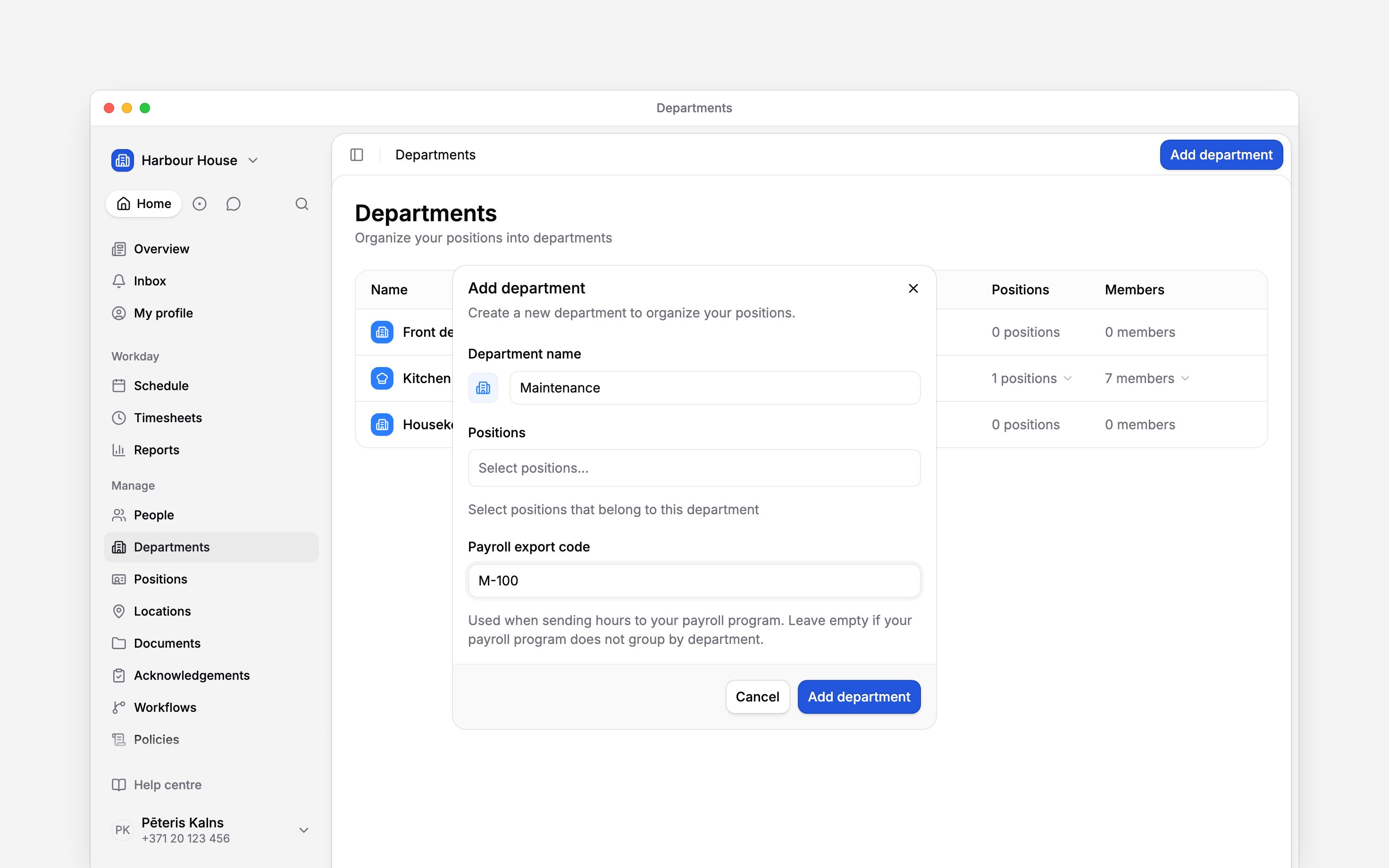
Choose Departments in the sidebar, then Add department.
2
Name it
Enter the Department name. Use the button beside the name to choose its icon and colour.
3
Choose its positions
Select the jobs that belong here under Positions. You can leave this empty while you set up
the team.
4
Add a payroll code if you use one
Enter the code your payroll program uses under Payroll export code. Leave it empty if your
payroll program does not group by department.
5
Save it
Click Add department. The department appears in the list.
Add the people separately
The Positions selection links jobs, not people. A department can show positions and still have no people. Open each person’s profile to assign their department. A payroll export code identifies the department for payroll mappings. Entering it does not send hours or set up an integration.Next
Assigning people and positions
Choose who belongs to the department.
Managing departments
Change details, reorder the list or remove a department.
Still need help?
Contact support
Email the Begin team and we’ll get back to you.
Ask Begin AI
Open the AI assistant and get instant answers based on these docs.