


 File employment changes with Estonia’s Employment Register from Begin. By default, contract changes wait in Pending filings for you to review before they reach TÖR.
Beta
The employment register is rolling out gradually for Estonian workspaces on Pro. If
Employment register (TÖR) is missing from Settings → Integrations, ask us about enabling
it. Your role needs permission to manage integrations.
Set up the connection
1
Confirm the employer
Open Settings → Integrations → Employment register (TÖR) → Setup. Check the legal name and
company registry code. Begin then checks that the company approved your workspace: Company
verification reads Waiting for Begin to verify until it has, and the connection cannot be
turned on before. Contact Begin support to arrange the check.
2
Grant access in e-MTA
A person authorised to grant the company’s access signs in to e-MTA. Under settings and access
permissions, open the machine-to-machine interfaces. Give the interface shown in Begin
permission to change employment register data, then save.
3
Verify the access
Return to the setup wizard and run the verification. Continue once it confirms that access
works.
4
Import existing registrations
Import what the register already holds to link entries to matching contracts. Review the matched
and unmatched counts, then finish setup.
Review a hire, change or leaver
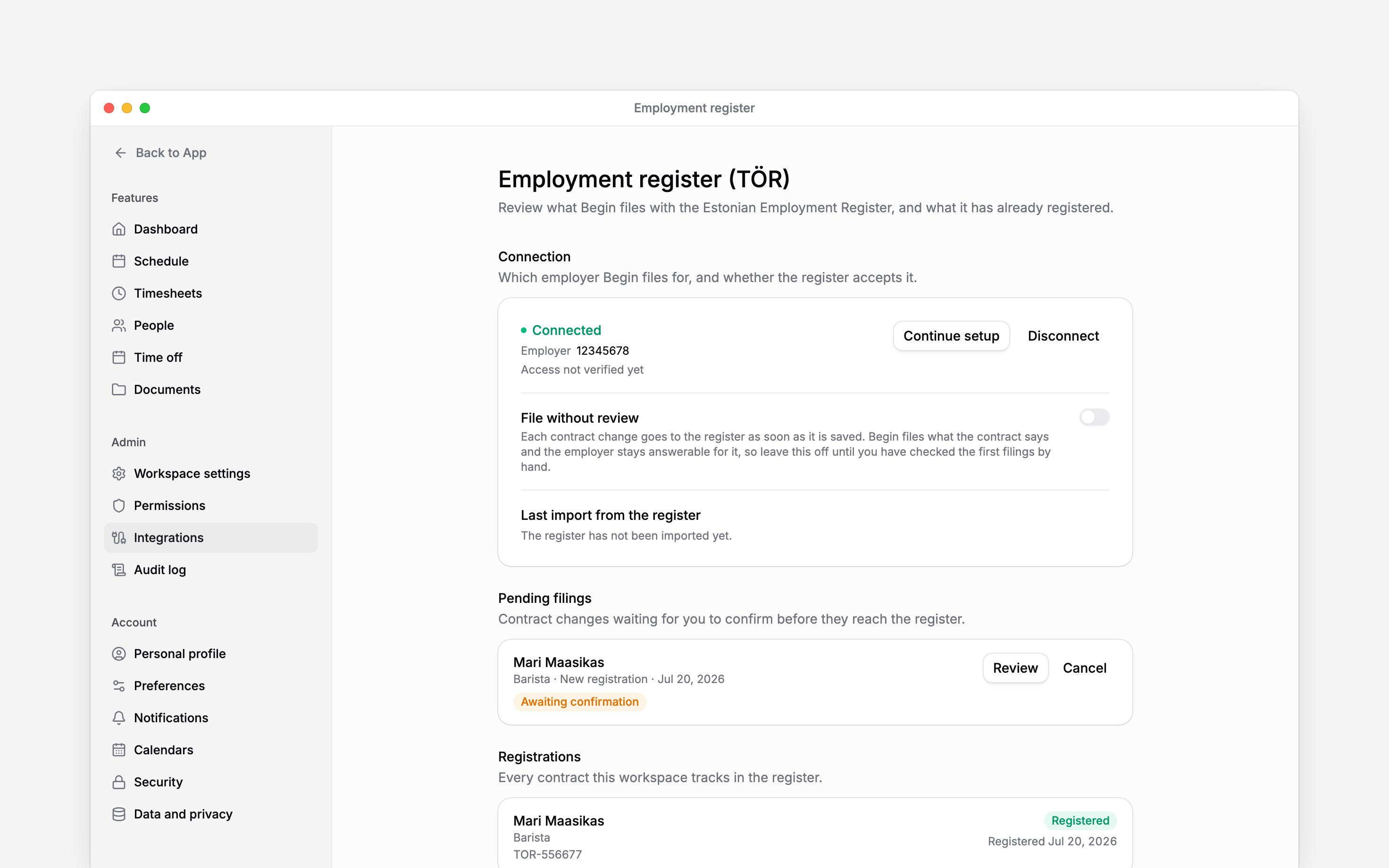
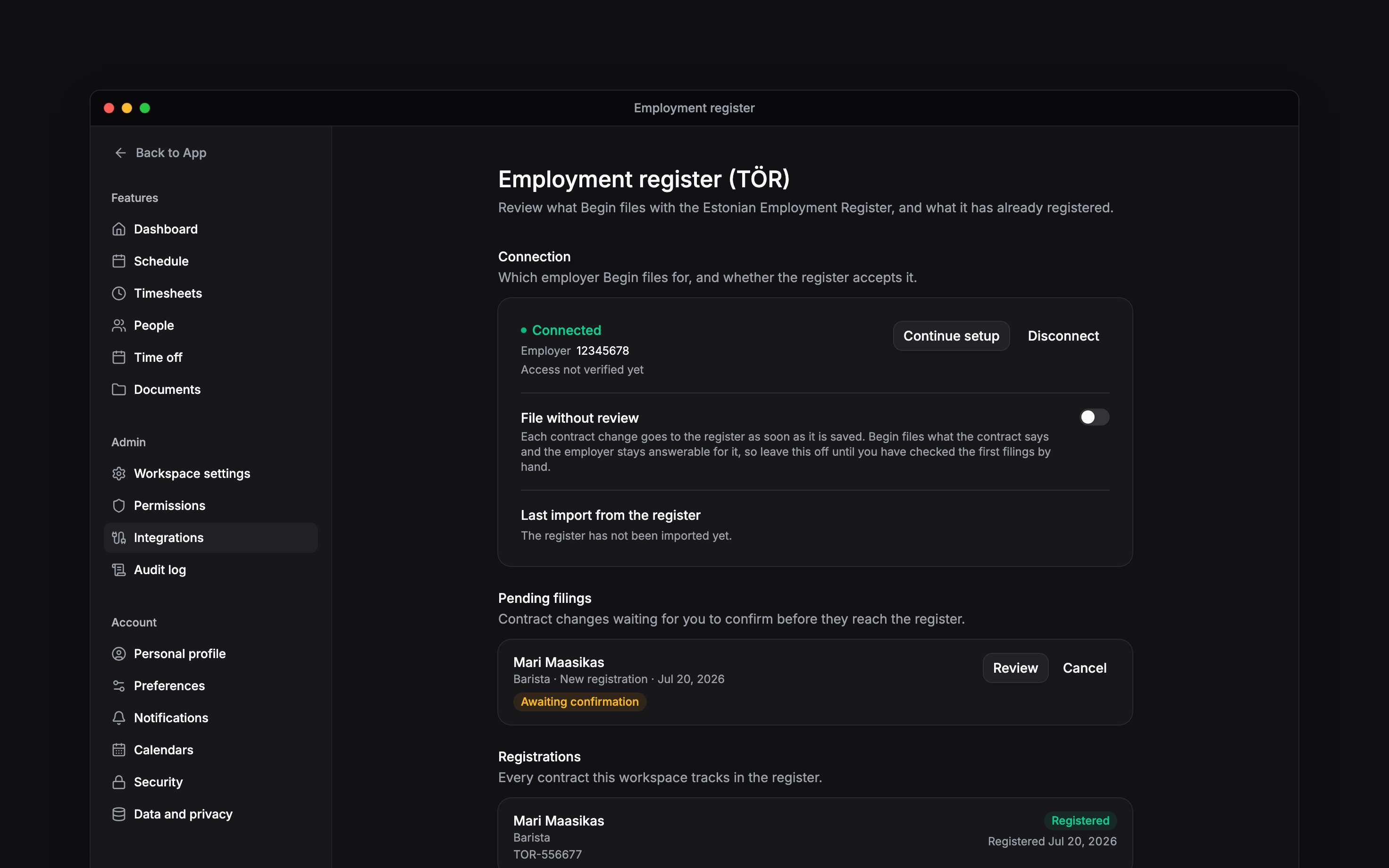
Save the contract start, change, suspension or end in Begin. Open its row under Pending filings, review the person, personal code, dates and change, and fill what the register still needs: pick the Occupation code from the Estonian classification and check the Workplace address. Choose File with TÖR. The personal code shows only if your role can see that person’s personal data, or the filing is about you. Otherwise the filing shows Hidden next to the person’s name, and Begin still sends the code to the register. The row reads Queued while it waits, Filing while it is sent and Filed when the register accepts it. Check Registrations for the register entry ID. A hire becomes registered; a successfully filed leaver becomes terminated. If the register refuses a filing, the row says why and Begin retries on its own; Retry sends it now. A filing replaced by a newer change reads Superseded. Cancelling a pending filing does not tell the register about the change. Begin prepares it again only when the contract changes.Control automatic filing
Leave File without review off until you have checked the first filings by hand. Turning it on queues a contract change automatically when its required details are complete. Incomplete filings still need you under Pending filings. The employer remains responsible for the details. Disconnecting stops new filings and blocks queued filings that have not been sent. A request already sent cannot be recalled. Entries already in the register stay there, and Tervisekassa remains unchanged. Begin verifies a registration number for one workspace only. If it is verified for another workspace, Begin shows an error when you save the number or connect. If another workspace saved it without being verified, your save goes through, and Begin moves the number to your workspace when it verifies your company. To correct the number, disconnect both TÖR and Tervisekassa first, then edit it in workspace settings. Begin then verifies the company for the new number before either can reconnect. The e-MTA access remains separate from the eesti.ee mandate used by Tervisekassa.Next
Tervisekassa
Connect sick-leave certificates separately.
Choose an integration
Compare providers and connection methods.
Still need help?
Contact support
Email the Begin team and we’ll get back to you.
Ask Begin AI
Open the AI assistant and get instant answers based on these docs.