


 Connect Tervisekassa so certificates of incapacity for work become absences on the schedule. A board member first grants Begin the company’s mandate.
Beta
Tervisekassa is rolling out gradually for Estonian workspaces and needs the Pro plan. If it is
missing from Settings → Integrations, ask us about enabling it. Your role must also allow
managing integrations.
Grant the mandate
1
Check the employer
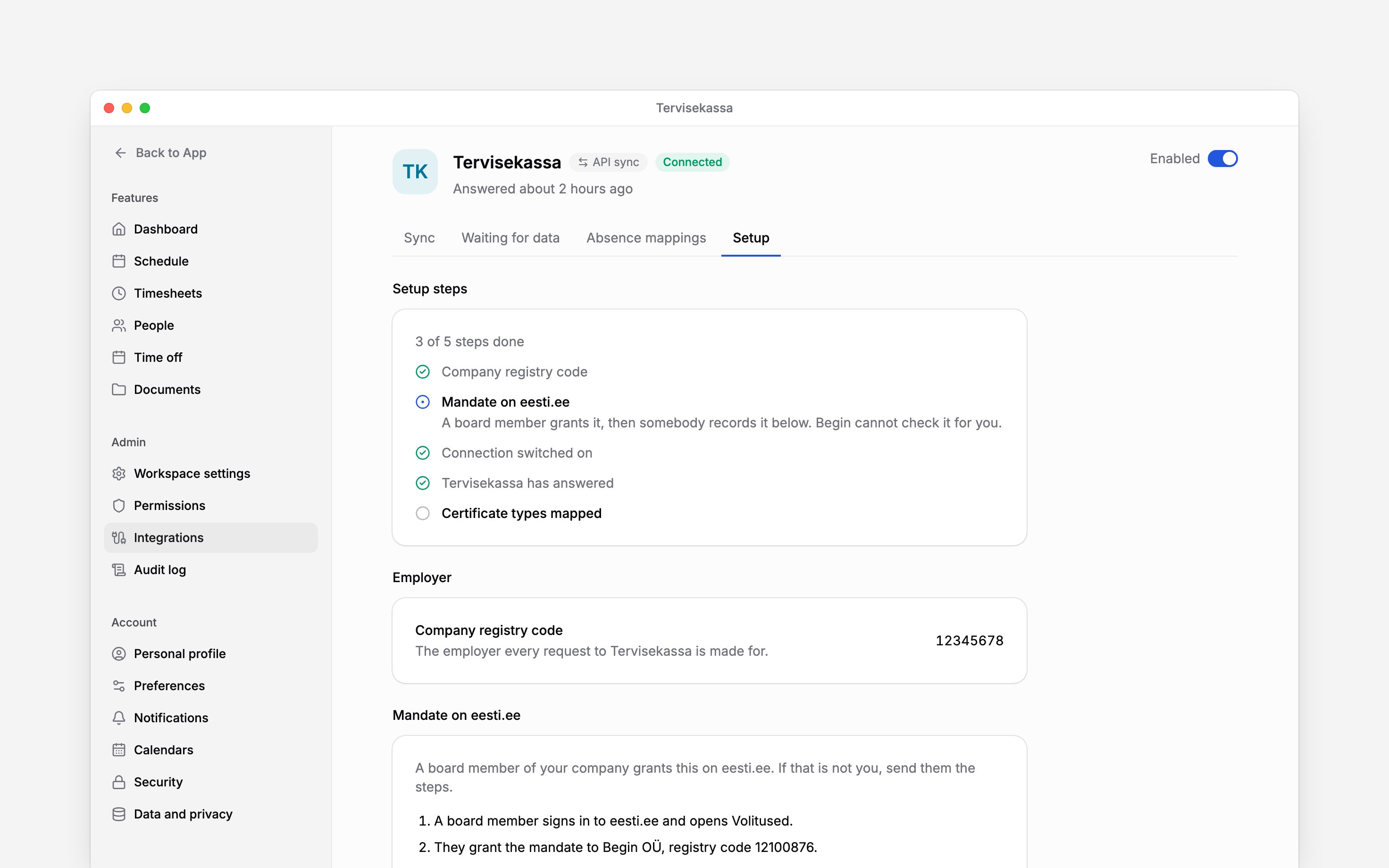
Open Settings → Integrations → Tervisekassa → Setup. Check the company registry code; add it
in workspace settings if it is missing. Begin then checks that the company approved your
workspace: Company verification reads Waiting for Begin to verify until it has, and the
connection cannot be turned on before. Contact Begin support to arrange the check.
2
Ask a board member to grant access
In Mandate on eesti.ee, use Open eesti.ee or send the displayed steps to a board member.
They sign in, open Volitused, and grant Begin OÜ, registry code
12100876, access to the
Tervisekassa employer X-tee services.3
Record the confirmation
After the board member grants access, choose Mark the mandate as granted in Begin. This
records their confirmation; it does not grant the mandate.
Choose the absences colleagues see
Open Absence mappings and map each certificate type you use to a time-off policy. Create the policy first if none is available. Use Reason overrides when a particular reason should use a different policy, such as a work accident rather than ordinary sick leave. If Tervisekassa corrects a certificate’s reason, Begin moves the existing absence to the policy for the new reason rather than adding a second one. Everyone who can read the schedule sees that the person is away. They see which leave it is only if the policy has Show the leave type to colleagues on, or if they hold View others’ time-off details. The absence’s history names Tervisekassa as its source, and anyone who can open the absence sees that, even when the leave type is hidden. The certificate itself, with its type, reason and number, stays with the people who manage integrations. The reason code Begin copies onto the absence is separate: reading it on the schedule or in a report takes the View others’ time-off details permission, so colleagues see the absence without it. Downloaded report files follow the same permission. No diagnosis is fetched or stored. These absences arrive approved and published. Consider that automatic visibility before turning on the connection. A certificate over days that already hold time off is booked beside it, so both absences show. Decide which one stands: shorten or remove the other absence, or remove the Tervisekassa one, which then stays removed. While Tervisekassa still lists the certificate, shortening its absence does not last, because the next check sets it back to the certificate’s dates. Begin AI’s conflict check lists these overlaps.Connect and check
Turn on the header switch. Begin checks hourly; use Check for certificates on Sync to ask now. Check the run result and the resulting absences. Closed certificates that need your data appear under Waiting for data.Connected means Tervisekassa answered. An empty result does not prove that the eesti.ee
mandate is still valid. Check the mandate if expected certificates do not arrive.
Next
Send certificate data
Complete the employer’s part after a certificate closes.
Employment register
Set up employment filings separately.
Still need help?
Contact support
Email the Begin team and we’ll get back to you.
Ask Begin AI
Open the AI assistant and get instant answers based on these docs.