


 An open shift is an ordinary shift with Open shift as its assignee instead of a person. The hours, position, location and notes are set; only the name is missing.
Beta
Open shifts are rolling out gradually, so your workspace may not have them yet. If you do not see
Open shift anywhere on your schedule, ask us to turn it on.
What an open shift is, and is not
Only a shift can be left open. Time off and availability always belong to a person, so Begin refuses to leave those open.
Post one
1
Open the schedule
Go to the period you are filling.
2
Ask for a new shift
Open Add in the toolbar and choose Open shift, or search for New open shift in the
command palette (Cmd / Ctrl + K). Either opens the shift form
with Open shift already chosen as the assignee.
3
Fill in the shift you need
Set the date, the times, and the position and location. Fill these in even where a policy does
not require them: they are what decides who the shift is suggested to.
4
Save and publish
An open shift is a draft until you publish the period, the same as any other shift. Publishing
does not offer it to anybody: it is what makes the shift ready to be offered.
5
Send the offer
Open the shift, choose the Offer to row under the assignee, and choose Send offer.
Find the ones still open
Open shifts sit in their own Open shift row alongside the roster, so a gap is visible while you read the week.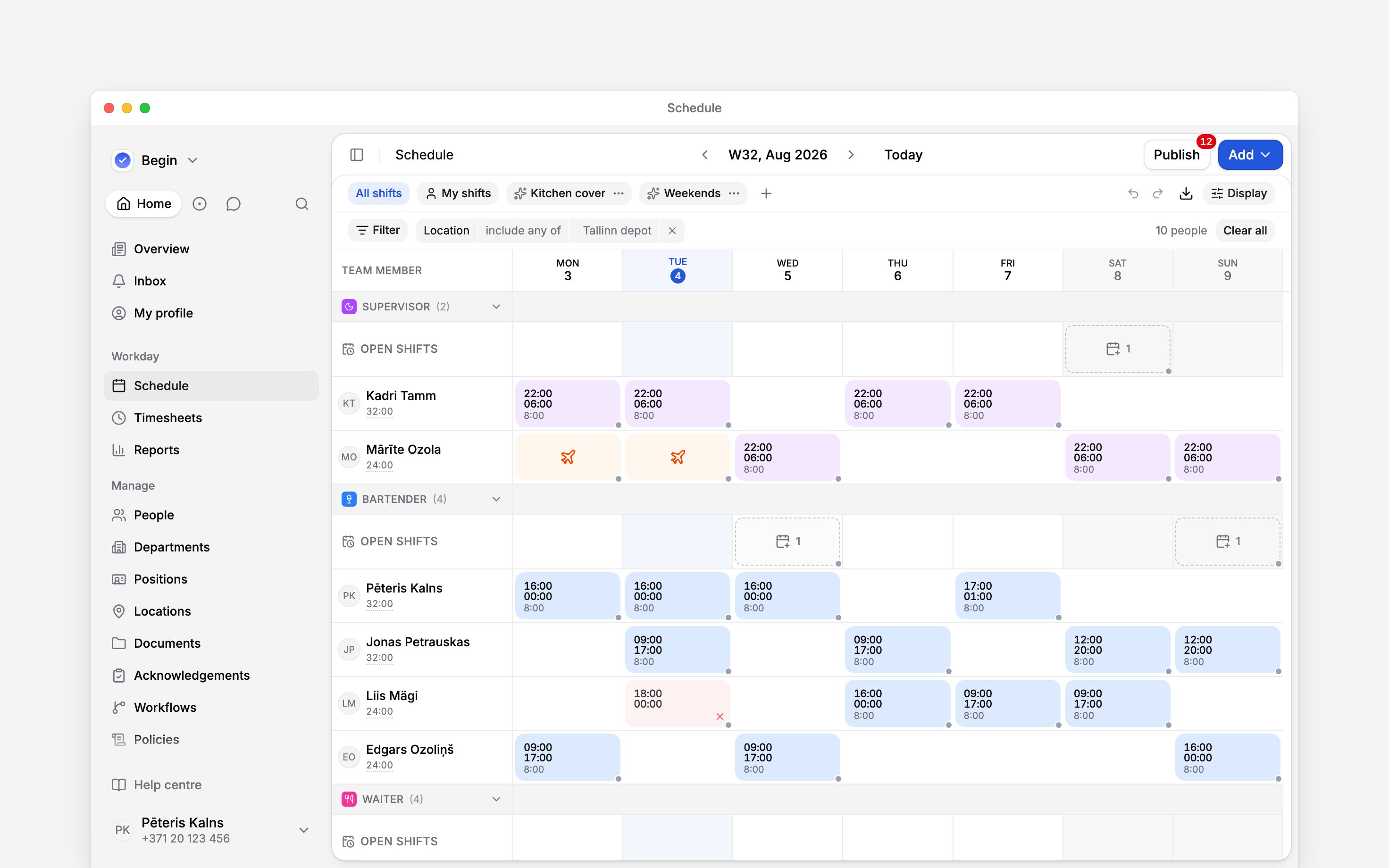
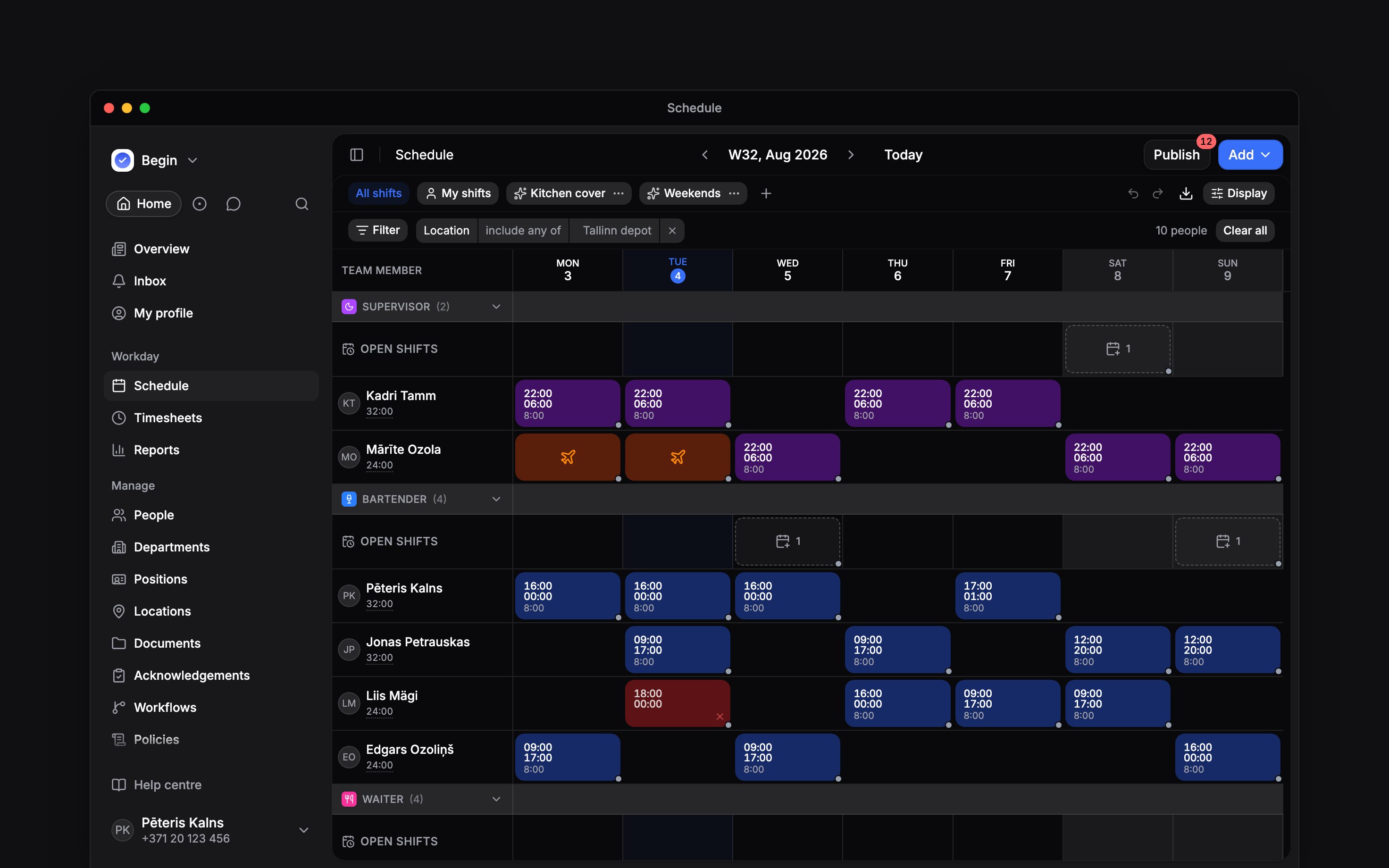
Every position band keeps its own Open shifts row, whether or not anything is waiting in it
Send the offer, and change who has it
Nothing reaches anybody until you send it. Offer to, under the assignee, shows who the offer stands for, and choosing the row opens the offer dialog. Who gets the offer lists the people it will go to. The dialog opens on the ones who hold the shift’s position and location and have nothing in those hours, so you can send it without changing anything. Where few people match, anybody a rule blocks outright is left unticked too: the offer is not one they could accept. Remove somebody with the bin beside their name. Add people searches the whole active roster, Suggested first and Everyone else under it. Nobody is kept out: a clash, a scheduling rule or the wrong position reads as a line under the name, and you can still offer them the shift. The same line follows them into the list, until they answer. A clash with someone’s clock-in shows only if you can see their timesheet. To look further than the shift’s own location, ask Begin AI who can cover it. It lists the people in the shift’s position who are free for those hours at every location you can see, and says when your clocking policy would stop someone clocking in there (Taking actions with Begin AI). Choose Send offer when the list is right. Everybody ticked gets an inbox card with Accept and Decline, and a push notification. They can also answer inside the shift itself on the schedule. The first to answer gets it. Only the people you offered it to can see the shift, unless their role lets them see unpublished shifts. Come back and the button reads Update offer: somebody added gets a fresh offer, somebody removed who has not answered loses theirs silently, and anybody who answered keeps their answer. Their own profile history still records the invitation, and says it was withdrawn. It says the same for an offer a colleague took first, and for one nobody answered before the shift started. Declining answers for that person alone, and they can still take the shift later. Three identical open shifts on one day reach each person as a single offer counting three seats. Offer to… is also on the right-click menu of every open shift. Several open shifts on one day draw as one stacked card; right-click it to offer them all. For shifts on several days, select them by dragging across the grid or with a modifier-click, then right-click one of the open shifts. The dialog lists the shifts by day, and sending gives each one the list you picked, replacing any list it had. Drafts, started shifts, shifts with a claim awaiting approval and assigned shifts are left out, and the dialog says how many. Each person gets an inbox card for every group of identical shifts, but only one push notification per send. Someone given new offers in several groups gets a push that counts them and opens the inbox; someone new to one group gets that card’s own push. Your compliance rules decide who can take it, not only what you can save. A claim that would break one is refused: Keep anyway is your override, so assign the shift yourself if you judge the breach acceptable. Moving an offered shift updates the cards people hold and tells them again. Offers close when the shift starts, when it is taken, or when you unpublish or delete it.Add Open shift claim approval from the library under New workflow in Workflows, then
publish and activate it, and accepting only sends a request to whoever posted the shift. The shift
stays open until it is approved, and a request still waiting when the shift starts closes by
itself.
Can I turn shifts I have copied into open shifts?
Can I turn shifts I have copied into open shifts?
Yes. Copy them with Copy all, then right-click a day in an Open shifts row and choose
Paste as open shift. Copy with assignments keeps each person on their copy instead.
Can a shift pattern roster open shifts?
Can a shift pattern roster open shifts?
Yes, and it can publish them as it generates, the same as a rota for a person. Publishing still
sends nothing: offer each day’s shift when you are ready for it to go out.
Can I hide the Open shifts rows while I work?
Can I hide the Open shifts rows while I work?
Yes. Untick Open shifts under Display, in Rows. The open shifts themselves are
untouched, and ticking it again returns the rows.
Next
Publishing
Nothing about an open shift reaches the team until you publish it.
Shift swaps
The other way a shift changes hands, when somebody is giving one up.
Still need help?
Contact support
Email the Begin team and we’ll get back to you.
Ask Begin AI
Open the AI assistant and get instant answers based on these docs.