


 A time entry is a clock record: what somebody actually worked, against the shift you planned for them. Timesheets sits under Workday in the sidebar and collects those records, whether they came from somebody clocking in, from a wall-mounted terminal, or from you typing one in. Approval puts an entry into approved-only totals and default payroll exports; raw rows, counts and durations retain every status.
Start here
Or ask Begin AI (Cmd / Ctrl + J):Show me last week's approved timesheet hours by team member.
Where approval matters
Every entry carries one of five stored statuses. In progress is not a stored status, only what a running timer looks like. A cancelled running entry therefore still appears as In progress until somebody clocks out. It remains under both In progress and Cancelled status filters so neither the live timer nor its recorded status is hidden.
Weekly paid hours at the top of the page counts approved entries only. Approved-only report totals also leave out pending, review, rejected and cancelled entries, while raw report rows, counts and durations keep them available to filter and inspect. A month that looks short is often a month nobody has approved yet, not a month nobody worked.
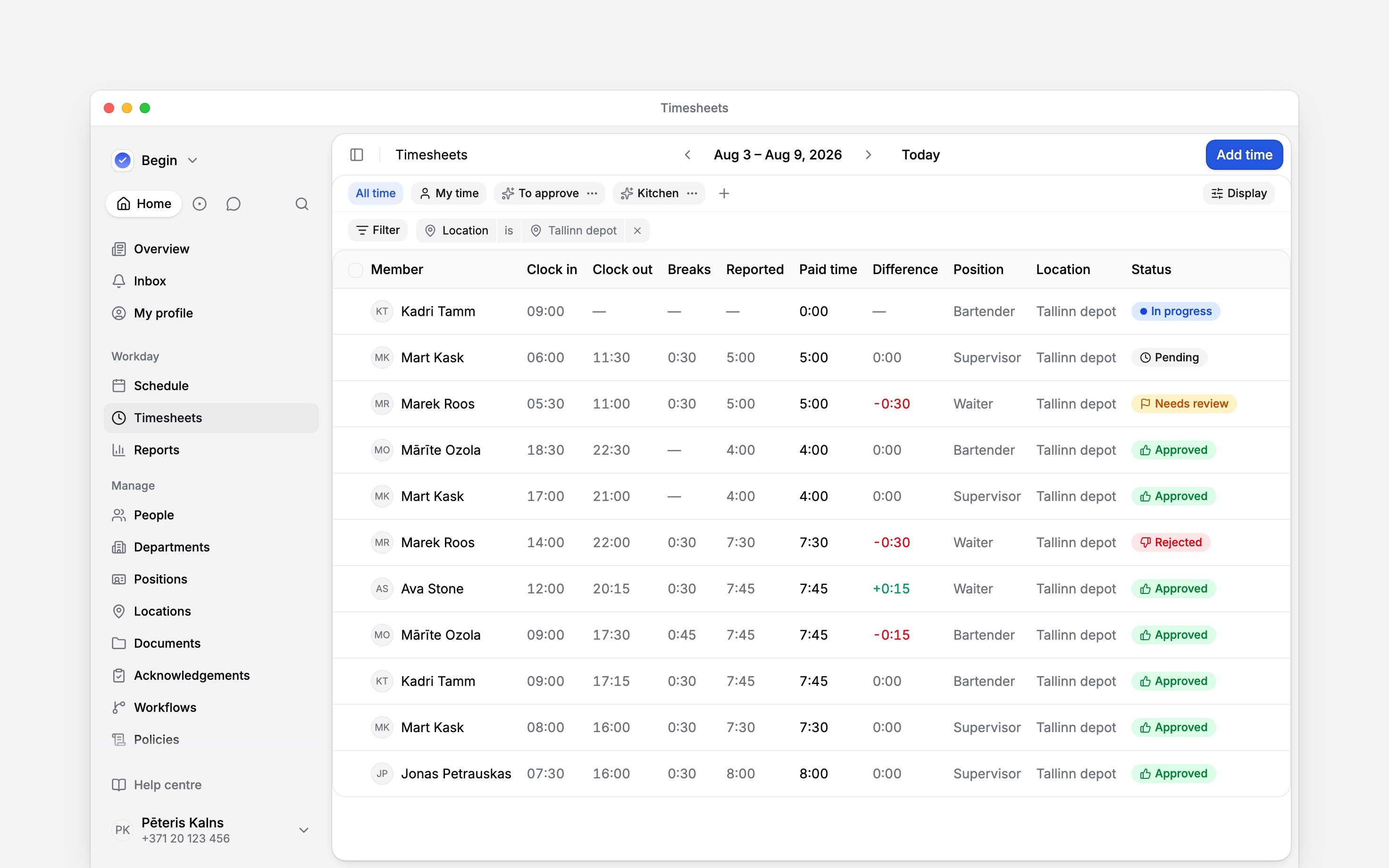
One week of records, carrying several common entry statuses
Most of the rules live somewhere else
Very little of what you read on a timesheet is decided on the timesheets page. Policies and settings move punches, add breaks and close timers before you ever see the entry. If a figure surprises you, Settings and policies says which surface owns which decision. Workflows is the separate thing you build yourself, to make Begin act on an entry without anybody watching.Does anybody submit a timesheet?
Does anybody submit a timesheet?
No. There is no submit step and no weekly sign-off. An entry is reviewable the moment it exists,
and your team never confirms a period as finished.
Does approving lock the entry?
Does approving lock the entry?
No. There is no period close in Begin. An approved entry stays editable by anyone whose role
reaches it, so approval is a statement about the hours rather than a lock on them.
Next
Tracking time
The clock, the pauses, and adding time for somebody who forgot.
Approving timesheets
How a pending entry becomes hours that count.
Still need help?
Contact support
Email the Begin team and we’ll get back to you.
Ask Begin AI
Open the AI assistant and get instant answers based on these docs.