


 Request a workspace export when you need a copy of the records held by the whole workspace. It includes records for people who have left, alongside schedules, timesheets, payroll runs, documents and settings.
Only the workspace owner can request and download this archive. An administrator who is not the
owner does not see the workspace export card.
Request the archive
1
Open the correct workspace
Check the workspace switcher, then go to Settings → Workspace settings.
2
Request the export
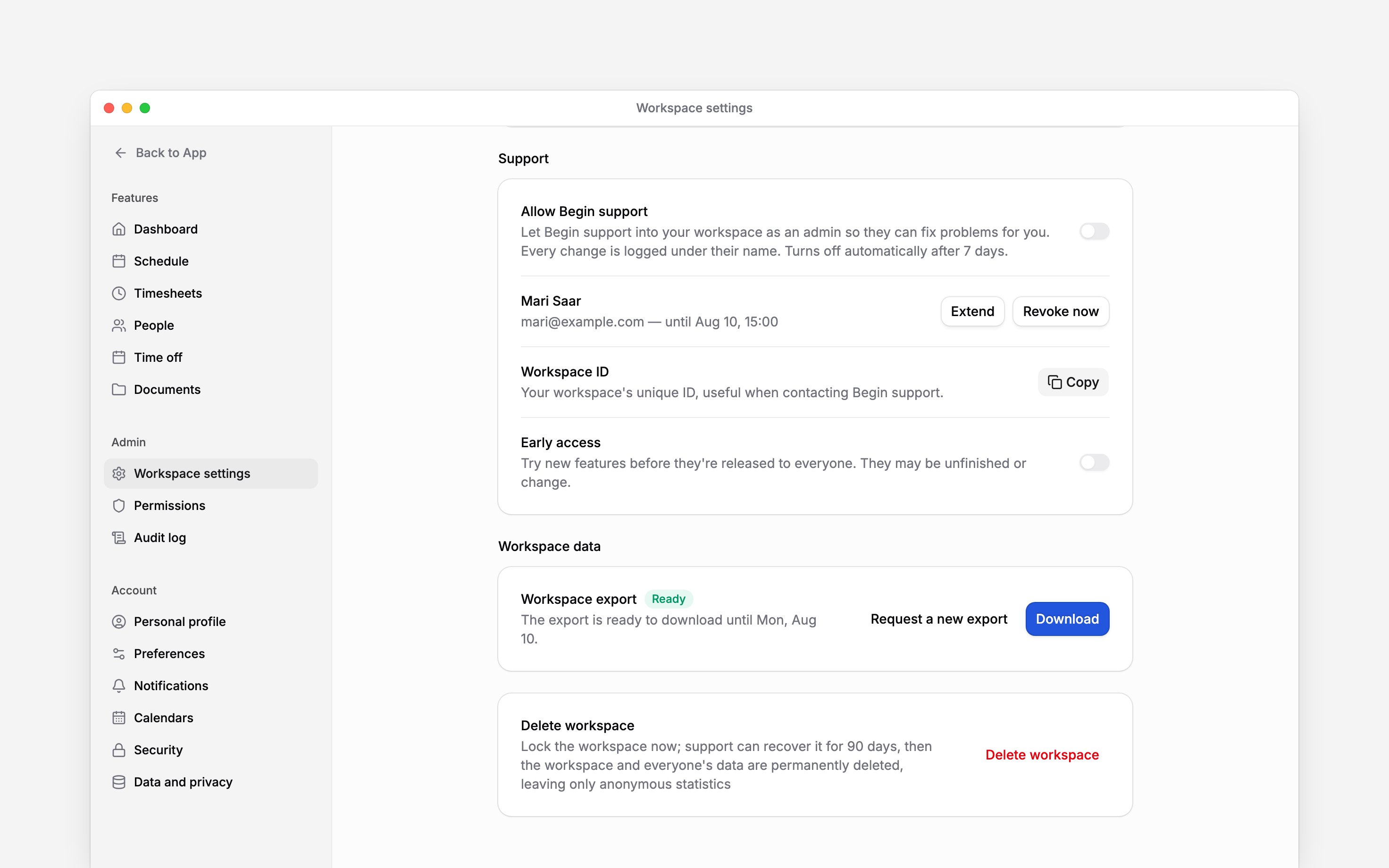
Scroll to Workspace data and choose Request export in the Workspace export row.
3
Wait for preparation
The row shows that Begin is gathering your data. You can leave the page while it runs; larger
workspaces can take longer.
4
Download the completed archive
Return to the same row. When it is ready, select Download and save the ZIP file before the
expiry date shown.
Resolve an unavailable download
If Workspace data is missing, check that you are the owner of the selected workspace. Giving someone general workspace-management permission does not grant export access.
Download before deleting
For only your own records in the current workspace, use your personal data export. That is a separate archive with different access and contents.Next
Delete a workspace
Prepare to close the workspace.
Audit log
Review recorded workspace activity.
Still need help?
Contact support
Email the Begin team and we’ll get back to you.
Ask Begin AI
Open the AI assistant and get instant answers based on these docs.