


 If a report total looks wrong, check its period, filters and calculation state first. A list of clock records can include work that a calculated hour total excludes, and a blank or marked cell does not always mean zero hours.
Read the marks
Open Info in the report toolbar and read the key at the foot of the panel, such as Reading the table, opening it if it is closed. It tells apart a measured zero, a figure with a calculation note, a dash where nothing was measured, and a person whose hours cannot be calculated. An ⓘ beside a person’s name means their figures were not calculated, and says why. A rule that empties a whole column is stated once in Info, not on the column. On a report of several blocks, Needs attention lists the blocks that need it; each row opens one. Wait for loading hour cells to finish before comparing or exporting them. A calculation still in progress is not a measured zero. A large list of records shows its rows first and then counts the whole report. While it counts, a spinner stands where the row count goes (point at it or tap it to read Counting rows…), each section heading shows a loading bar in place of its count, and Info says Counting rows…. The count, the section counts and Not included appear once counting finishes, so wait for them before comparing. After a Begin update to how hours are calculated, a report can show its earlier figures until Begin recalculates them. A download or print waits for the new figures, so it can differ from the screen meanwhile. Not included lists what a block read but did not count: unapproved time entries, shifts outside the Status filter, and availability, unavailability and time-off blocks, which a Shifts report never counts. Review in timesheets or Review in schedule opens them. On a report of several blocks, open the mark on the block itself. Chart too crowded appears when a chart holds more bars or slices than it can draw clearly, and says how far to filter it to read each one.Explain a difference
1
Check the same period and people
Confirm the report’s range, grouping and filters match the records you are comparing.
2
Open the explanation
Open the block’s own mark and read Totals; on a report of one block the toolbar’s Info
holds it. The mark reads the condition: red where the calculation refused or failed, amber where
a rule cut coverage you cannot see, and muted where a rule worked as designed. Needs
attention names the first two; Not calculated names a figure the report’s own scope could
not answer.
3
Compare the totals
Totals says whether the calculated totals differ from the records, and why. Choose Show
totals to see each affected column’s calculated total beside the total of its records.
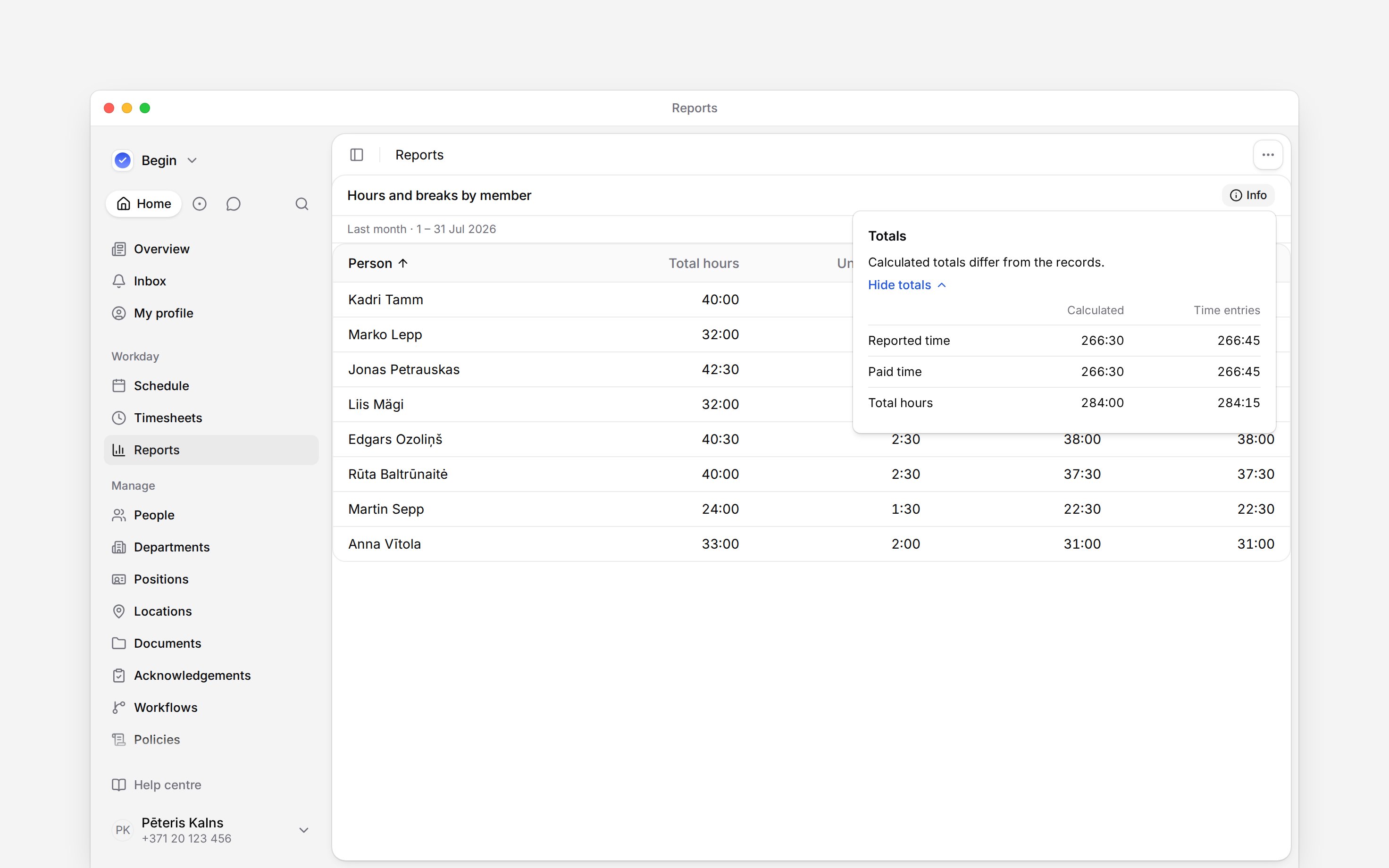
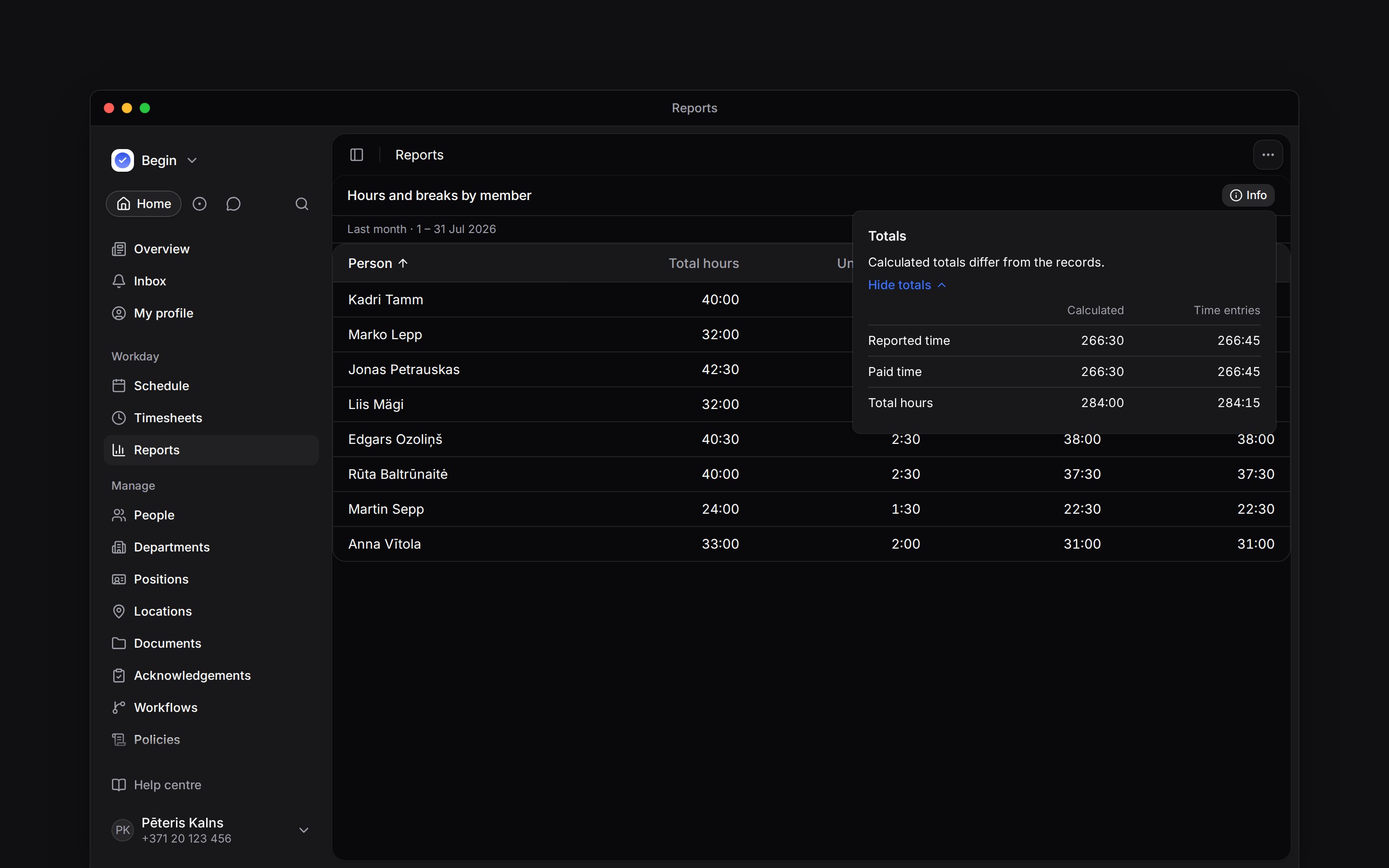
Without a status filter, calculated time-entry hours count approved work. A status filter picks
the entries they are calculated from, so Pending shows the norm and overtime those pending
hours would give. If the explanation names unapproved entries, review them before using the hours
for payroll.
Recover an unavailable figure
Where calculated hours reach Location, Position and Date summaries, their hour columns are calculated too; norm, overtime and period figures still need Person.
A permission restriction can also withhold figures that would reveal unpublished shifts. Ask an administrator to check access rather than treating those cells as zero.
A rule can remove whole rows rather than figures. A leave table holding only colleagues you cannot see keeps none of them, and says All rows withheld with the rule in place of its rows. No filter change brings those rows back, so ask an administrator to check access rather than reading the period as empty.
Compare a chart with a table
Charts that sum paid time by person or date use calculated hours too. Counts and break or time-off figures come from records. Other chart groupings may not support the same hour calculation. A chart waits for its whole calculation before it draws anything, because every bar and every metric figure adds people together. While it waits it shows a placeholder instead of a figure, so a chart that has not finished is never a zero. If the calculation stops before it finishes, the block says Still calculating and offers Try again. A chart that says Not calculated because your role cannot start the hours calculation needs access, not another try: ask an administrator for access to those people’s timesheets. After a Begin update to how hours are calculated, a chart can keep its earlier figures until they are recalculated. Open Info, where a chart a permission rule shortened is listed under Needs attention with the rule, then compare the same measure, people, period and filters. A chart’s own menu offers View chart data, which replaces the plot with a table of its labels and values, listed in the order the plot draws them and without the empty buckets the plot hides. A breakdown of more than eight series is the one difference: the plot and a downloaded file fold every series past the seventh into Other, while the table names each one. Changing the picture from a chart to a table does not, by itself, explain a difference.Next
The hour columns
Check what each hour figure measures.
Reading a day breakdown
Find the days and records behind one person’s total.
Still need help?
Contact support
Email the Begin team and we’ll get back to you.
Ask Begin AI
Open the AI assistant and get instant answers based on these docs.